Notion
8 Notion Skills to Master Systems in 2025
Learn the 8 essential Notion skills that separate successful business owners from the rest. Master process mapping, purposeful builds, and team management.
Daniel Canosa ·
TL;DR: The eight Notion skills that separate working systems from messy setups are: process mapping before building, purpose-first views, proper team spaces, centralized database placement, linked databases instead of duplicates, "can edit content" permissions, custom property layouts, and webhook integrations for automation. Master these and your Notion workspace becomes a real business operating system.
Key Takeaways
- Always map your processes in a flowchart before opening Notion. Building without a plan creates a mess with good aesthetics, not a real system.
- Each database view should answer exactly one question. Separate views for leads, active clients, and follow-ups keep things usable for your entire team.
- Store all databases in one central "Databases" page per team space and use linked views everywhere else. This prevents accidental deletions from breaking your system.
- Use "Can edit content" permissions so team members can add and update entries without being able to delete properties or break the database structure.
- Webhooks connecting Notion to tools like Zapier or Make.com turn status changes into automated actions, removing you from steps that do not require your involvement.
At some point, you have to stop being the person doing everything and start being the person running the business.
That shift, in my experience, happens around the 10K per month mark for most service businesses.
And that's when systems stop being optional.
I've been helping businesses implement their systems in Notion for five years now.
And across those five years, across all types of service businesses, I keep seeing the same patterns.
There are eight specific skills that separate Notion systems that actually work from Frankenstein setups that just create more work for you.
So let me walk you through all of them.
The Foundation: Map First, Build Second
The biggest mistake I see is people opening Notion and just starting to build.
I get it.
Notion feels productive.
You're clicking around, creating pages, linking databases, and it feels like you're building something.
But you're not building a system.
You're building a mess with good aesthetics.
Bear in mind, Notion is only a tool.
A system is a set of processes you always follow.
So the first skill is learning to map your processes before you ever touch Notion.
I do this in simple flowchart tools, basically mapping out every step from beginning to end, every decision point, every handoff.
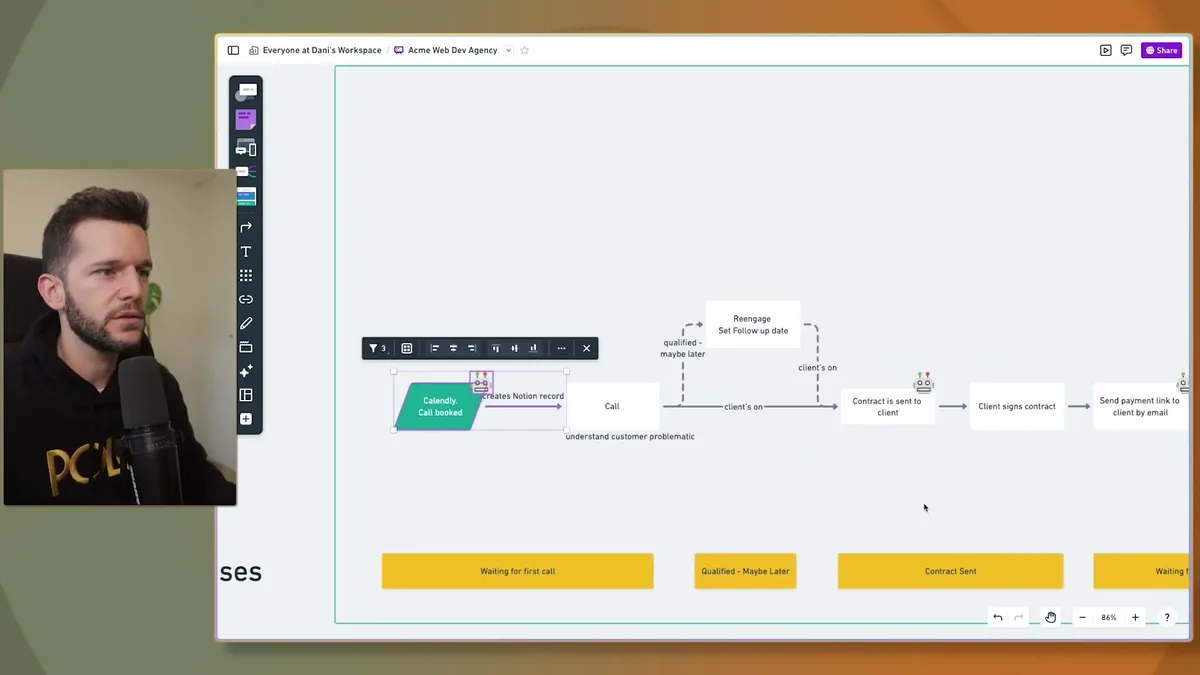
This is what a client delivery process looks like before I build anything in Notion.
Every stage is visible.
Every decision point is accounted for.
Only after this exists do I start translating it into Notion.
The second foundational skill is what I call purpose-first building.
This one sounds obvious, but almost nobody does it.
Honestly, the reason most Notion dashboards feel overwhelming is because we cram every possible detail into one view because we think that's being thorough.
It isn't.
It's just noise.
What I do instead is ask one question before building any view: what is the only thing I need to see here?
Let's say I want a leads view.
I don't want to see all my client data mixed in with people who haven't bought yet.
The only things I want to see for leads are how long they've been in the pipeline, when I contacted them, when to follow up, and where they came from.
That's it.
Then I build separate views for separate purposes.
One view for active clients.
One for leads.
One for follow-ups.
Each view answers one question clearly.
This keeps everything simple enough that your team can actually use it, not just you.
The Architecture Skills: Where You Put Things Matters
Once you understand what to build, you need to understand how to structure it.
And in Notion, structure is mostly about two things: team spaces and database placement.
Skill three is knowing how to use team spaces properly.
This becomes critical the moment you have more than one person in your workspace.
Team spaces are the best way to manage permissions in Notion because you can assign permissions to an entire team space at once.
The way I do it is by creating member groups inside Notion settings, basically under Settings, then Members, then Groups.
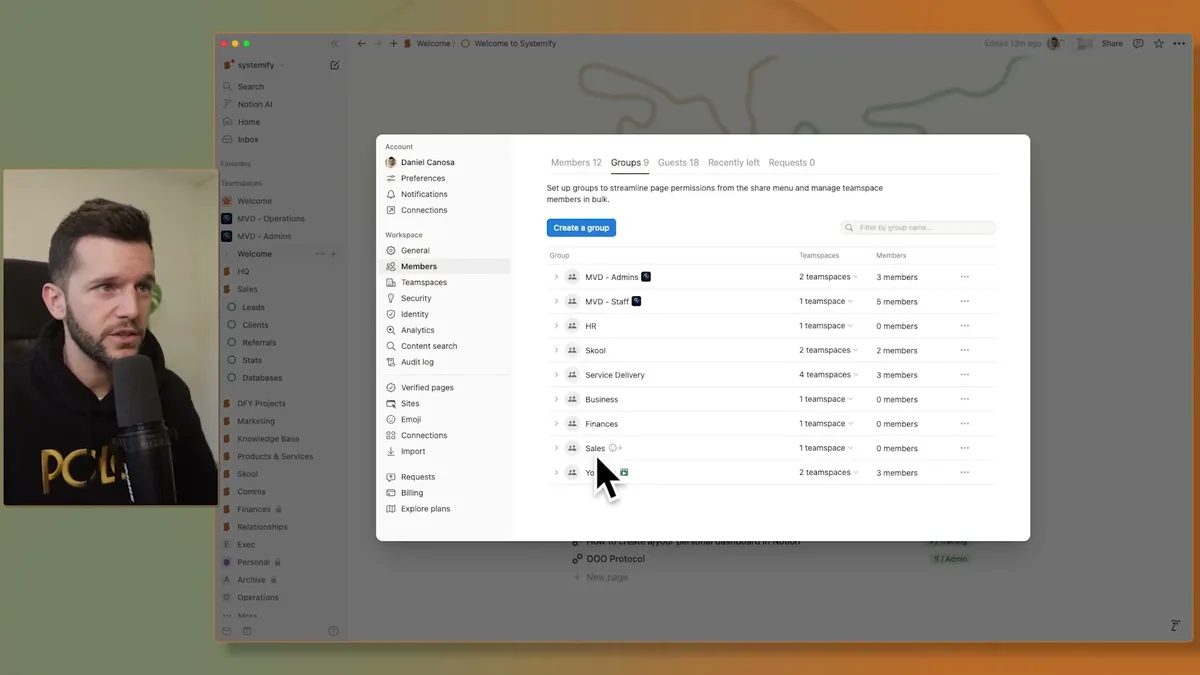
So for example, I have a "Service Delivery" group.
Whenever I hire someone new in service delivery, I add them to that group.
They automatically inherit every permission that group has, in every team space that group is assigned to.
No manual permission updates for every page.
No accidentally missing something.
It scales cleanly.
Skill four is knowing where to place your databases.
This one gets overlooked constantly, and it creates serious problems later.
In Notion, where a database lives determines who can access it.
The way I structure it is simple: inside each team space, I have one Databases page.
Every actual database lives inside that page.
Every other page in the workspace uses linked views, which pull information from those databases and filter it for the specific context you need.
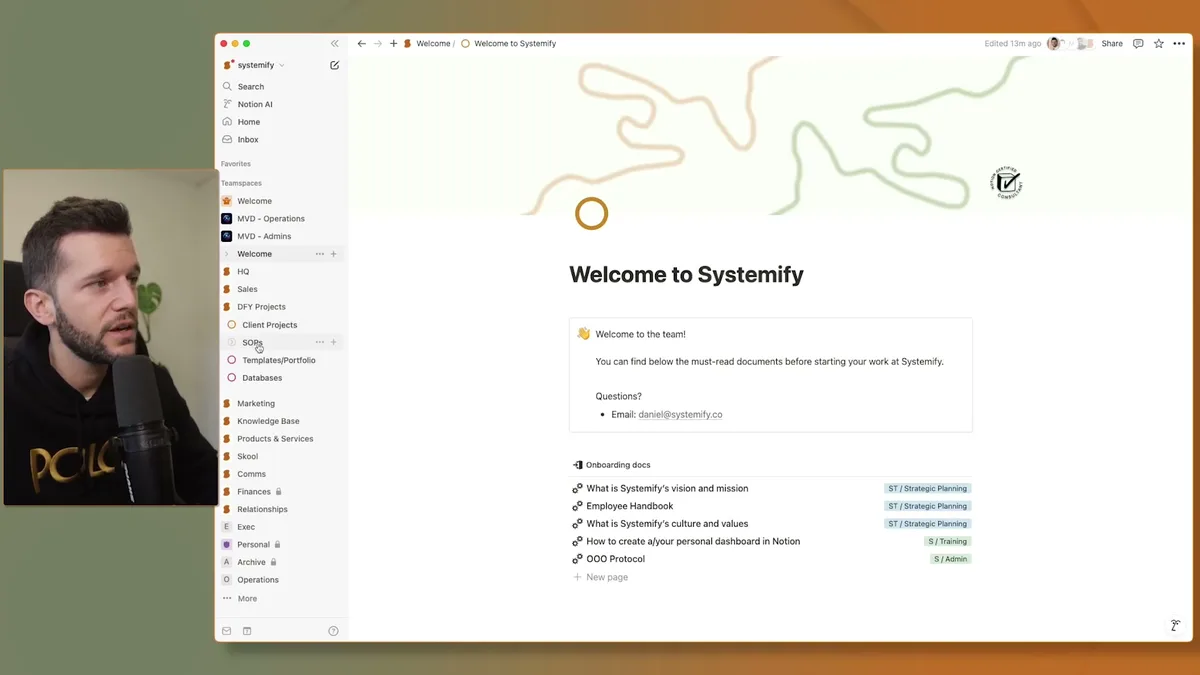
The sidebar shows you exactly what this looks like in practice.
All the actual databases are in one place.
Everything else is just a filtered window into those databases.
Why does this matter?
Because if your databases are scattered across random pages in your workspace, there's no way to know where they are.
And then someone on your team accidentally deletes one.
And it takes down data from an entire section of your system.
I've seen it happen.
Skill five is closely related: using linked databases instead of creating new databases for every client.
This is one of the most common mistakes I see with people before they come to work with me.
They onboard a new client, and they create a new task database for that client's page.
Then another for the next client.
Then another.
Now they have twelve task databases scattered across the workspace, and there's no single place to see all open tasks.
That is not scalable.
In my opinion, you should have one task database total.
Then you filter it by client wherever you need to.
Let's say you're on a client's page.
You add a linked view of your main task database, filtered to show only that client's tasks.
It looks like a dedicated task list for that client.
But it's actually the same central database, just filtered.
This means you can always go to one place and see everything that needs to get done across all clients.
The Power Skills: Protecting and Automating Your System
Building the system is one thing. Keeping it intact and making it work for you is another.
Skill six is one I see overlooked constantly, usually until something breaks.
Most business owners don't think about what happens when a team member accidentally deletes a property from a database.
Bear in mind, in Notion, deleting a property removes it from every single entry in that database, across the entire workspace.
It's not like deleting a row.
It's like deleting a column from a spreadsheet that has three years of data.
The fix is using the "Can edit content" permission.
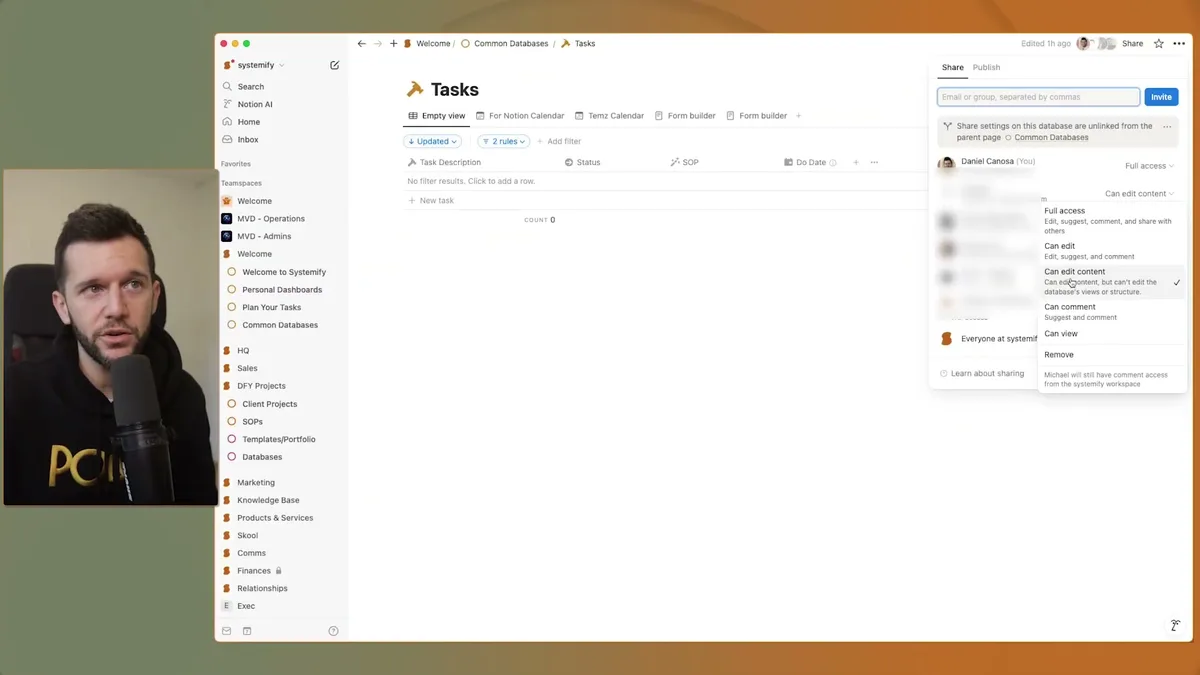
When you share a database with this setting, people can use the database fully, they can add entries, update information, move things around, but they cannot create or delete properties.
They can only use the infrastructure you've built.
This is a crucial distinction: the person who builds the system and the person who uses the system need different permissions.
Most workspaces don't separate these, and eventually something important gets deleted.
Skill seven is using custom layouts as your databases grow.
Honestly, this one is mostly about reducing cognitive load for your team.
As your Notion system matures, your databases accumulate more and more properties.
Dates, statuses, assignees, client references, categories, priorities.
Open a task page and it becomes a wall of fields.
Team members miss properties.
Information doesn't get filled in.
Things fall through the cracks.
Custom layouts let you group properties into sections with labels, so a task page looks organized rather than overwhelming.
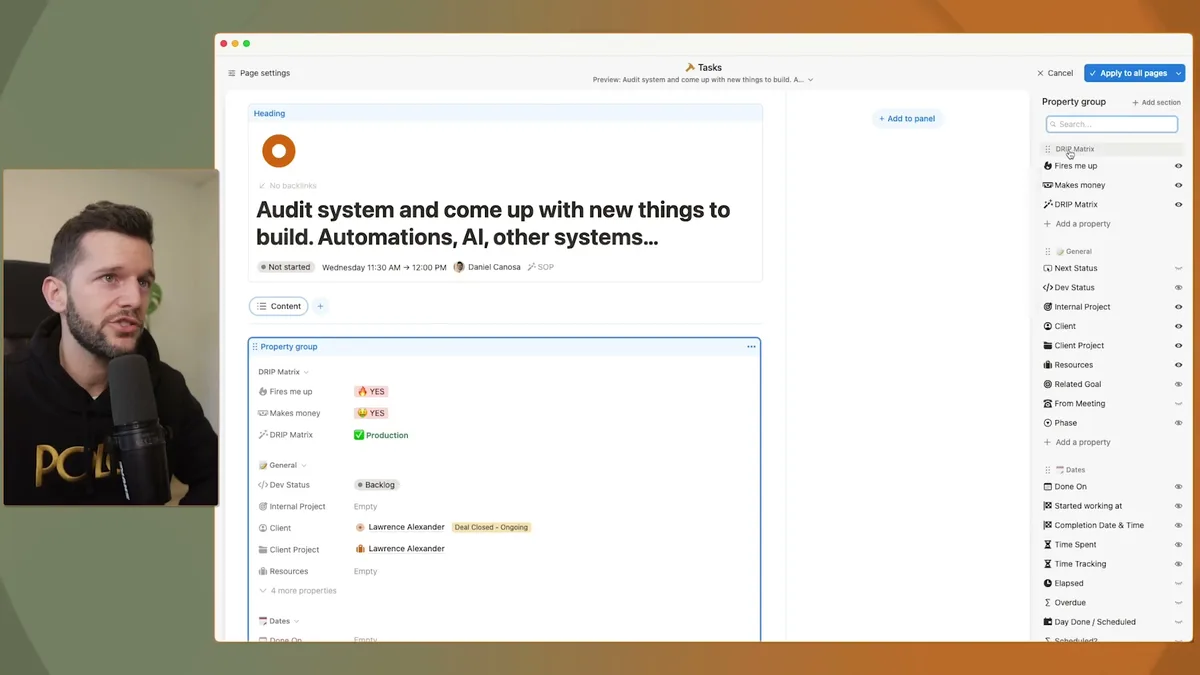
For example, in my task database, I have the core information at the top, then separate sections below for different categories of properties.
You set this up by going to Customize Layout, clicking Property Group, then Add Section.
Then you just drag properties into the right sections.
Skill eight is the one that ties everything together: knowing how webhooks work and how to connect Notion to your other tools.
In my opinion, this is where you go from having a system to having an automated system.
Of course, all the previous skills matter.
But this is what gets you actual time back.
Here's a real example from my own workflow.
That status change triggers an automation in the backend.
The automation sends the lead's information to a webhook URL.
That webhook is connected to Zapier.
Zapier then creates a payment link for that person and sends them an email with the link and custom text, all automatically.
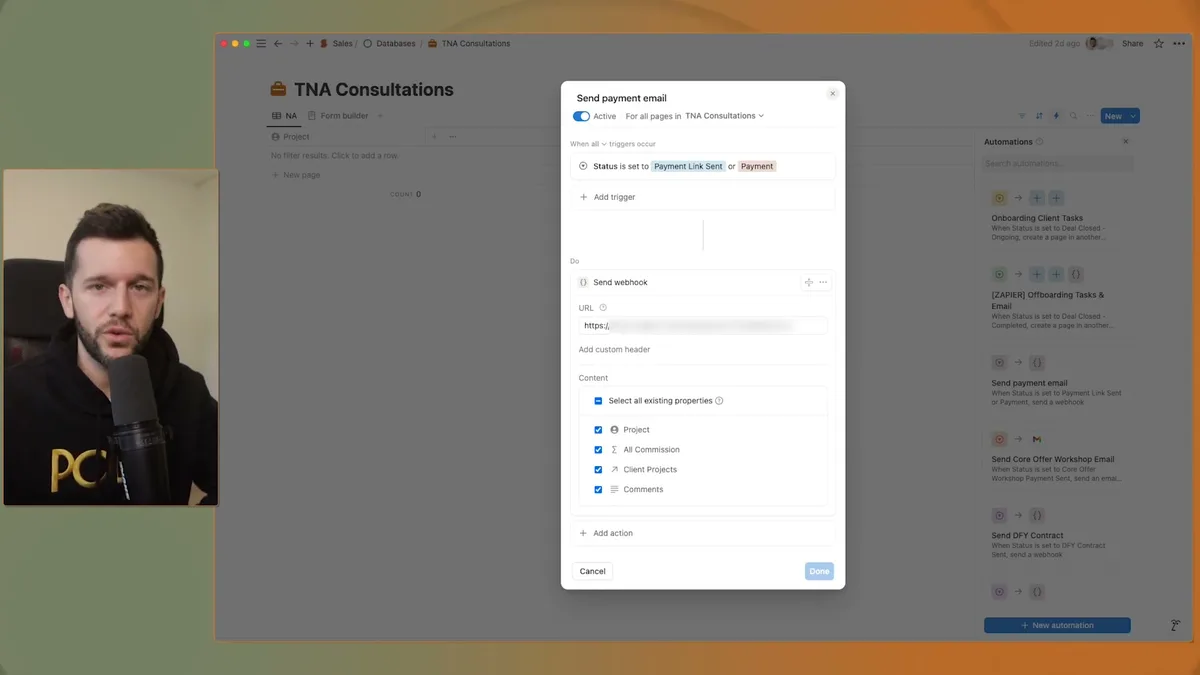
The backend of that automation is straightforward, but it completely removes a manual step from my follow-up process.
A webhook is basically just a URL that another program listens to.
When Notion sends information to that URL, the other program, whether that's Zapier, Make.com, or something else, receives it and runs whatever you've set up.
This is not complicated to set up once you understand the concept.
And once you have it running, the only thing you're doing is updating a status in Notion.
Everything else happens automatically.
This is what business freedom actually looks like in practice.
Not just efficiency, not just higher output, but removing yourself from the steps that don't require you.
I started my business because I wanted freedom.
Freedom from endless tasks.
Freedom from the chaos of trying to keep everything in my head.
Freedom to spend time on the things and people that actually matter.
Systems in Notion, built correctly with these eight skills, are how I got there.
And honestly, this is available to any service business owner willing to invest the time in learning how to build things the right way.
Not the fastest way.
The right way.
Ready to see where your business stands with AI and automation? Take our AI Readiness Scorecard to find out.
Frequently Asked Questions
When should a service business start building systems in Notion?
Most service businesses hit the tipping point around $10K per month in revenue. At that stage, you need to shift from doing everything yourself to running the business, and that requires repeatable systems. Starting earlier is fine, but the pain of not having systems becomes obvious around that revenue mark.
What is the difference between a database and a linked view in Notion?
A database is the actual source of your data, stored in one central location. A linked view is a filtered window into that database displayed on another page. You should have one task database (for example) and use linked views filtered by client, status, or assignee wherever you need to display tasks. This keeps all your data in one place while showing relevant slices everywhere.
How do webhooks work with Notion for automation?
A webhook is a URL that another program listens to. When something changes in Notion (like a status update), Notion sends data to that URL. The receiving tool, whether Zapier, Make.com, or n8n, then runs whatever action you have configured, such as sending an email, creating an invoice, or updating a CRM record. You set this up through Notion's built-in automation triggers.
Get more like this in your inbox
AI implementation insights for service business founders. No fluff.