AI & Automation
AI Brain in Notion: Unite Your Team With Claude
Learn how to centralize your AI workflows in Notion so your entire team accesses the same AI brain. Eliminate sync issues and boost collaboration.
Daniel Canosa ·
TL;DR: By storing all AI context, memory, and skills inside Notion databases and connecting Claude Code via MCP, every team member's AI runs from the same shared brain, with role-based permissions controlling exactly what each person's AI can access.
Key Takeaways
- A shared AI brain in Notion lets every team member's Claude Code session start with full company context, processes, and accumulated learnings, without any manual setup each time.
- Notion's MCP connection means each person's Claude Code inherits exactly the Notion permissions that person already has, giving you granular, role-based access control for AI without any extra configuration.
- Skills in Notion act as SOPs for AI. Every team member's AI follows the same processes, the same way, regardless of who is running the session.
- The system is self-improving. Decisions, learnings, and plans are written back to Notion during sessions, so future sessions pick up accumulated knowledge automatically.
- Onboarding a new teammate takes roughly 20 minutes, because the AI brain, the processes, and the permissions are already set up before they arrive.
Why Having Two Separate Systems Was Killing My Team's Productivity
For almost a year, my AI setup had a fundamental problem. All the context, memory, skills, and processes my AI needed lived on my laptop, where Claude Code could access them. Everything else, clients, tasks, projects, meeting notes, the whole team, lived in Notion.
So my AI brain and my actual work were completely separate.
I mean, on my laptop it was just me.
My team had no access to any of it, and if I wanted to replicate my setup for someone else, I would have to clone the whole thing, manage permissions separately, and then watch both copies drift out of sync over time.
I tried a few things to fix this.
First I tried going all-in on Notion AI and dropping Claude Code entirely.
Honestly, Notion AI is capable for a lot of things, but it started breaking down whenever I needed to do something complex, like managing our website or running integrations with external APIs.
Then I went the other direction and just kept using Claude Code, accepting that only I had access to the brain.
That obviously didn't work for a team.
Then I thought GitHub could be the source of truth, with all our AI files synced there.
The problem is that GitHub's permissions are pretty blunt. You either give someone access to everything or nothing. There's no middle ground, and I didn't want to create another app for the team to manage.
So why Claude Code and not Notion AI, specifically?
A few reasons.
Notion AI errors on anything genuinely complex. Claude Code can connect to basically any API on the internet.
Notion AI only runs one active window at a time. Claude Code can run multiple parallel sessions, which matters because I like to run several threads simultaneously while one is thinking.
And honestly, I didn't want to think about which tasks belonged to which tool. I just wanted one.
Claude Code won.
But the deeper problem was still there.
What I actually wanted was for every team member's AI to run from the same shared brain, so a new salesperson's Claude Code session would know exactly as much about the company as mine does.
The Architecture: Ten Databases, Three Layers
The solution was to put the entire AI brain inside Notion, structured as databases that Claude Code can query through an MCP connection.
Notion is essentially databases and pages. Databases are queryable by AI. So anything I was storing locally, I could move into Notion and have Claude Code read it from there.
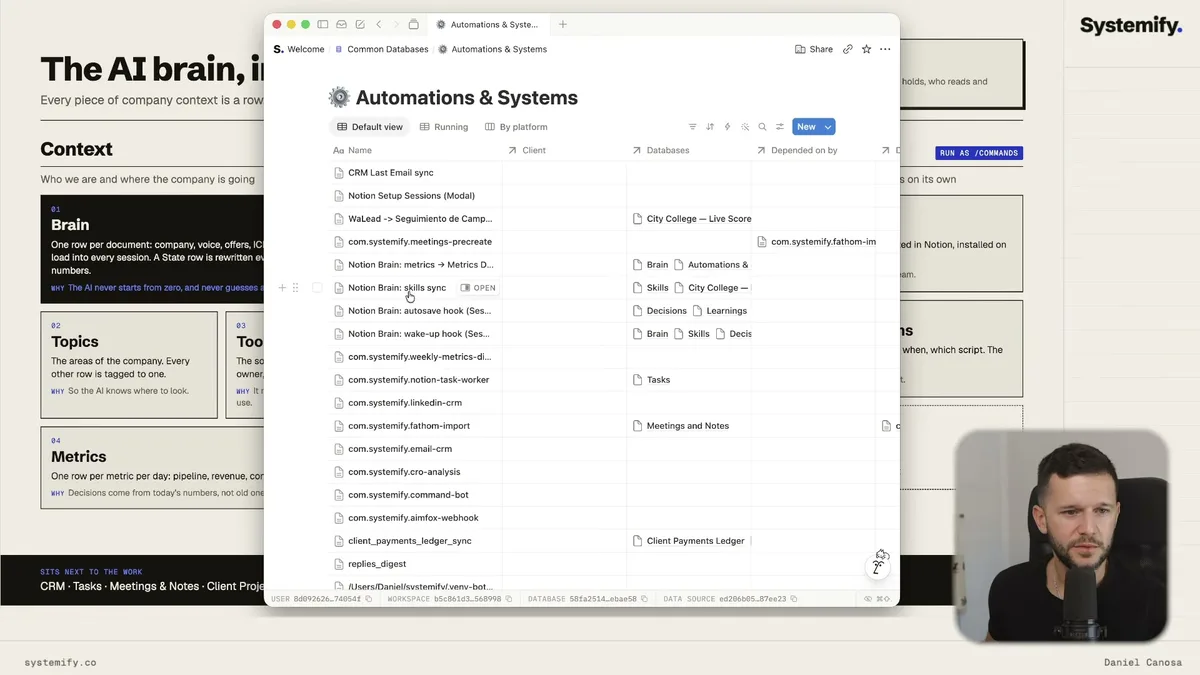
I ended up with ten databases, organized into three groups.
The first group is the context layer. This is who we are and where we're going as a company.
Database one is the Brain, which holds one document per row: company overview, voice, offers, ICP, playbooks, basically everything stable about the company that doesn't change often.
Database two is Topics, which maps every area of the company so the AI knows where to look first.
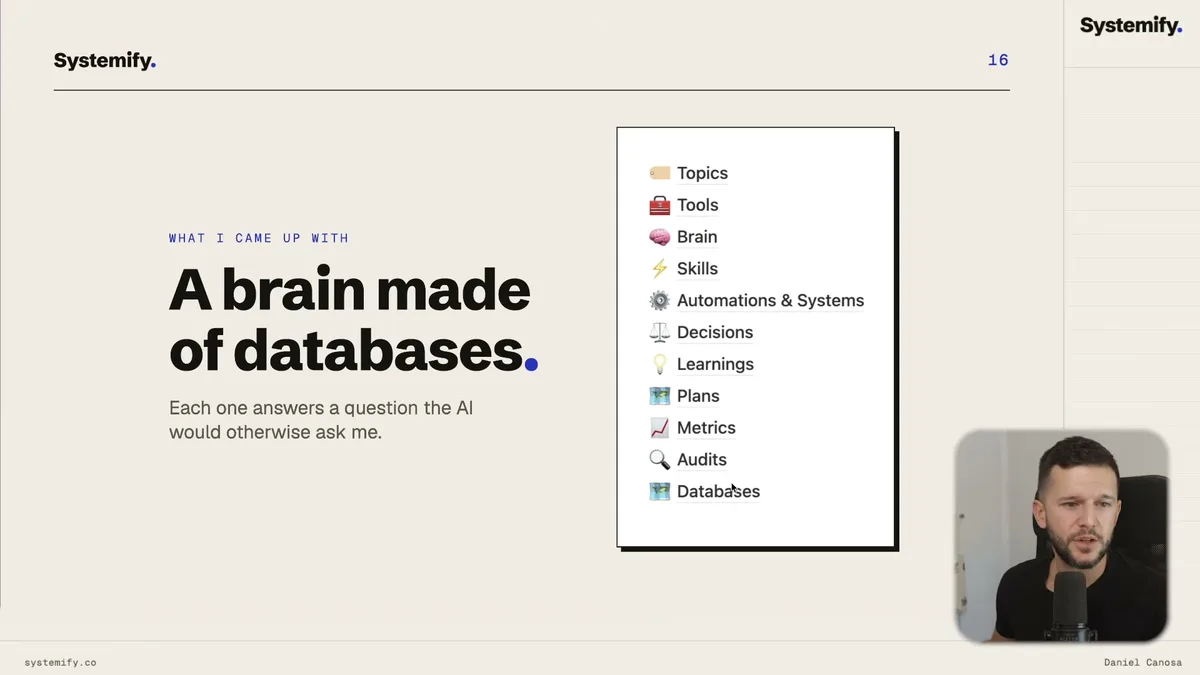
The Topics database acts as a navigation layer. When Claude Code needs to find something, it starts here and follows the links. Everything else in the system points back to a topic. This makes the AI significantly faster at finding what it needs, and it also trains the AI to understand where things live.
Database three is Tools, which is our full software stack with costs, owners, and API details. So when the AI is making an API call, it already knows which tool we use for invoicing, for example.
Database four is Metrics, which is the most dynamic part of the system.
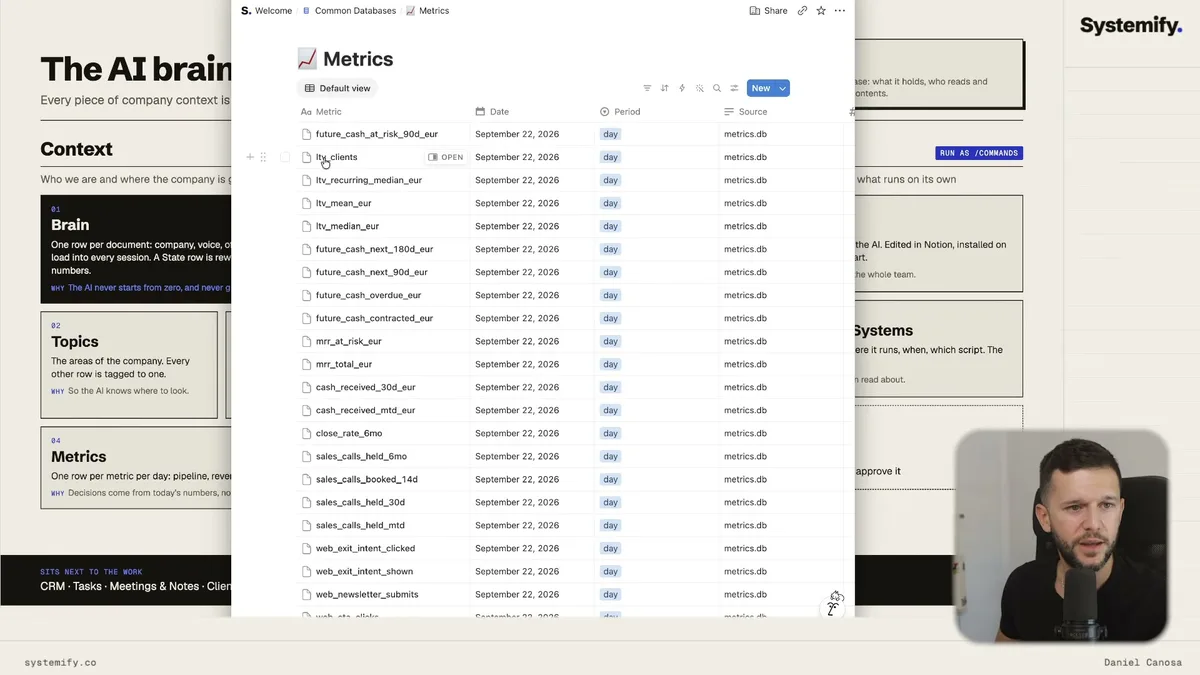
The Metrics database has one row per metric per day, populated automatically by backend scripts. Customer base, LTV, cash received, sales goals, web analytics. All of it lands there automatically. So at the start of every session, the AI has an up-to-date picture of where the business actually stands.
The second group is the memory layer. These are the things written during Claude Code sessions.
Decisions tracks outcomes from choices we make, so future sessions know which direction we went. If we decide to restructure our newsletter format, for example, that decision lives here and every future session knows about it.
Learnings is where we log solutions to problems we had to figure out. Claude Code is smart, but sometimes it can't crack a specific API endpoint or runs into something unusual. By logging the solution, we never have to solve the same problem twice.
Plans holds drafted initiative plans. If I'm halfway through building something in a Claude Code session and have to stop, I just point the next session at the plan and say "continue." Bear in mind this also means other people on the team can pick up where I left off.
The third group is skills.
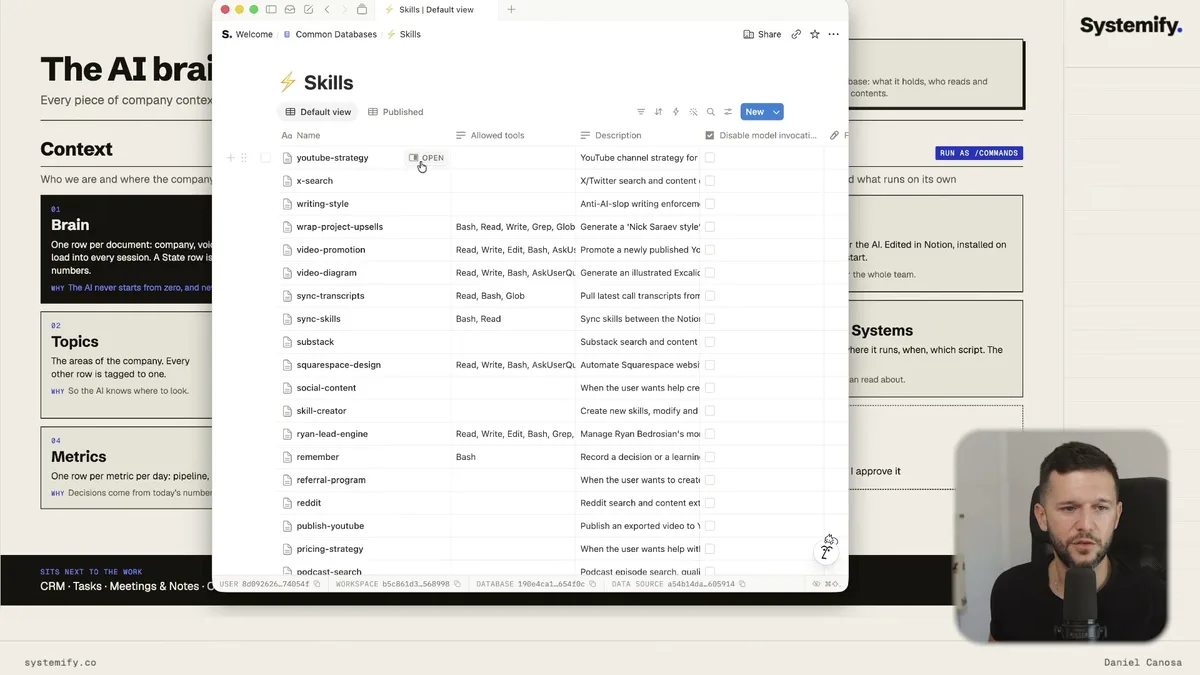
Skills are basically SOPs for AI. Every process we run, our YouTube strategy, writing style, how we structure PRDs, how we do CRO, how we handle referrals, lives as a row in this database with full instructions the AI can invoke.
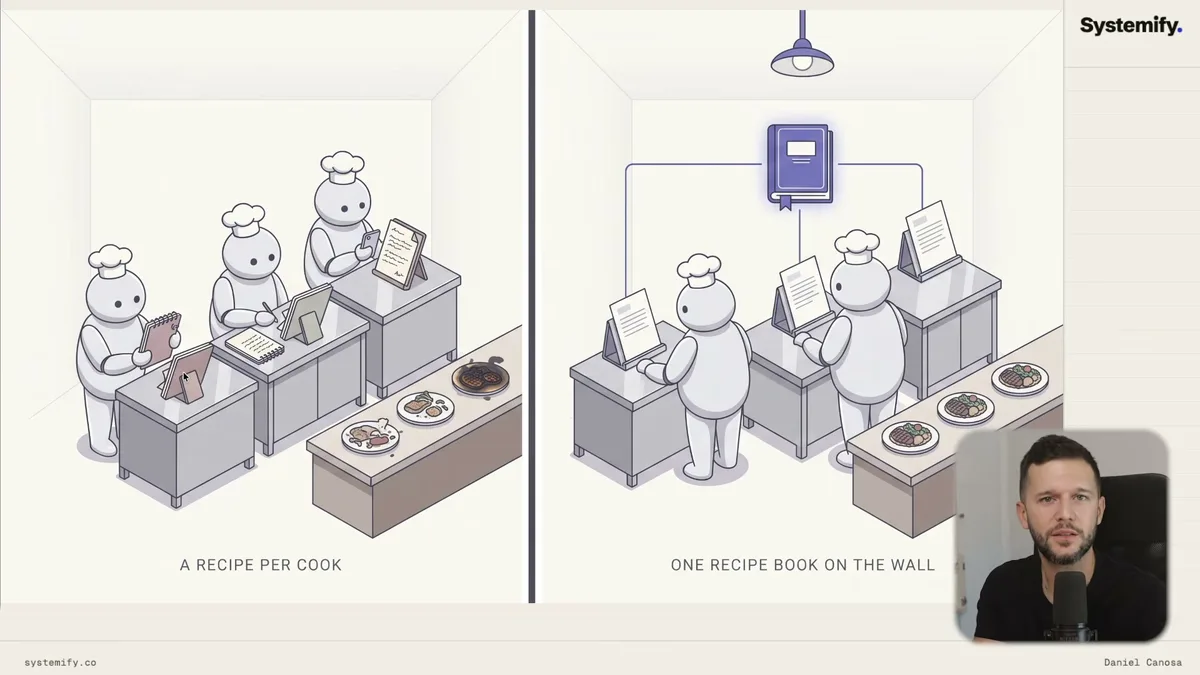
Before this system, everybody was creating their own AI skills in their own way. It was like a McDonald's where every cook follows a different recipe and every burger comes out different.
Now there's one cookbook. Every AI on the team follows the same recipe.
The last two databases are Automations and Systems, which documents everything we have running in Make, n8n, Vercel, locally, so the AI understands what's already automated and how, and a Databases database, which is basically a map of the whole system with all the database IDs.
How the Setup Actually Works for Each Person
Getting a new teammate connected to the shared brain takes about 20 minutes. The process is straightforward because most of the work is already done before they arrive.
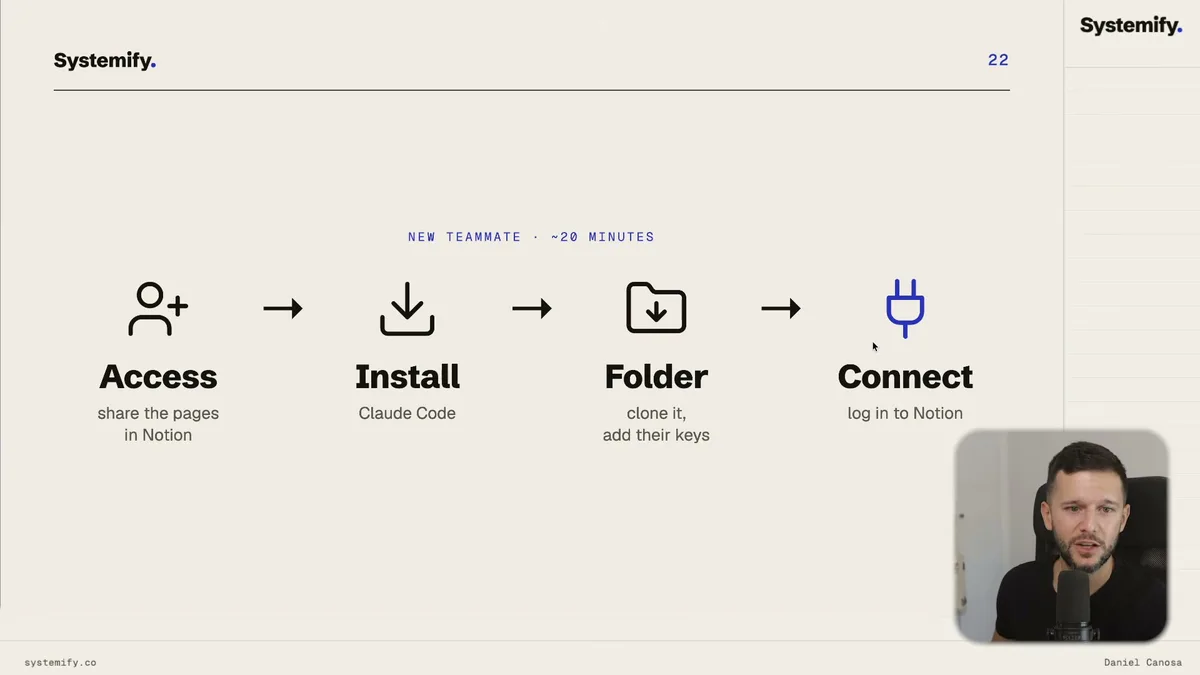
Step one: give them access to the right Notion pages.
The easiest way to do this is with member groups. I have groups for HR, sales, consulting, video, and so on. Each group already has permissions configured for exactly what that role needs to see. Adding a new person to a group gives them everything automatically. You set permissions once per role, not once per person.
Step two: install Claude Code on their laptop.
Step three: copy the shared folder onto their computer.
Step four: connect Claude Code to their Notion account through MCP.
That last step is the important one. Because the connection is through MCP using their Notion login, Claude Code only has access to whatever that person's Notion account can see. If a salesperson doesn't have access to financial data in Notion, their AI doesn't have access to it either.
This is something I genuinely couldn't crack before.
Before, it was all or nothing. Either you give someone the key to everything, or they get nothing. Now we have different badges, consulting, sales, video, and each badge only opens the doors it's supposed to open.
Now, the folder that lives on each person's laptop. It's small but important.
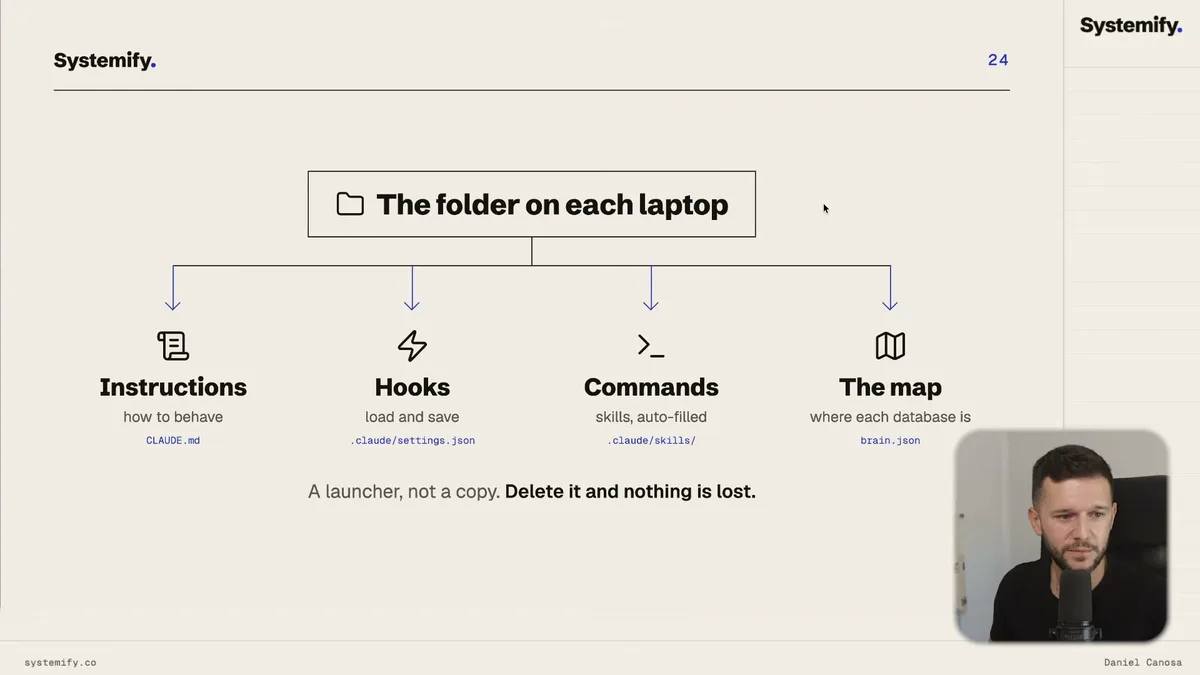
Inside it there's a CLAUDE.md file, which Claude Code reads at the start of every session. This is where the behavioral instructions live. How to behave, where to look for things, what the rules are.
There are also hooks that run at session start to pull the latest learnings from Notion. So if another team member solved a problem yesterday and logged it, your AI knows about it today.
There's a skills sync mechanism that checks whether your local skills are up to date with what's in Notion. We want local copies of skills because Claude Code can invoke them as slash commands, but Notion is always the source of truth.
And there's a brain.json file, basically a map of the whole Notion system, so Claude Code knows where everything lives without having to search.
The whole thing is what I'd call a launcher architecture. The folder is just a launcher. All the actual data lives in Notion. If you delete the folder, nothing is lost.
Here's a real example of what this looks like in practice.
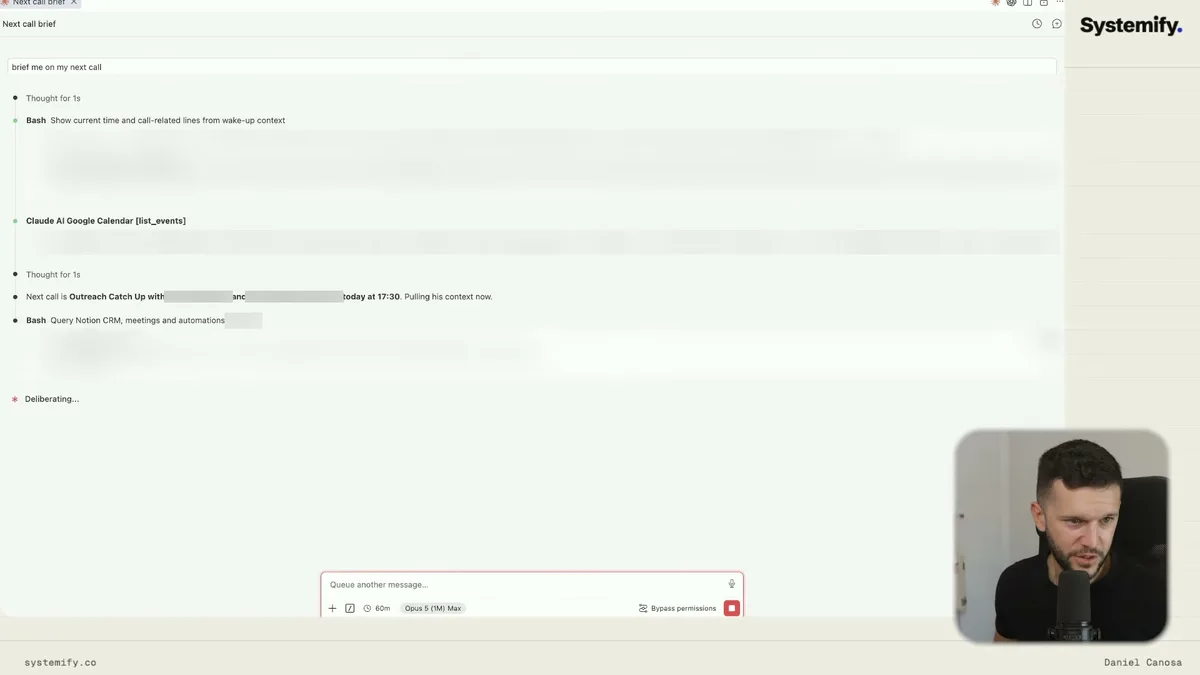
A team member types "brief me on my next call." Claude Code pulls the next event from Google Calendar, finds the relevant contact in the Notion CRM, pulls any emails from Gmail, and surfaces everything they need to walk into that meeting prepared. That whole sequence runs automatically because the AI already knows the tools, the structure, and the process.
I mean, that's what makes this worth building.
A new salesperson joins the team, and from day one, their AI knows our processes, our offers, our ICP, our writing style, how we structure PRDs. They don't have to ask me. Their AI already knows.
Frequently Asked Questions
Q: What is a Claude Code MCP connection and why does it matter for teams?
MCP is the protocol that lets Claude Code connect to external services like Notion. When a team member connects Claude Code to Notion through MCP, the AI can read and write to Notion using that person's permissions, meaning access control happens automatically through Notion's existing role-based permissions system.
Q: How is this different from just using Notion AI?
Notion AI is limited to one active session at a time and struggles with complex tasks like external API calls or managing third-party tools. Claude Code can run multiple parallel sessions and connect to any API on the internet, which makes it significantly more capable for running real business operations.
Q: Can different team members have different AI capabilities?
Yes, and this is one of the main advantages of the system. Because each person's Claude Code connects to Notion using their own login, their AI only has access to the Notion pages and databases that person can see. A video editor's AI won't have access to financial data or sensitive sales contracts, for example, because that person doesn't have Notion access to those pages.
Q: What happens to the AI brain if someone's local folder gets deleted?
Nothing, because the folder is just a launcher. All the actual data, skills, learnings, decisions, context, lives in Notion. The local folder contains only the instructions, hooks, and a cached map of the system. Deleting it and reinstalling takes about the same time as the initial setup.
Ready to see where your business stands with AI and automation? Take our AI Readiness Scorecard to find out.
Get more like this in your inbox
AI implementation insights for service business founders. No fluff.