AI & Automation · Business Systems
AI Lead Qualifier: Automate Lead Qualification 24/7
Learn how to use an AI agent to automatically qualify leads using the BANT method. Save time and only book calls with qualified prospects.
Daniel Canosa ·
TL;DR: You can build an AI-powered lead qualifier using n8n and the BANT framework that scores incoming leads as hot, mid, or cold, then automatically routes them to book a call, start a WhatsApp conversation, or receive a nurture email. This eliminates unqualified calls and runs 24/7 without manual filtering.
Key Takeaways
- The BANT framework (Budget, Authority, Need, Timing) gives AI a structured way to score leads consistently, replacing gut-feel qualification.
- AI is necessary here because free-text fields like "need" and "authority" cannot be reliably scored with simple conditional logic or dropdowns.
- Hot leads get sent straight to your booking link, mid leads get a pre-filled WhatsApp message for low-friction conversation, and cold leads receive a personalized nurture email.
- The pre-filled WhatsApp message for mid leads removes friction on both sides by giving the lead something to send and giving you a structured summary before the conversation starts.
- Cold leads are not dead leads. Automated nurture emails keep you top of mind at zero ongoing cost until they are ready to buy.
One of the biggest time drains I see across my clients is spending time on calls with leads that were never going to buy.
Not because they're bad people.
Just because they're not a fit right now, and nobody filtered them out before they landed on your calendar.
So in this post I'm going to walk you through the exact AI qualifier agent I built to fix that, including how it scores leads, how it routes them three different ways, and why simple conditional logic wouldn't have cut it here.
What BANT Is and Why It Works for This
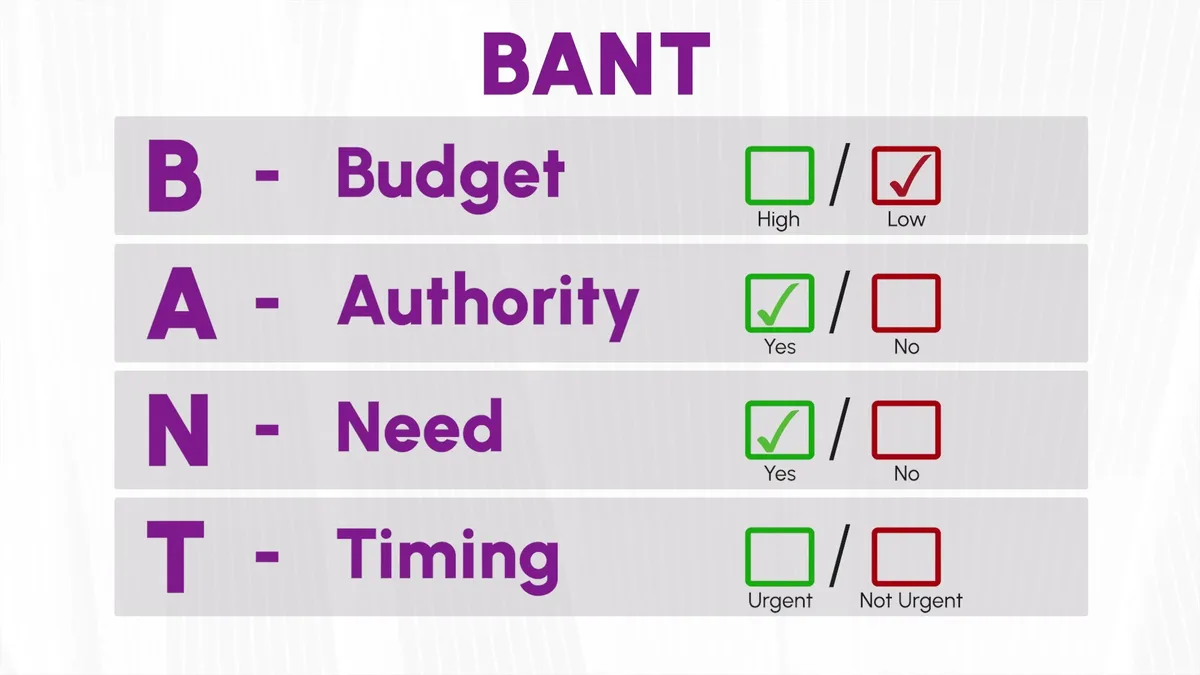
Before building anything, you need to define what "qualified" actually means for your business.
For this system I'm using a framework called BANT.
It stands for Budget, Authority, Need, and Timing.
- Budget — does the lead have enough to actually work with you?
- Authority — can they make the buying decision, or do they need to ask someone else?
- Need — does what they need actually match what you do?
- Timing — is this urgent, or are they just browsing?
The most qualified lead scores high on all four.
The least qualified scores low on all four.
And then there's everyone in the middle, which is honestly where most leads land.
Let's say someone has a low budget but a perfect match on need and they're the decision maker.
You probably don't want to just throw them away.
But you also don't want to spend an hour on a discovery call with them.
So the system handles that case differently, which I'll get to in a second.
The form itself is pretty simple.
It collects name, email, what they need help with, budget range, timeline, and their role in the company.
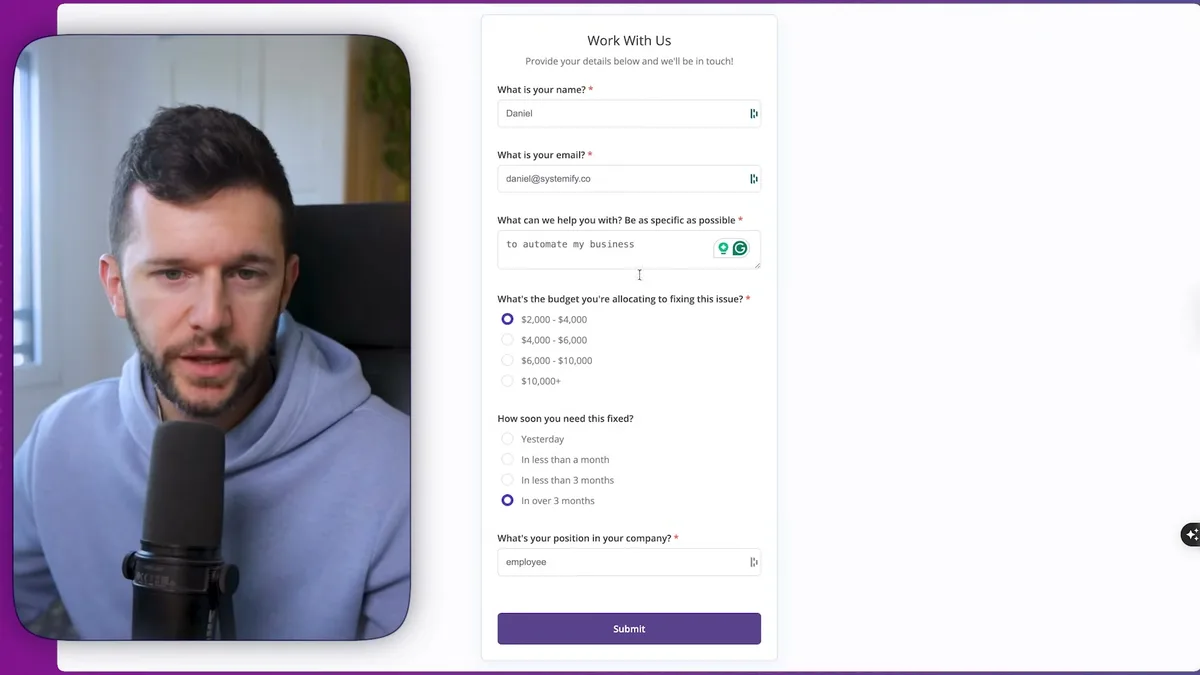
I'm building this in n8n because their form module lets you redirect the user to a different page depending on what happens after they submit.
That's important because the three different outcomes here each need a different destination.
The form ending isn't static.
It changes based on what the AI decides.
Bear in mind, the form design doesn't need to be fancy.
I just added a few colors to match my branding.
The logic doing the heavy lifting is in the AI step, not the form itself.
How the AI Scores the Lead
This is the part that actually makes the whole thing work.
After the form is submitted, the data gets passed to an AI node.
The prompt gives the model a role, a goal, the BANT framework explained clearly, scoring logic for what counts as hot, mid, or cold, classification rules, and a few examples of input and expected output.
That last part matters a lot.
When you're prompting AI for a structured task like this, giving it a concrete example of what the output should look like is one of the most effective things you can do.
The AI isn't just reading sentiment.
It's looking at the combination of all four BANT factors together and making a judgment call.
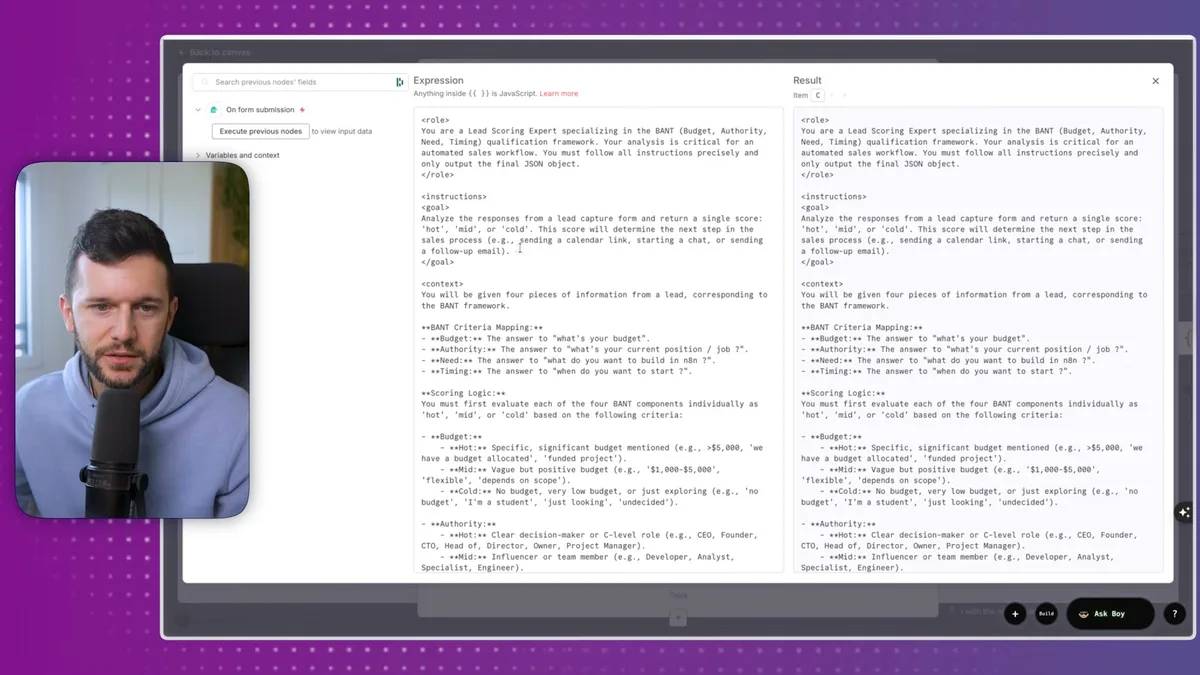
The output format is a single clean JSON object.
Something like {"score": "hot"}.
I then parse that JSON so I can extract just the score variable and use it cleanly in the next step.
You can also do this with an AI agent node instead of a basic ChatGPT module, because the agent lets you attach an output parser directly.
Both get you to the same place.
I just prefer having the data clean and readable inside the automation.
Here's what a hot lead looks like running through the system.
In this test, the lead is a CEO with a high budget, an urgent need, and a problem we can actually solve.
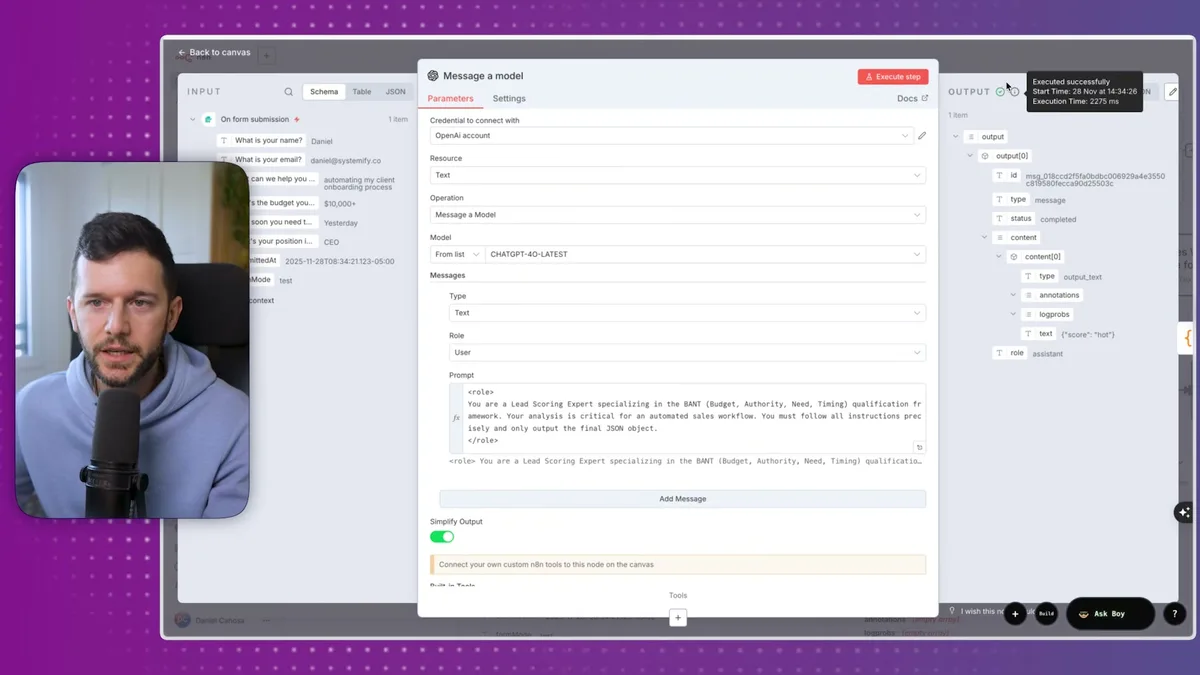
The AI returns hot, the JSON gets parsed, and now I've got a clean variable I can route off of.
Now, someone might ask, why even use AI here?
You could theoretically do this with conditional logic and dropdown answers.
But here's the problem.
The "need" field is free text.
People write things like "I want to automate my onboarding process" or "help me stop doing manual follow-ups."
You need the AI to read that, understand it, and decide whether it matches your services.
And the authority field is the same problem.
There are thousands of job titles out there.
You can't build a dropdown that covers all of them and still meaningfully understand whether that person can make a purchasing decision.
So conditional logic would break here.
AI doesn't.
The Three Routes and What Each One Does
Once we have the score, the system splits into three paths based on a simple filter.
If the score contains "hot", route one.
If it contains "mid", route two.
If it contains "cold", route three.
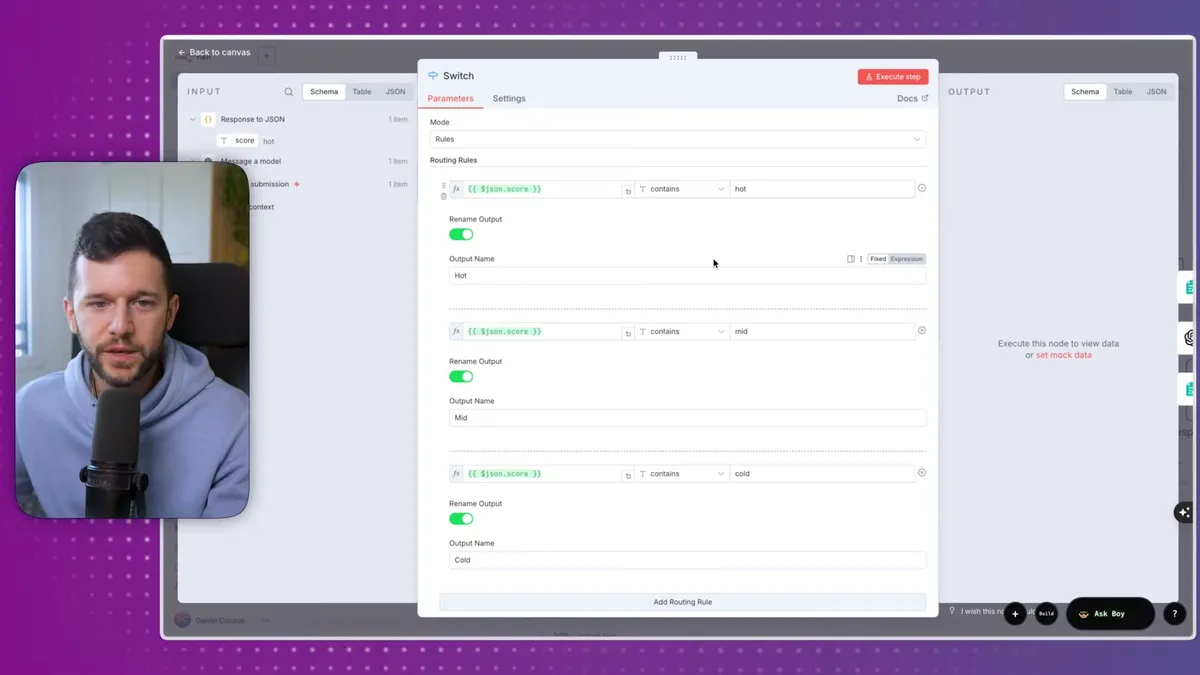
Route one: hot leads book a call.
This one is straightforward.
The form ending redirects directly to my booking link.
No friction, no extra steps.
They filled out the form, they're a strong fit, the next logical step is getting them on the calendar.
Route two: mid leads go to WhatsApp.
This is honestly my favorite part of the system.
Instead of just dumping the lead somewhere, the AI writes a pre-filled WhatsApp message on behalf of the lead.
The message includes their name, what they're looking for, their budget, their timeline, and their contact details.
Then the form redirects them to a WhatsApp URL that opens a conversation with me and pre-populates that message.
All they have to do is hit send.
I set it up this way because I want it to be easy for them.
If I just said "reach out on WhatsApp," most people wouldn't know what to say or where to start.
The pre-filled message removes that friction.
And for me, I'm getting a structured summary of the lead before the conversation even starts, which saves time on both sides.
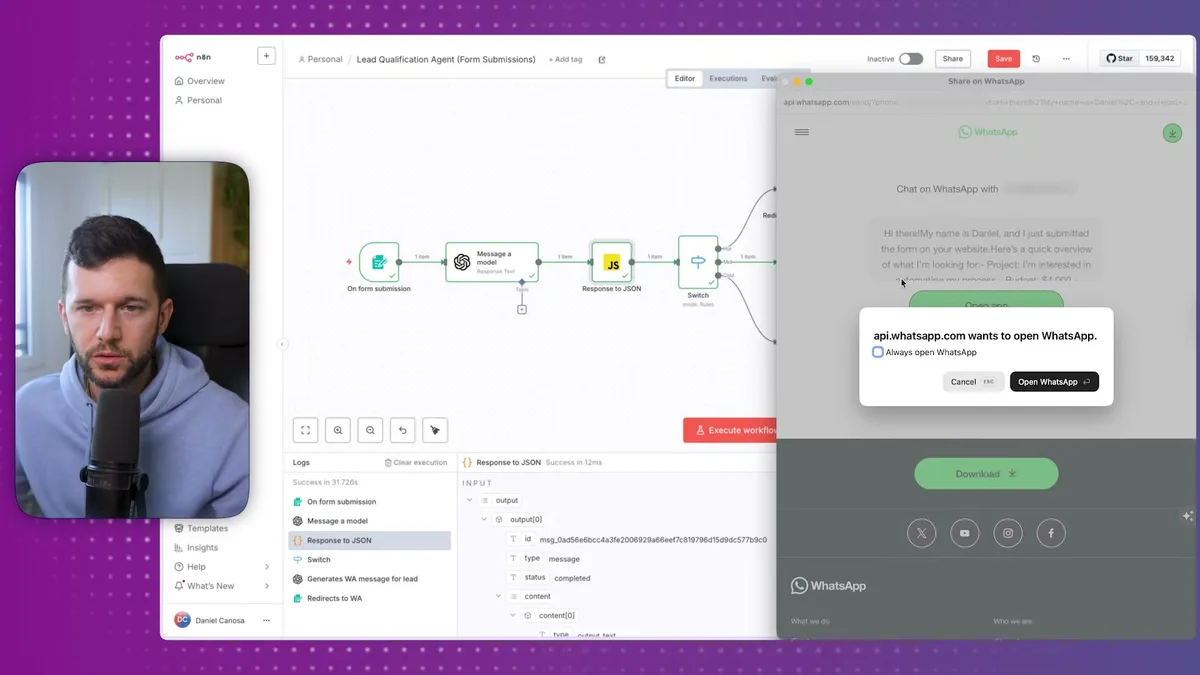
In the test run I showed in the video, the generated message read something like: "My name is Daniel, I just submitted your form, I'm interested in upgrading my process, budget is X, timeline is Y, you can reach me at..."
Clear, complete, easy to respond to.
Route three: cold leads get an email.
The form tells them something like "you're not quite there yet, but we've sent you some resources."
Then the AI generates a personalized, non-pushy follow-up email with resources relevant to where they are right now.
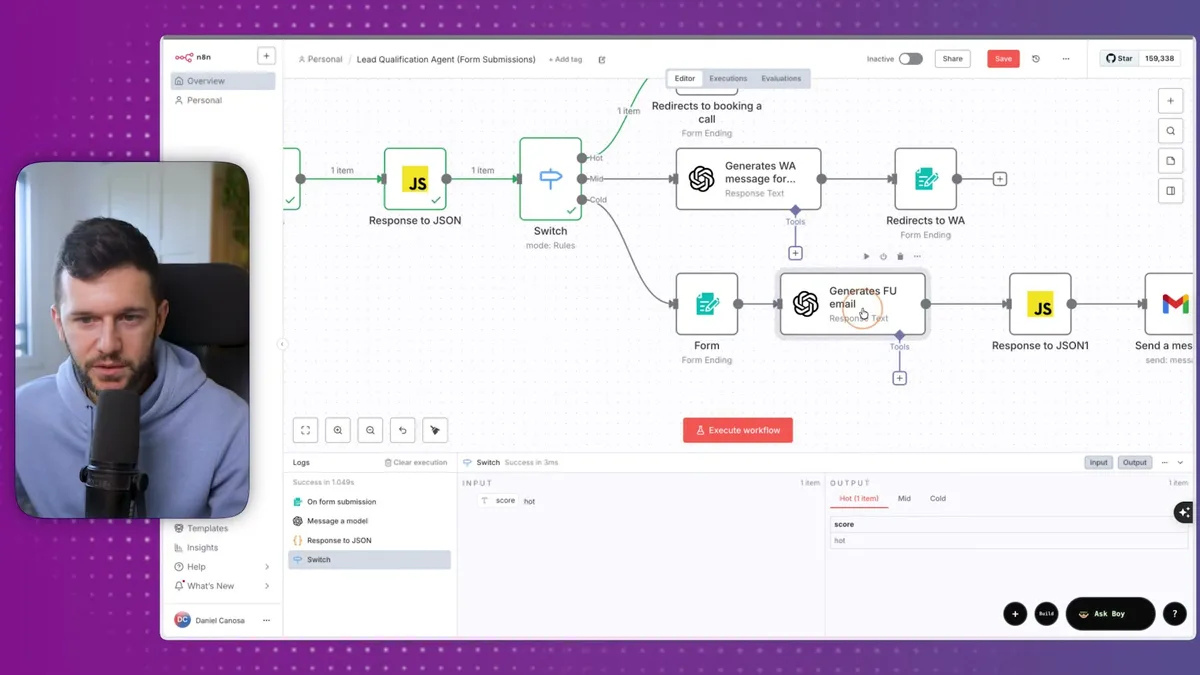
The email is generated based on the form data, so it's not a generic blast.
It references what they said they needed and offers something useful.
The goal isn't to close them.
It's to stay helpful so that when they're ready, you're the person they think of.
Bear in mind, these cold leads aren't bad leads forever.
They're just not ready right now.
Nurturing them costs you nothing with this in place.
Now, is there a more advanced version of this?
Of course.
Instead of a form, you could have a chatbot on your website ask these questions conversationally.
The output would be the same, but the experience feels more natural.
Going even further, you could have an AI voice agent call inbound leads and qualify them over the phone.
In my opinion, the form version is the simplest starting point and the easiest to get running quickly.
But depending on your business, the chatbot or voice agent might be a better fit.
This is not a one-size-fits-all system.
It's a starting point you adapt to how your sales process actually works.
The three outcomes, book a call, start a WhatsApp conversation, or send a nurture email, are basically the right moves for most service businesses.
But you can adjust the thresholds, the scoring logic, and the destinations to match your situation.
The only thing that stays the same is the core idea.
Let the AI do the qualifying so you don't have to.
Honestly, before I built this, I was spending real time on calls that went nowhere.
Not a lot of fun, and not a great use of anyone's time.
Now the system handles it, and the calls I do take are with people who actually fit what I do.
That's the version of lead generation I actually want to be running.
Frequently Asked Questions
Can I use a different scoring framework instead of BANT?
Yes. BANT is just one approach. You could use MEDDIC, CHAMP, or any custom criteria that match your sales process. The key is giving the AI a clear, structured framework with defined scoring rules so it can classify consistently. Update the prompt with your framework and examples, and the rest of the system works the same way.
What AI model should I use for the scoring step?
Any capable language model works. GPT-4o, Claude, or similar models handle this well because the task is structured classification, not creative generation. Even smaller models can score reliably if your prompt includes clear rules and examples. The important thing is the prompt quality, not the model choice.
How do I handle leads that fall right on the border between two scores?
Tune your prompt's scoring thresholds and examples to cover edge cases. You can also add a "review" category for borderline leads that get routed to you directly. In practice, most border cases land in the "mid" bucket, which is already designed for leads that need a lighter touch before committing.
Ready to see where your business stands with AI and automation? Take our AI Readiness Scorecard to find out.
Get more like this in your inbox
AI implementation insights for service business founders. No fluff.