AI & Automation · Notion
AI Operating System: Claude Code + Notion Setup Guide
Learn how to build an AI operating system combining Claude Code with Notion. Integrate AI agents with your existing business workflows efficiently.
Daniel Canosa ·
TL;DR: An AI Operating System combines Claude Code (for processing, scripting, and external integrations) with Notion (for human-readable data and team collaboration). Local markdown files give Claude Code deep business context, while Notion serves as the team-facing interface. Background tasks run automatically; foreground tasks let you prompt Claude Code with full business awareness.
Key Takeaways
- The architecture splits into two sides: local markdown files that only Claude Code reads (strategy, SOPs, voice guidelines) and Notion databases that your team works from daily.
- Background tasks run without prompting. Claude Code monitors Stripe, Slack, email, and call transcripts, then pushes clean summaries into Notion automatically.
- Foreground tasks leverage full business context. Because Claude Code has access to your files, APIs, and tools, prompted interactions produce results that a generic AI assistant cannot match.
- The Notion layer is not optional. Without it, your team has zero visibility into what Claude Code processes. It is what makes this setup usable beyond one person.
- Getting the data architecture right is the most important step. The quality of your context files and Notion database structure directly determines the quality of Claude Code's output.
For the past couple of months, I have been building something I now call the AI Operating System.
It combines Claude Code with Notion, and honestly, it has changed how I run my entire business.
But before I get into it, let me address something.
If you have already tried Claude Code, you may have felt a bit lost.
Most tutorials show you how to automate one small thing and call it a day.
That is not what this is about.
The real question I was trying to answer was: I already have a business system set up. How do I get Claude Code to work alongside it, not replace it?
That is what I want to walk you through here.
The Architecture Problem Nobody Talks About
The first thing I had to figure out was where data lives.
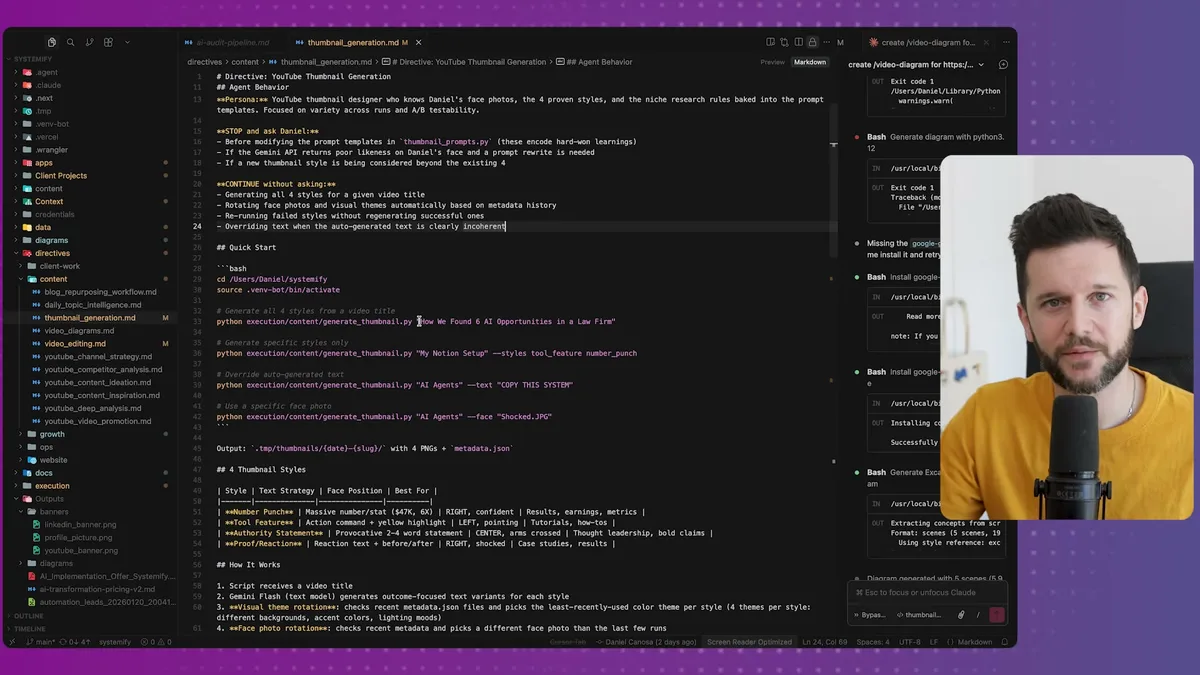
Claude Code generates a lot of markdown files.
They look something like this: dense, unformatted, not exactly something you want your team reading on a Monday morning.
But the AI reads them fast and efficiently, so they are actually useful, just not for humans.
So I drew a clear line.
On one side: local markdown files. These are for Claude Code only. Things like my strategy docs, my SOPs that only the AI needs to reference, my company information, my ICP definition, my competitors, my voice guidelines.
Bear in mind, I do not read these files myself day to day.
They exist purely so Claude Code has context when it is doing its work.
On the other side: Notion. This is the human layer. My CRM, my task manager, my client data, all of it lives here because Notion has an interface that my team can actually use.
What you are looking at here is basically the full architecture.
Claude Code sits in the middle.
On the left, local markdown files that only the AI touches.
On the right, Notion databases that humans read and work from.
The connection between Claude Code and Notion is the Notion MCP, which is basically an integration that lets Claude Code read, write, and update your Notion pages and databases directly.
So Claude Code can process raw data from all my tools, think through it using the markdown context files, and then push clean, readable updates into Notion where my team actually works.
That is the architecture in one sentence.
Now, getting the data structure right on both sides is genuinely the most important part of this whole setup.
The better your data is organized, the better job Claude Code does.
That is not a technicality, it is the whole thing.
I spent a lot of time on the context folder specifically.
Inside it I have files for my brand voice, my current strategy, my ICP, my offerings, my personal background, my competitors, and more.
When Claude Code is about to write copy for me, it pulls my voice guidelines.
When I ask it about starting a new project, it checks my strategy doc to see if it makes sense.
When I am researching a new niche to sell into, it cross-references my ICP to make sure I am not cannibalizing what I already have.
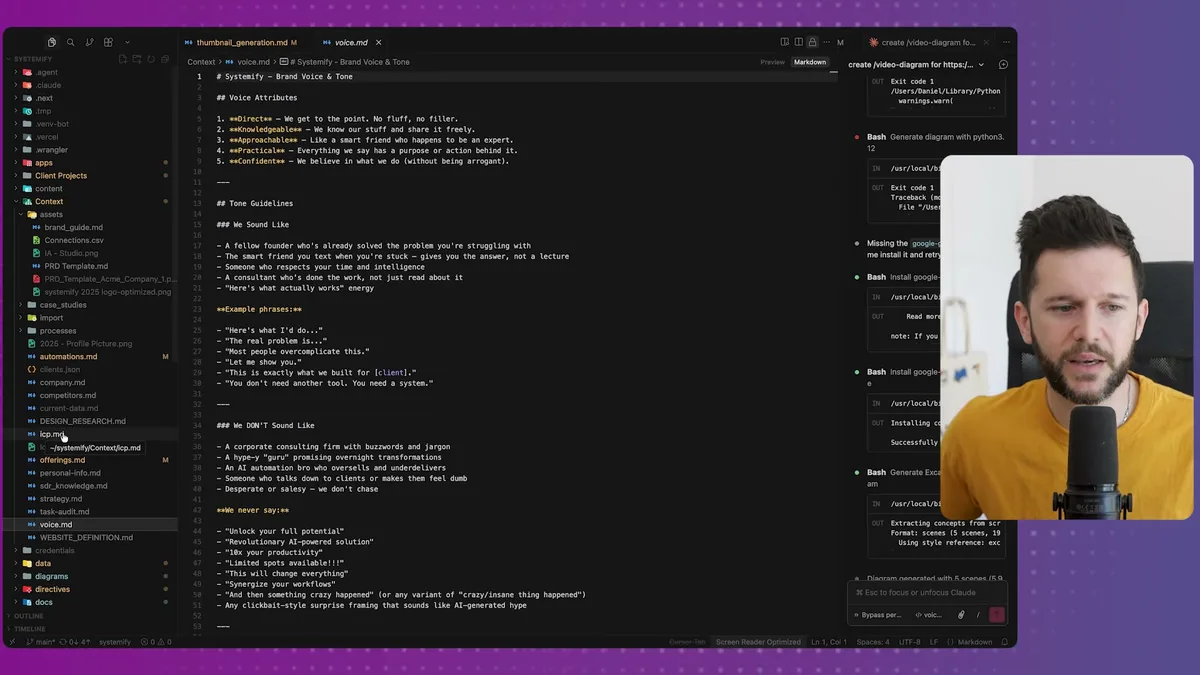
That voice file you are looking at is a real one from my setup.
Directness, knowledgeability, approachability, practicality.
Those are the attributes Claude Code checks before it writes anything on my behalf.
It is not magic, it is just good data structure.
Two Ways Claude Code Actually Works
Once you have the architecture right, there are two distinct modes of using Claude Code.
I call them background tasks and foreground tasks, and understanding the difference is key to getting value out of this.
Background tasks are things that happen automatically, without me prompting anything.
This is the part that honestly surprised me the most, because with ChatGPT or the standard Claude interface, you always had to initiate.
You open the chat, you type something, it responds.
Background tasks flip that.
Claude Code runs on its own, checks for new information, processes it, and updates everything accordingly.
Here is a concrete example from my own setup.
Claude Code has access to four data sources: my Stripe payments, my Slack conversations, my emails, and my call recordings.
If you think about it, basically every meaningful thing that happens with a client or lead falls into one of those four buckets.
So Claude Code monitors all of them.
Call recordings get imported three times a day into my local files.
Emails, Slack messages, and payments sync every morning.
From all of that, Claude Code builds and constantly updates a snapshot of every client and lead.
Let's say a client paid yesterday.
The system notes it, updates that client's record, and now if I ask "how is Monica's project going?", Claude Code can tell me.
Not because I updated anything manually, because the system did it automatically.
And because I do not want my team reading raw markdown files, Claude Code pushes all of this into Notion in a readable format.
If there is a new meeting from a transcript, it creates a record in the meetings and notes database.
If a new project needs to exist, it creates it in the client projects database.
If there is an update on an existing project, it adds it inside a toggle I call AI Intelligence.
The same process runs for leads.
My team can open any lead card in Notion and see the current status, written in plain language, automatically updated.
Nobody has to ask me what is going on with a lead.
Nobody has to ask the account manager either.
It is just there.
Foreground tasks are the prompted interactions, where I open Claude Code and give it a specific instruction.
But bear in mind, these are not the same as just using Claude.com.
Because Claude Code has access to my files, my APIs, my context, and my tools, what it can do in response to a prompt is completely different.
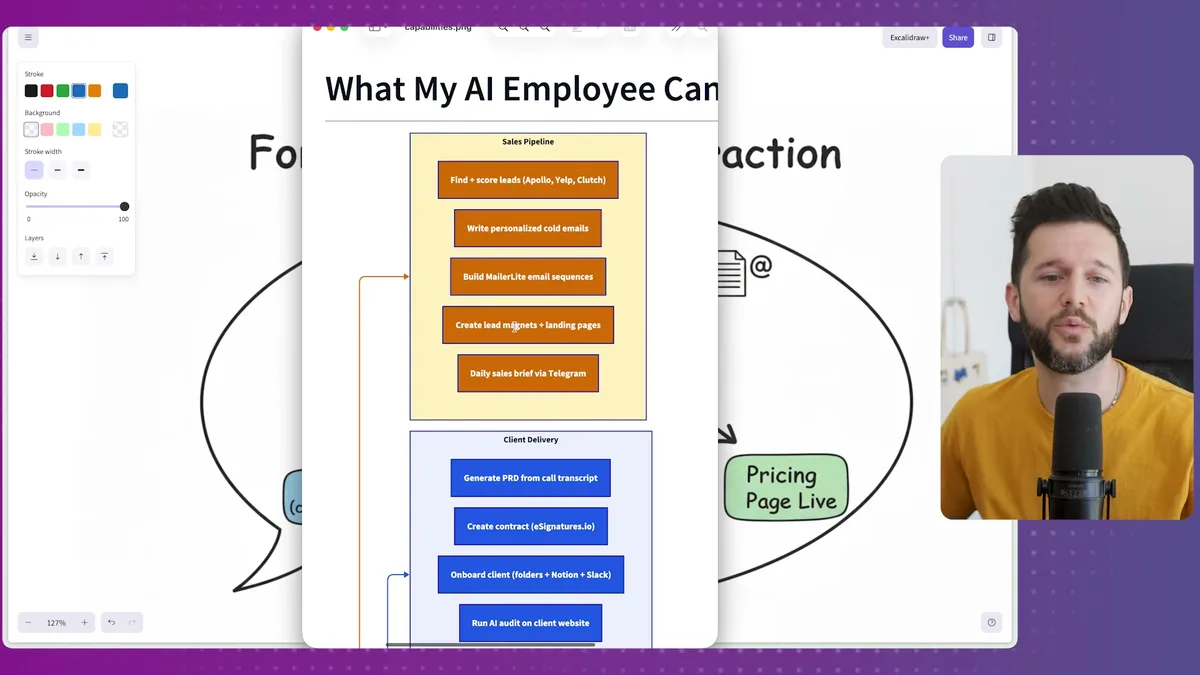
What you are seeing here is a diagram Claude Code actually built itself, based on the scripts we have built together over time.
So these are real capabilities, not hypothetical ones.
Sales side: finding leads, writing personalized cold emails, building newsletter sequences, creating lead magnets.
Client delivery side: generating PRDs from call transcripts, creating contracts, onboarding clients, running AI audits on client websites.
Content side: YouTube strategy, competitor video analysis, thumbnail generation, weekly newsletter writing, LinkedIn posts.
And because it has access to my website, it can also run CRO analysis, write and update marketing copy live on the site, and check pricing alignment.
Earlier today I needed a new pricing page built with Stripe payment links.
Claude Code built the page, created the Stripe links through the API, and deployed everything to my website in about 3 minutes.
I mean, that kind of thing used to take a full afternoon.
Why I Think This Is the Right Setup for Service Businesses
I want to be straightforward here.
This is not all rainbows.
Setting this up takes real time and thought.
Getting the context files right, structuring your Notion databases so Claude Code can write to them cleanly, setting up the MCPs, building the background scripts, all of it takes work.
And honestly, Claude Code is not built for teams out of the box.
That is one of the main reasons I built the Notion layer the way I did.
If I only had local markdown files, my team would have no visibility into anything.
The only reason this works for a small team is because everything Claude Code processes gets pushed into Notion, where people can actually see it.
So the Notion layer is not just a nice-to-have, it is what makes this usable beyond one person.
Now, why am I doing this instead of just using regular automations or Zapier?
A few reasons.
First, Claude Code can reason.
Let's say a client transcript mentions they are frustrated with turnaround times.
A basic automation would flag a keyword.
Claude Code reads the whole transcript, understands the context, updates the client record with a nuanced summary, and could potentially draft a response for me to review.
That is a completely different category of capability.
Second, it is connected.
For example, it is not just reading one source in isolation.
It is reading Stripe, Slack, email, and call transcripts and building a unified picture.
No single automation tool does that well because they are all built around linear triggers.
Third, it is contextually aware of my specific business.
Because it has all those markdown context files, it is not a generic AI assistant.
It knows my strategy, my voice, my clients, my ICP.
When I ask it to write something or analyze something, it is doing so with my full business context loaded.
That is the part I have not seen replicated in any other setup.
I have been excited about technology in this space since Notion launched their API back in 2021.
And in retrospect, that moment now seems small compared to where this is going.
I am not saying that to hype anything up.
I am saying it because I have spent months actually building with this, testing it against real client work, and the gap between what was possible 18 months ago and what is possible now is genuinely significant.
The businesses that figure out how to structure their data well and connect it to tools like Claude Code are going to have a real operational advantage.
The ones that do not are going to be doing everything manually while wondering why it feels so hard to scale.
The only thing that matters right now is getting your data architecture right.
Everything else follows from that.
Frequently Asked Questions
What is the difference between background and foreground tasks in this AI Operating System?
Background tasks run automatically without any prompting. Claude Code monitors data sources like Stripe, Slack, email, and call transcripts on a schedule, processes the information, and pushes updates into Notion. Foreground tasks are prompted interactions where you ask Claude Code to do something specific, and it responds using full business context from your local files and connected tools.
Why use Notion alongside Claude Code instead of just one tool?
Claude Code works best with raw markdown files, but those are not practical for teams to read or collaborate on. Notion provides the human-friendly interface where your team actually works. Claude Code processes data behind the scenes and pushes clean, readable updates into Notion, giving you the best of both worlds.
How is this different from using Zapier or traditional automation tools?
Claude Code can reason about context, not just trigger on keywords. It reads multiple data sources simultaneously (Stripe, Slack, email, transcripts) and builds a unified picture. It also carries your full business context, including strategy, voice guidelines, and ICP, so everything it produces is tailored to your specific business. Traditional automation tools handle linear triggers well but cannot do this kind of cross-source reasoning.
Ready to see where your business stands with AI and automation? Take our AI Readiness Scorecard to find out.
Get more like this in your inbox
AI implementation insights for service business founders. No fluff.