Notion · AI & Automation
Build a Self-Managing Agency in Notion: 5-Minute Setup
Learn how to automate client project setup in Notion. Reduce delivery time from 20+ to 2-3 hours weekly with self-managing systems and auto-generated tasks.
Daniel Canosa ·
TL;DR: A self-managing agency system in Notion uses three connected databases (Projects, Tasks, and SOPs) with automations that auto-generate tasks when a project status changes to "Active." Each task is dynamically assigned to the right team member and linked to step-by-step documentation. This setup reduces hands-on delivery time from 20+ hours to 2-3 hours per week for service businesses with standardized processes.
Key Takeaways
- Hiring more people without systems just shifts your time from doing the work to managing the people doing the work. Systems solve the root problem.
- The three-database setup (Projects, Tasks, SOPs) works because tasks are generated automatically with the correct assignee, due date, and linked documentation.
- Dynamic assignee formulas pull the right team member from the project record, so tasks route to the developer, strategist, or whoever is responsible.
- Linking every auto-generated task to a living SOP means your team always references the latest process documentation without you updating individual tasks.
- This approach requires a standardized, repeatable process. If every client engagement is completely custom, automated task generation will not work well.
I've been building these self-managing systems for my clients since 2021, and honestly, the transformation is pretty incredible.
Before we implement this system, our clients are spending more than 20 hours per week just on client delivery alone.
After the 5-minute setup I'm about to walk you through? Two to three hours per week.
That's not a typo. We're talking about an 85% reduction in hands-on delivery time, which means founders can finally step back and focus on growth instead of being buried in project management.
The Core Problem (And Why Hiring More People Makes It Worse)
Here's what I see with every service provider who's trying to scale.
They hit that point where client delivery is eating up all their time. Setting up new projects, managing tasks, making sure nothing falls through the cracks.
The natural instinct? Hire someone to help.
But then what happens? Now you're spending your time training this person, babysitting them, telling them what to do, when to do it, how to do it.
You're creating tasks for them manually, or worse, managing everything through Slack messages and WhatsApp threads. I hope you're not one of them.
What if there was a system that automatically tells your team member exactly what they need to do, when they need to do it, and how to do it?
Without you having to babysit anyone.
That's what we're building today. A system that automatically generates tasks, assigns them to the right person, and includes built-in documentation showing exactly how to complete each task.
But before we dive into the setup, bear in mind there's one critical requirement.
Since tasks are generated automatically, you need a standardized process. Something you follow every single time.
This is the first thing we ensure our clients have. If they don't have it, we help them define it beforehand.
If you're a company doing lots of different things, offering different services, fulfilling every service in a different way, this is going to be very hard for you. Most of what you do will stay manual.
My recommendation? Take a look at all the services you're providing. See which ones generate the most revenue and which ones you enjoy doing the most.
Find the service where both of these things are true, then focus your offering there and work on making it as standardized as possible.
Once you get your process standardized, you'll have something like this:
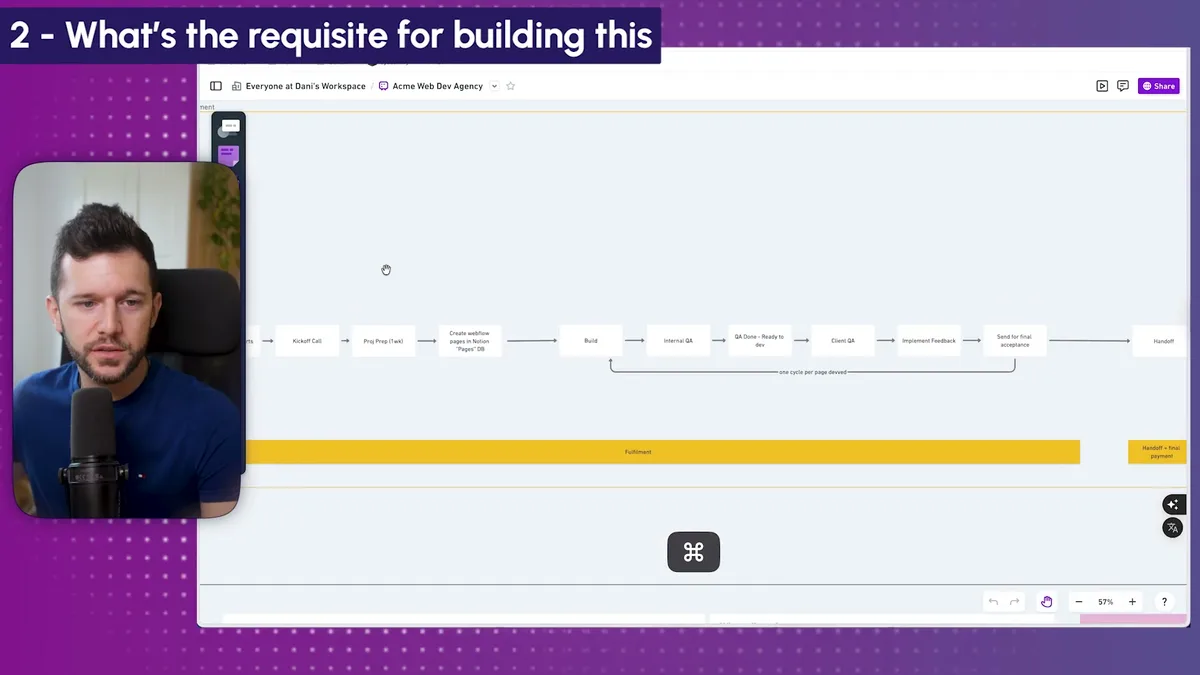
This is a real output from one of our clients. Of course, I've changed the names for privacy, but this linear path with all the different tasks is exactly what we need to build our automated system.
The Three-Database Setup That Makes Everything Work
Now, let's build this in Notion. We need three different databases working together.
Database #1: Projects
Every project represents something you're doing for a client. In my case, since we build Notion workspaces, all my projects are Notion builds.
Here's the key thing. I always think in terms of scalability. I want the same system to work whether we're two people today or 50 people in five years.
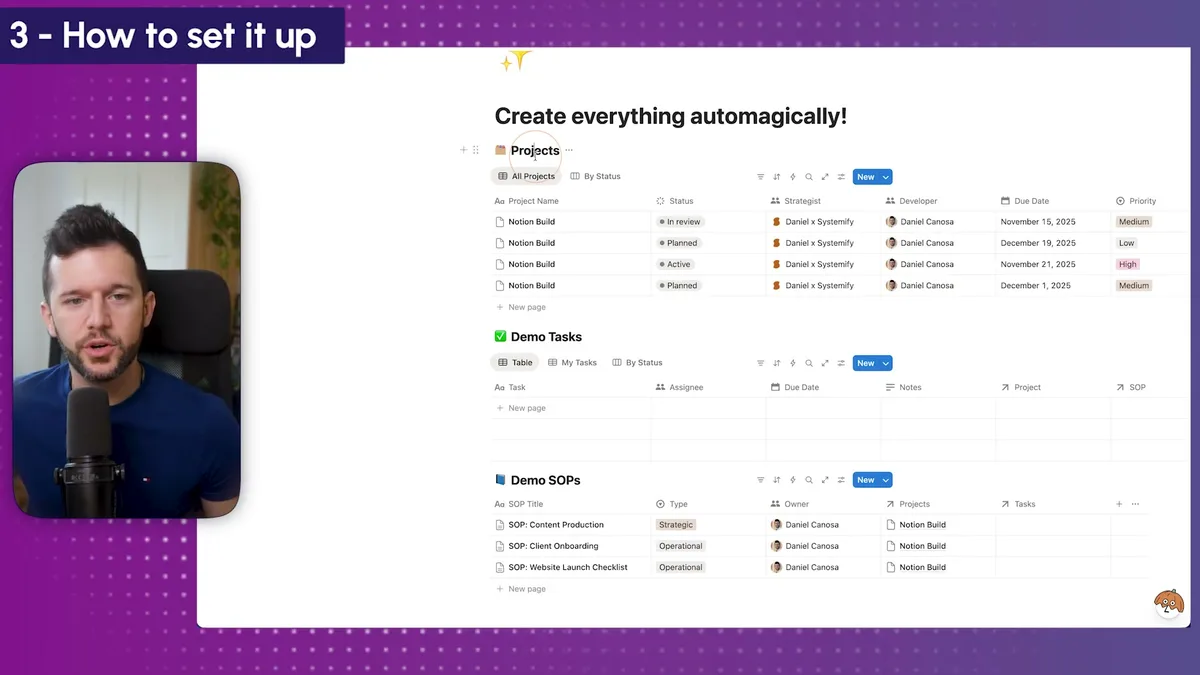
For my Notion builds, we have two different positions. The Strategist (typically me) who helps companies standardize their process and maps out how the Notion system will work. And the Developer who actually builds the workspace following that plan.
This gives me flexibility. In some projects, I'm both roles. In others, I'm only the strategist. But in the future, if I have multiple developers, I can assign them here.
What does this mean? Every task that needs to be done by the developer will automatically be assigned to whoever is in that Developer field for that specific project.
Database #2: Tasks
This is where all the magic happens. Tasks get created automatically and assigned dynamically based on the project setup.
Database #3: SOPs
This contains all the documentation showing exactly how to complete each task. When a task gets created, it automatically links to the relevant SOP.
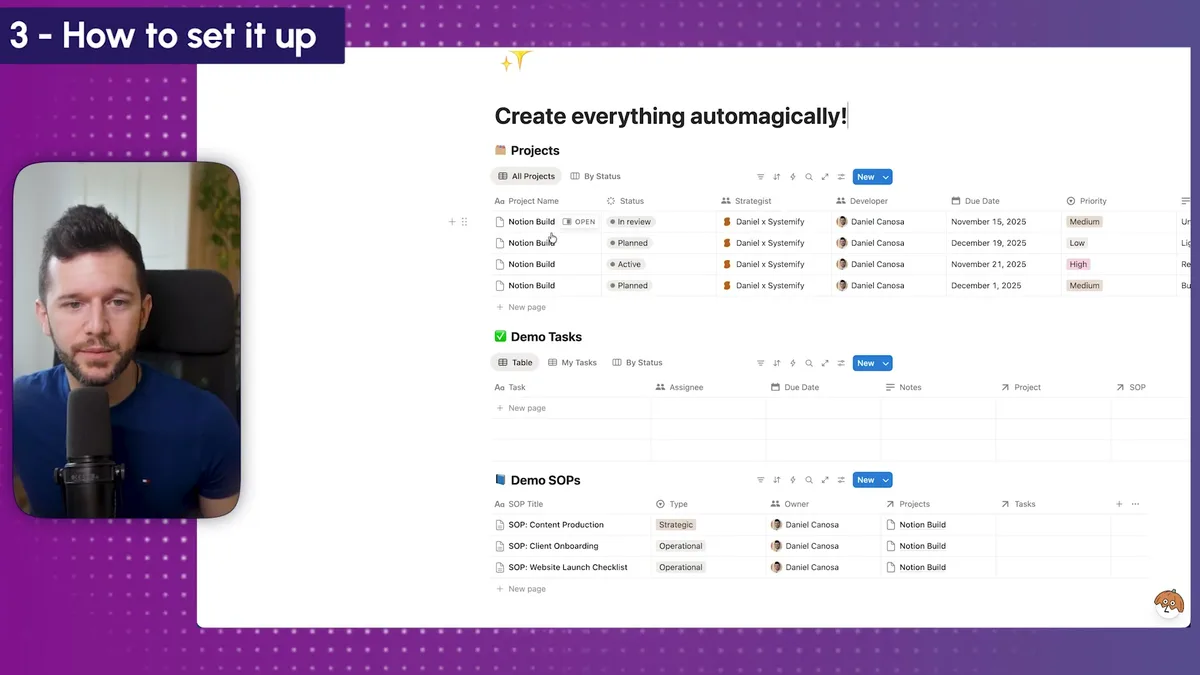
Setting Up the Automation (The 5-Minute Magic)
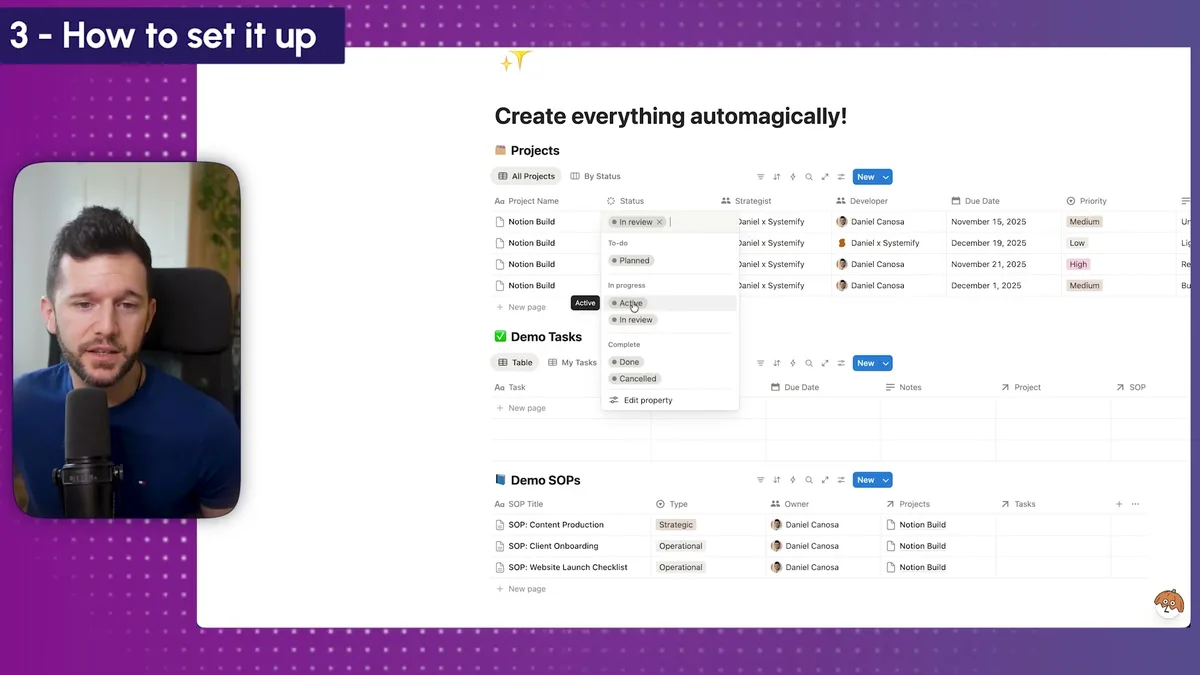
Here's where everything comes together. I want tasks to be created automatically whenever a project moves to the "Active" phase.
Let me walk you through the setup.
First, I'll create an automation called "Active Project." The trigger is simple: when the project status changes to "Active," we want to create tasks.
Setting up task creation:
For each task, I need to define several things:
- The task name (for example, "Turn standard process into a list of tasks")
- A dynamic due date
- The assignee
- A link to the relevant SOP
For the due date, I use a formula that automatically sets the due date to two days from when the automation triggers.
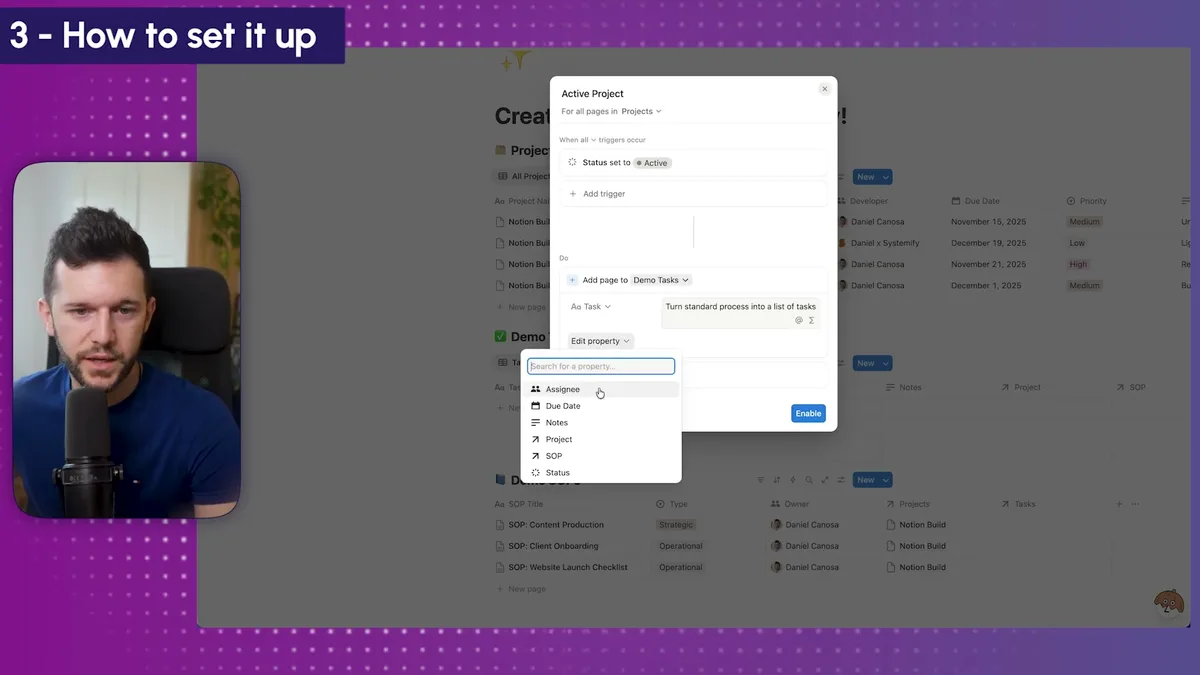
For the assignee, since this particular task is the developer's responsibility, I use a custom formula that pulls whoever is listed as the Developer in the trigger page.
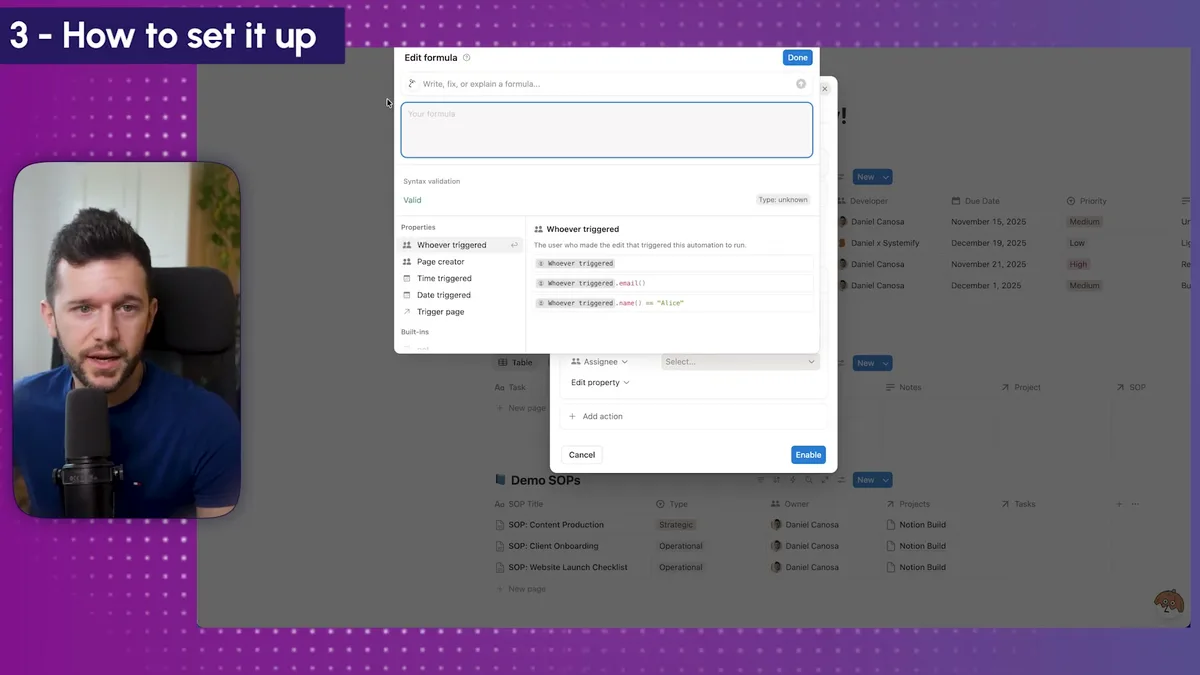
I can create as many tasks as I need by duplicating this setup and changing the task names. Let's say I also need "Set up first dashboard" and "Set up second dashboard" tasks.
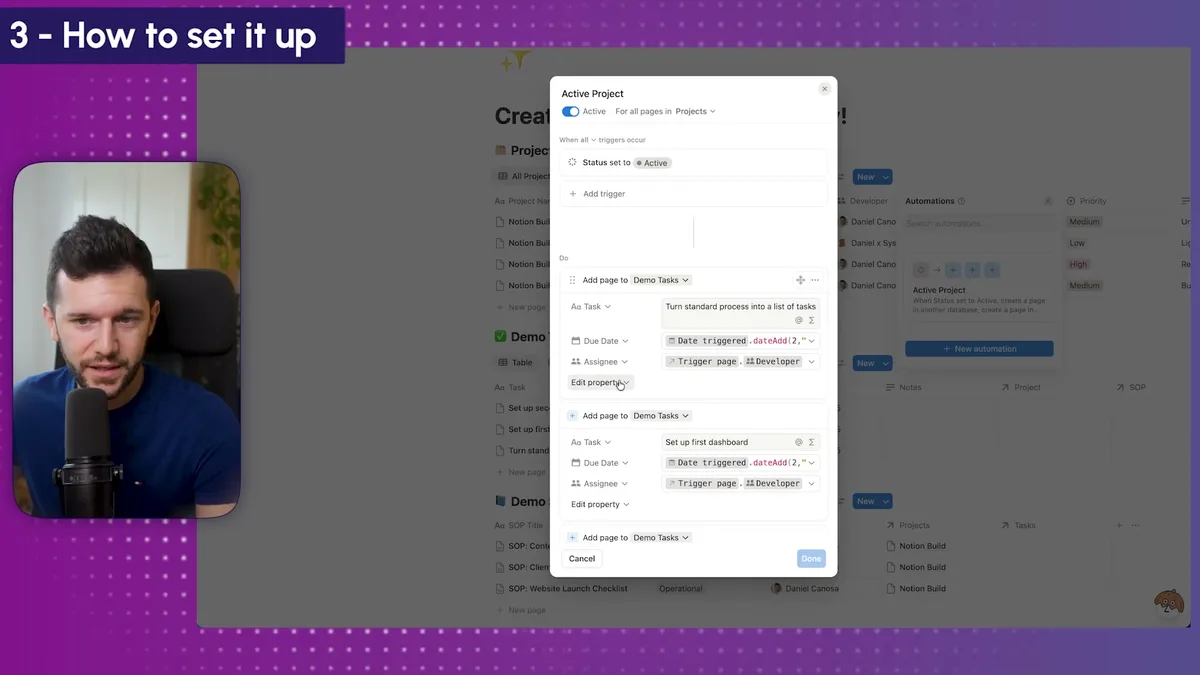
Now, whenever a project goes to Active status, all these tasks get created automatically with the correct assignee, due date, and project link.
But here's the thing. These tasks are created, but they don't tell someone HOW to complete them.
That's where the SOPs database comes in.
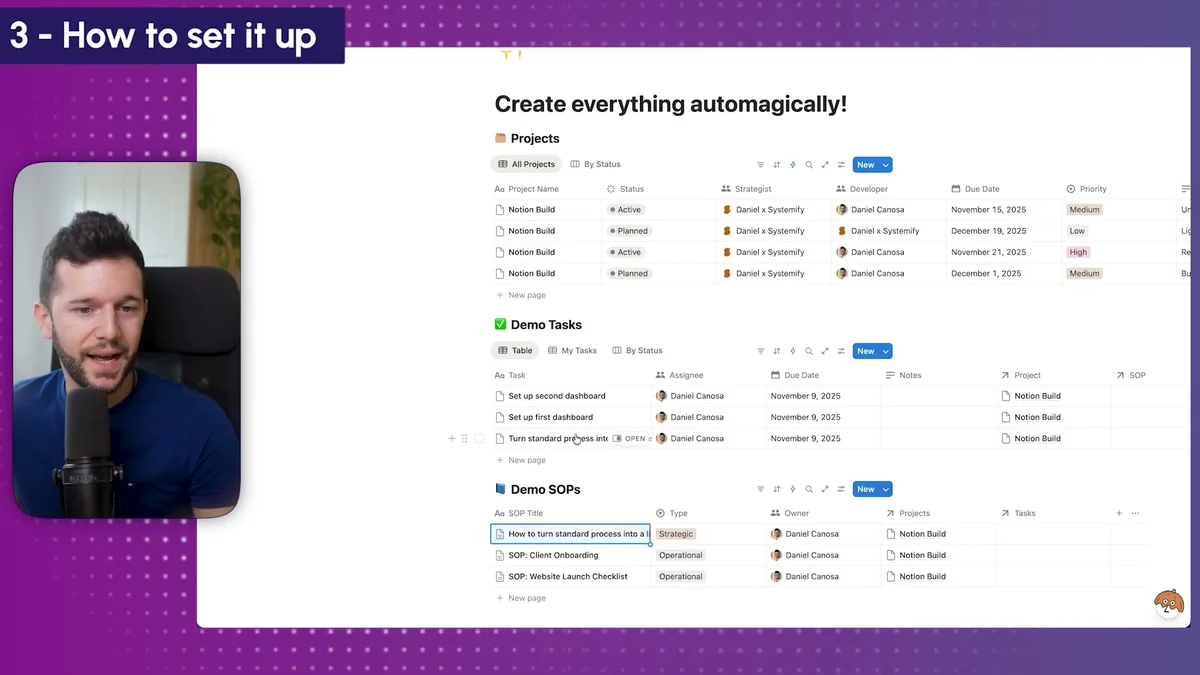
I can link each automated task to its corresponding SOP right in the automation setup.
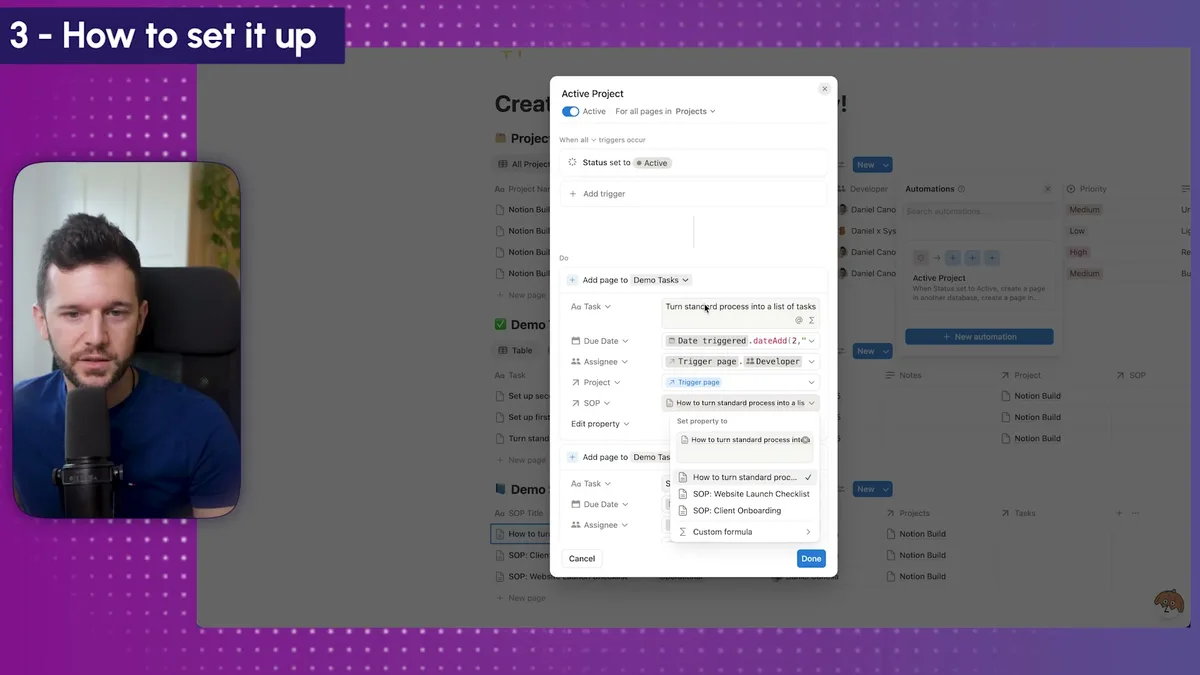
So when Daniel (or whoever the developer is) receives a task like "Turn standard process into a list of tasks," he just clicks on the linked SOP and gets all the steps he needs to take.
The beautiful part? Every time a new task is created and linked to an SOP, it's always linked to the same one. So when we update the SOP, it doesn't matter because all past and future tasks will always reference the latest version.
Basically, this is how we turn a standardized process with a set of steps into a workable system that runs itself.
Some of my clients used to keep their task lists in Word documents or Excel files. For every new project, they'd copy and paste them, then manually modify properties for each project.
Now everything is completely automated. You just need to think about which statuses will trigger which sets of tasks with which SOPs.
But it all comes back to having a standardized process like the one I showed you earlier.
Bear in mind, this isn't all rainbows. If your process changes frequently, you'll need to update your automations. And if you're doing completely custom work for every client, this approach won't work for you.
But for service providers with repeatable processes, this system can give you back 15-18 hours per week. That's time you can spend growing your business, working on strategy, or honestly, just taking a break.
The key is starting with one standardized service and building from there. Once you see how powerful this is, you'll want to systematize everything else too.
Ready to see where your business stands with AI and automation? Take our AI Readiness Scorecard to find out.
Frequently Asked Questions
What if my service delivery process is not fully standardized yet?
Start by identifying the service that generates the most revenue and that you enjoy delivering. Map out every step from kickoff to handoff. Once you have a repeatable sequence of tasks, you can build the automation around it. You do not need to standardize everything at once; start with one service and expand from there.
Can I set different due dates for different tasks in the automation?
Yes. Notion's automation formulas support dynamic date calculations. You can set each task's due date relative to when the automation triggers. For example, the first task might be due in 2 days, the second in 5 days, and the final task in 14 days. Each task in the automation gets its own due date formula.
What happens when I update an SOP after tasks have already been created?
Because tasks link to the SOP page through a relation (not a copy of the content), every task always references the latest version of the SOP. When you update the SOP, all past and future tasks that link to it automatically reflect the changes. You never need to update individual tasks.
Get more like this in your inbox
AI implementation insights for service business founders. No fluff.