AI & Automation
Claude AI Proposal Generator: Automate Client Proposals in 90 Seconds
Learn how to build a Claude Code skill that automatically generates professional client proposals from call transcripts in 90 seconds instead of 2 hours.
Daniel Canosa ·
TL;DR: By building a Claude Code skill backed by brand guidelines and an offerings file, you can generate a fully branded client proposal in Google Docs within 90 seconds of finishing a sales call. You still review and adjust before sending, but the AI handles the 90% that used to take one to two hours.
Key Takeaways
- Speed matters more than perfection for proposals; leads go cold fast, and a strong first draft in 90 seconds beats a polished one sent the next day.
- The quality of AI-generated proposals depends on your foundation files (brand guidelines, service offerings), not on the prompt itself.
- Separating directives (plain-English SOPs) from execution scripts (Python code) makes the system maintainable without touching code.
- Claude Code reads the call transcript, extracts pain points and deliverables, matches them against your offerings, and outputs a structured Google Doc with your branding.
- This is a first-draft machine, not a set-it-and-forget-it system. Pricing and specific details still need human review every time.
I just got off a sales call.
The prospect was interested.
And within 90 seconds, I had a fully branded proposal sitting in Google Docs, ready to send.
A few months ago, that same proposal would have taken me one to two hours to write.
I'd finish the call, tell myself I'd do it later, and "later" meant the next morning, by which point the lead had already gone cold.
That's the thing about proposals nobody talks about. It's not the writing that kills you. It's the timing.
So I built a Claude Code skill that takes a call transcript and generates a complete, branded proposal in Google Docs. Automatically.
Here's how it works, why I built it this way, and how you can set it up for yourself.
The Problem With How Most Service Businesses Write Proposals
Let me be honest about how proposals used to work for me.
After every sales call I'd have a full brain dump of what the client needed, what they could afford, what was going to be a headache, and what I could realistically deliver.
That information was fresh. It was good.
And then I'd do nothing with it for 12 hours because I had another call, or client work, or I was just mentally done for the day.
By the time I sat down to write the proposal, I was working from a cold memory and a scattered set of notes.
The proposal I sent was fine. But it wasn't sharp. And it wasn't fast.
Honestly, the bigger issue was that I knew leads go cold fast.
There's a window right after a sales conversation where someone is still in buying mode.
They're thinking about the problem, they're picturing the solution, they're ready to move.
If I don't land in their inbox while that window is open, I'm competing against their daily life, their other priorities, and whatever else is trying to get their attention.
So the question I asked myself was simple. What if a proposal wasn't something I wrote, but something I reviewed?
That's the framing that made everything click.
A proposal is basically taking a conversation, passing it through your offerings and your branding, and outputting a structured document.
With the right context, an AI should be able to do 90% of that.
The only thing I should be doing is the last 10%. Review, adjust pricing, add anything the AI missed, and send.
So I built the system around that assumption.
What the System Actually Does (And How It's Built)
The pipeline is straightforward.
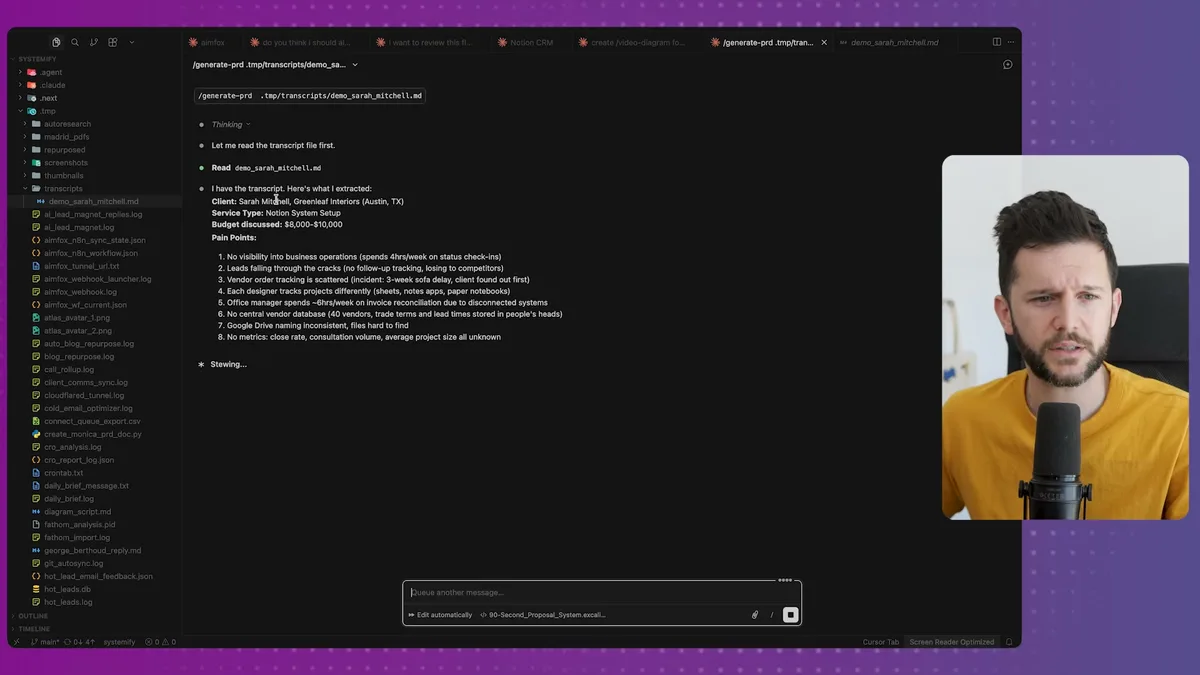
After a sales call, I drop the transcript into Claude Code and run a single command: generate PRD.
Claude Code reads the transcript first. It extracts the pain points, the deliverables, what should be out of scope, the risks, the assumptions, the next steps. All of it.
Then it runs a script that structures everything into JSON, pulling from my brand guidelines and my service offerings to make sure the proposal fits what I actually sell.
Then it generates the full proposal directly in Google Docs.
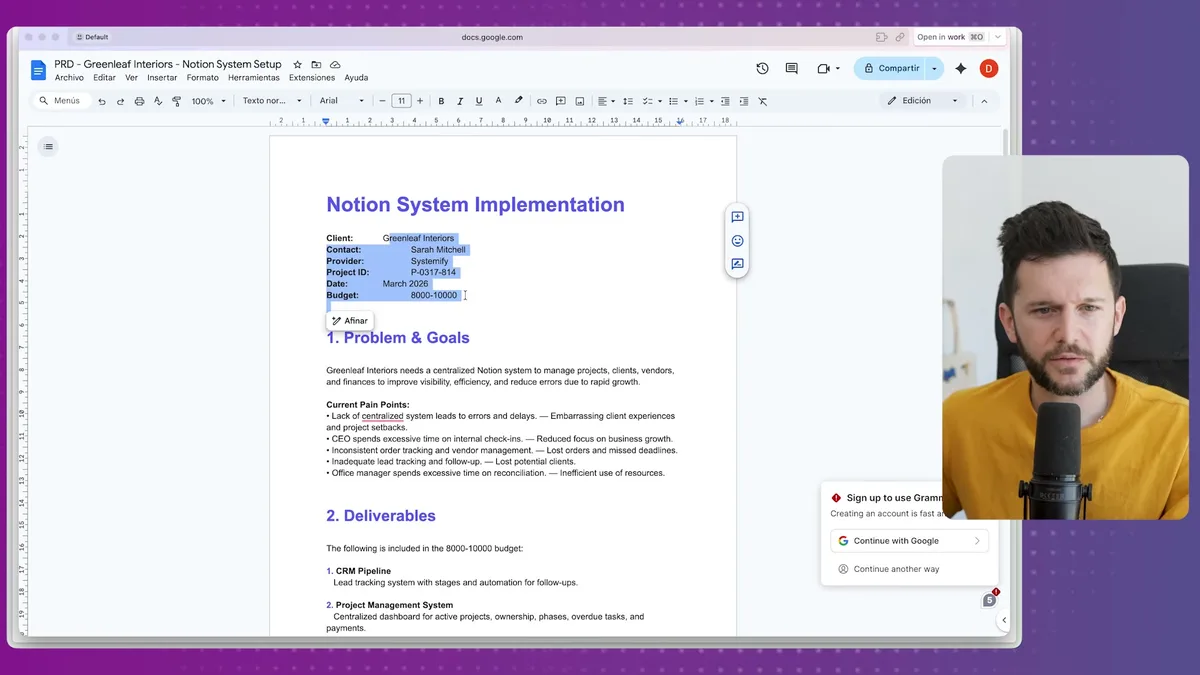
The doc comes out with my brand colors, the client's name and company, the problem statement, the deliverables, the timeline, the pricing suggestion, what's out of scope, risk and assumptions, and next steps.
The whole thing takes about 90 seconds.
Bear in mind, I'm not sending this automatically. I still open the doc, read through it, adjust the pricing if needed, maybe add a case study or a specific detail from the call.
That's intentional. I don't trust AI 100% on something this important. But I trust it to get me to 90%, and that's where the time savings live.
Here's the basic pipeline to visualize it:
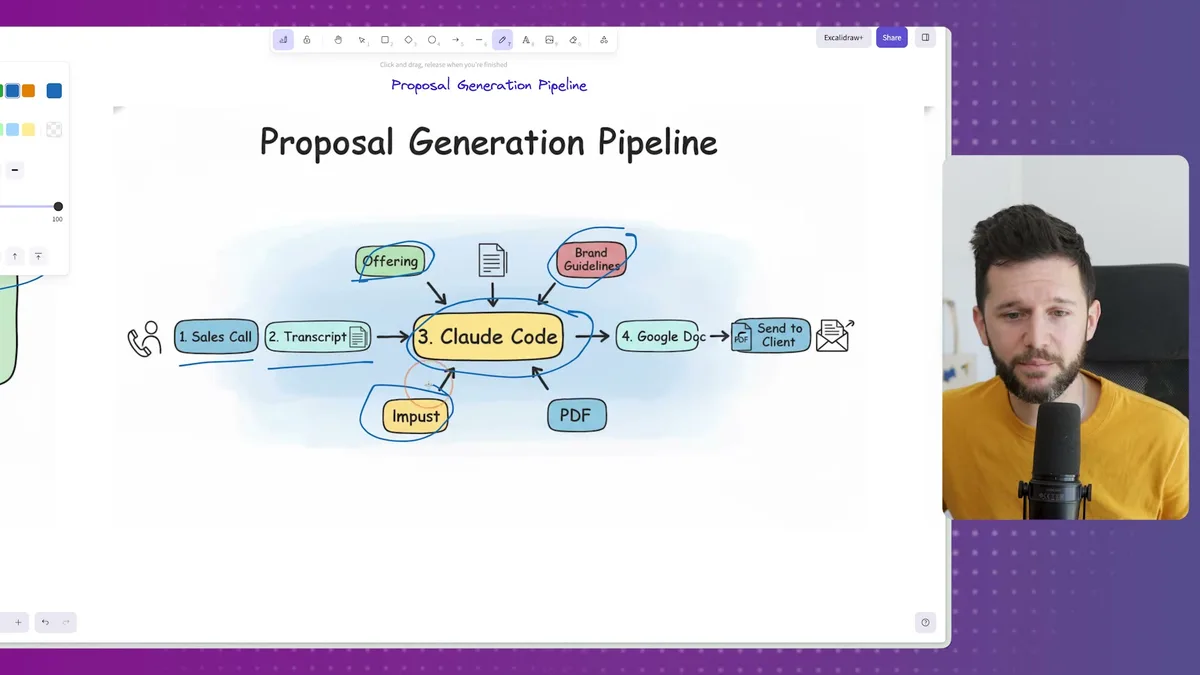
Sales call to Google Docs in three steps. The human only touches it at the review stage.
Now, here's what makes this actually work well. It's not the prompt. It's the foundation.
There are three things I had set up in Claude Code before any of this was possible.
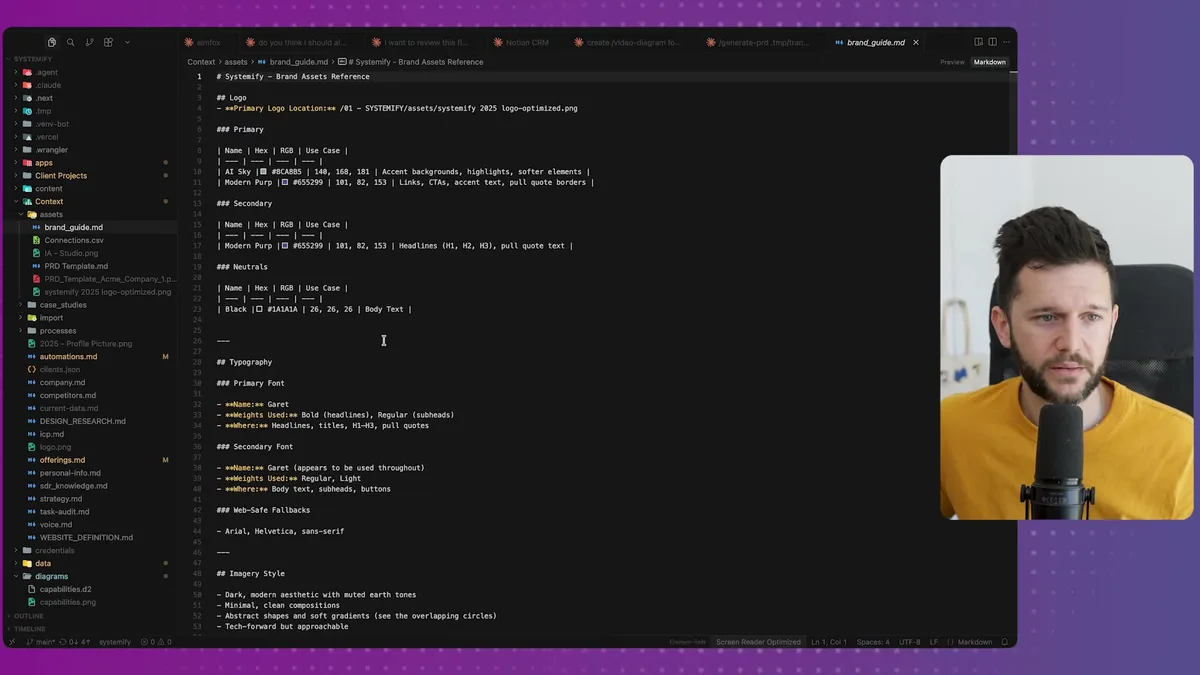
First, brand guidelines.
This is a markdown file that describes my typography, my color palette, my imagery style, the tone I use in documents.
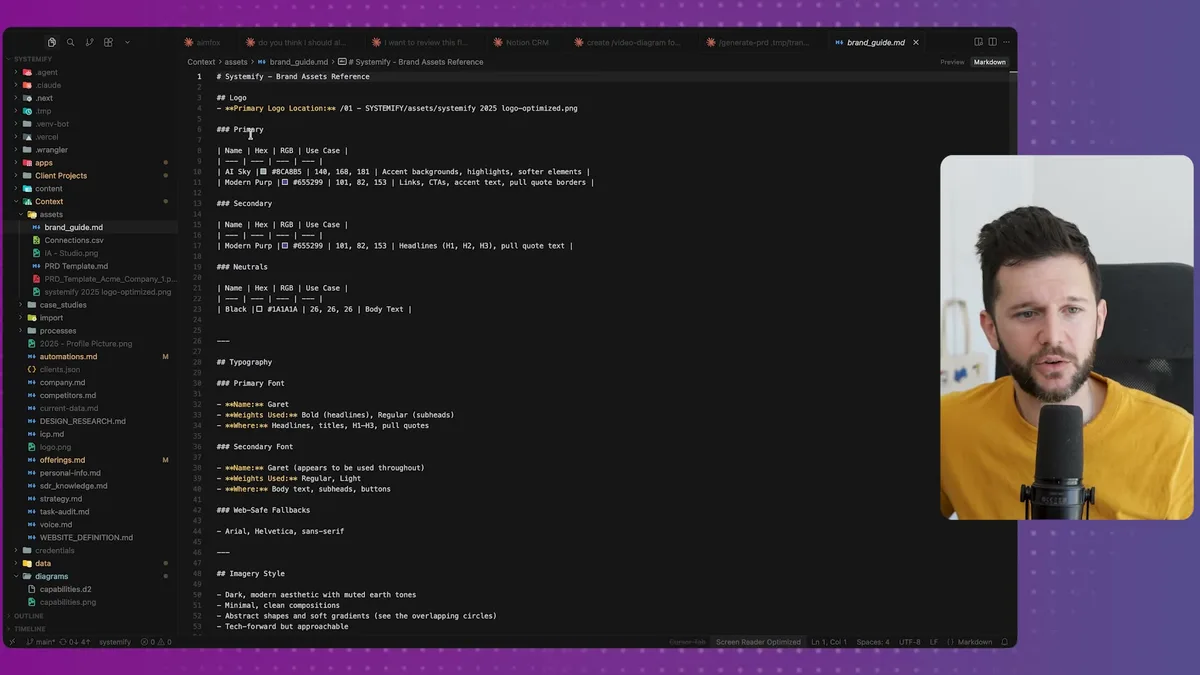
Claude Code helped me create this file, by the way. I didn't write it from scratch. I just described my brand to it and iterated until the file was accurate.
Second, my offerings.
This is another markdown file that lists every service I offer, with enough detail that Claude Code can read a transcript and figure out which service matches what the client actually needs.
For example, let's say someone on a call mentions they're drowning in spreadsheets and their team is using five different tools that don't talk to each other. Claude Code reads that, matches it against my offerings file, and proposes a relevant service with appropriate deliverables.
That matching is only as good as the offerings file. So the more specific and honest you are about what you actually do, the better the output.
Third, the Google Docs API key.
This is what lets Claude Code actually write to a live document instead of just outputting text in the chat.
Now, the structure underneath all of this is what I want to walk you through, because it's the same structure I use for every automation I build.
In Claude Code, there's a file called CLAUDE.md.
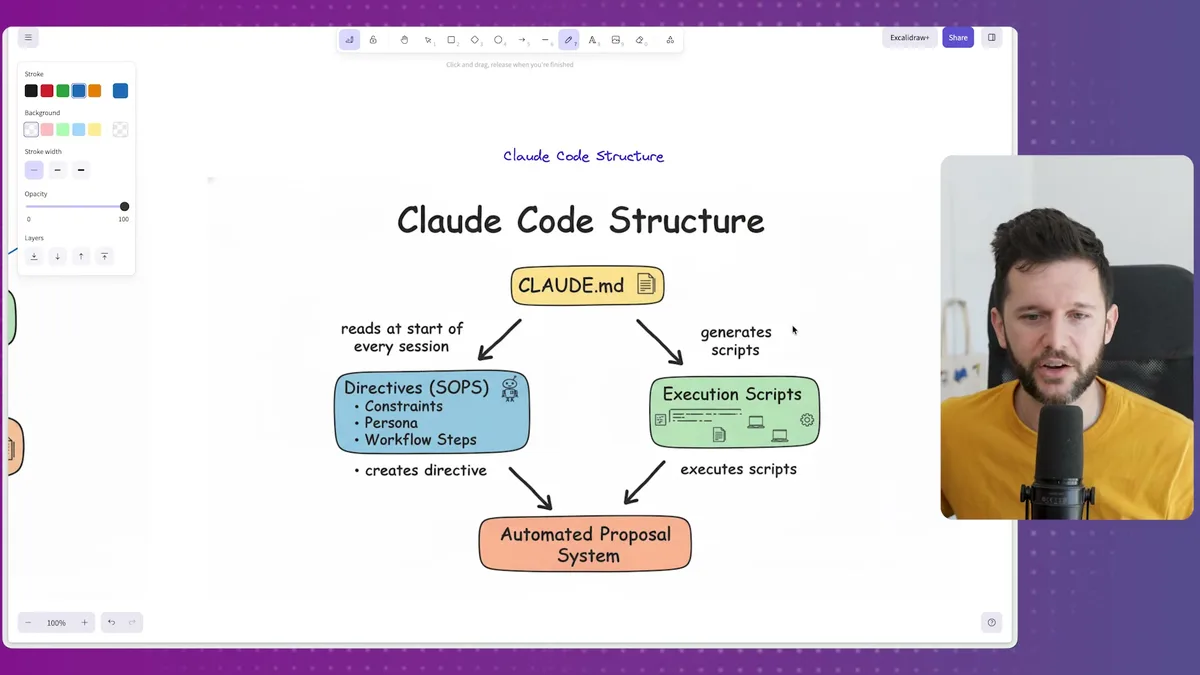
This file gets read at the start of every Claude Code session. Think of it as the instruction manual that tells Claude Code how to behave, what tools it has access to, and how my automations are structured.
Inside CLAUDE.md, I've defined that my automations are split into two parts: directives and execution scripts.
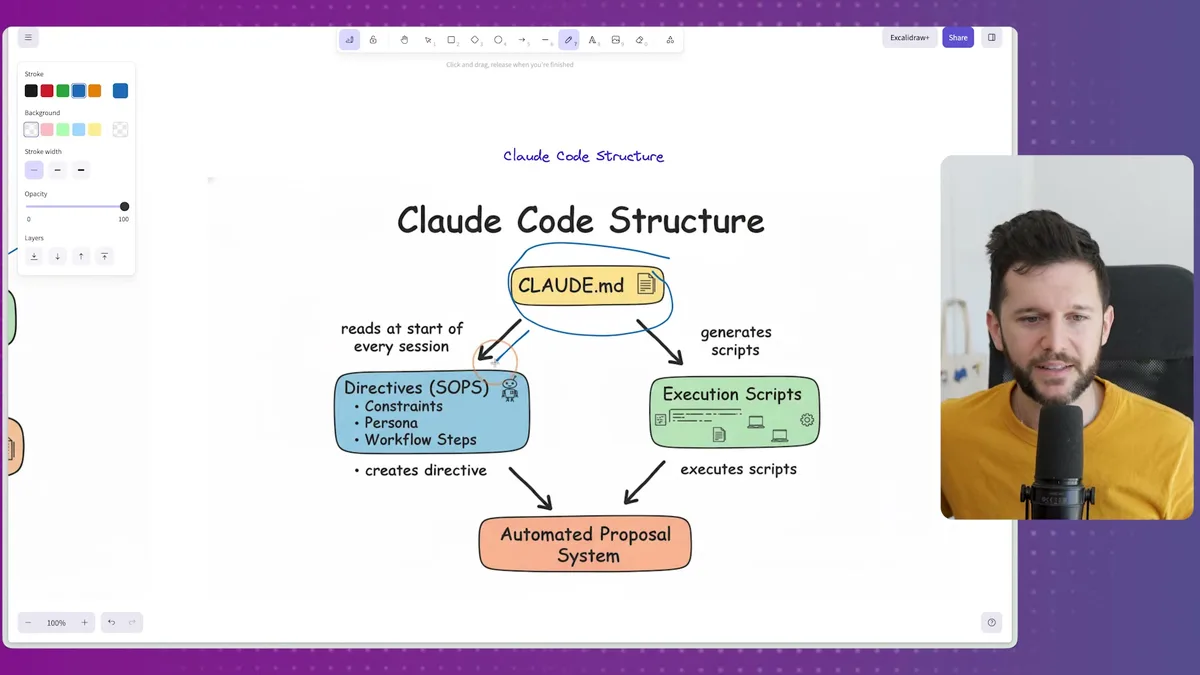
A directive is basically a plain-English SOP.
For the proposal generation, the directive is a simple file that says: read the transcript, extract these specific things, call this script, generate the doc.
The execution script is where the actual code lives.
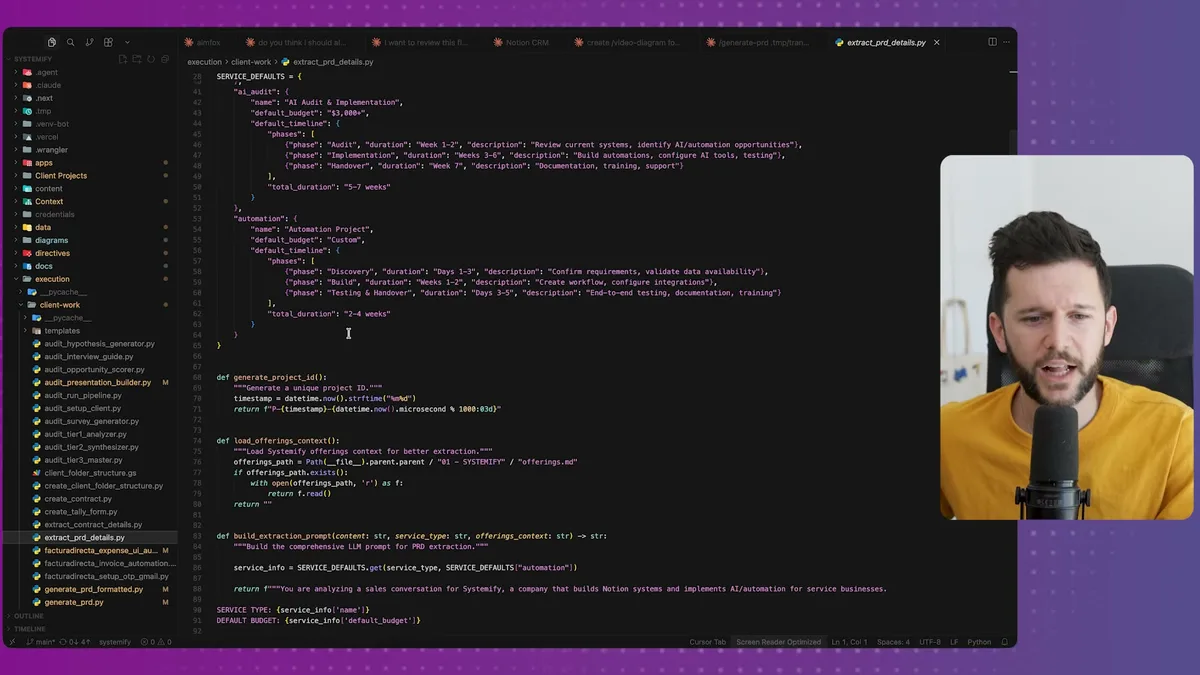
The script handles the structured extraction, the JSON building, the Google Docs API calls. Claude Code writes and runs this code. I don't have to touch it directly.
The separation matters. Directives are human-readable. If something isn't working right, I can go into the directive and update the workflow in plain English without touching any code.
This is in my opinion the right way to build this kind of automation because it means you can maintain and improve it yourself over time.
How to Set This Up, And Where to Take It Next
Starting this from scratch is simpler than it sounds.
Here's roughly the prompt I'd use to kick off the build:
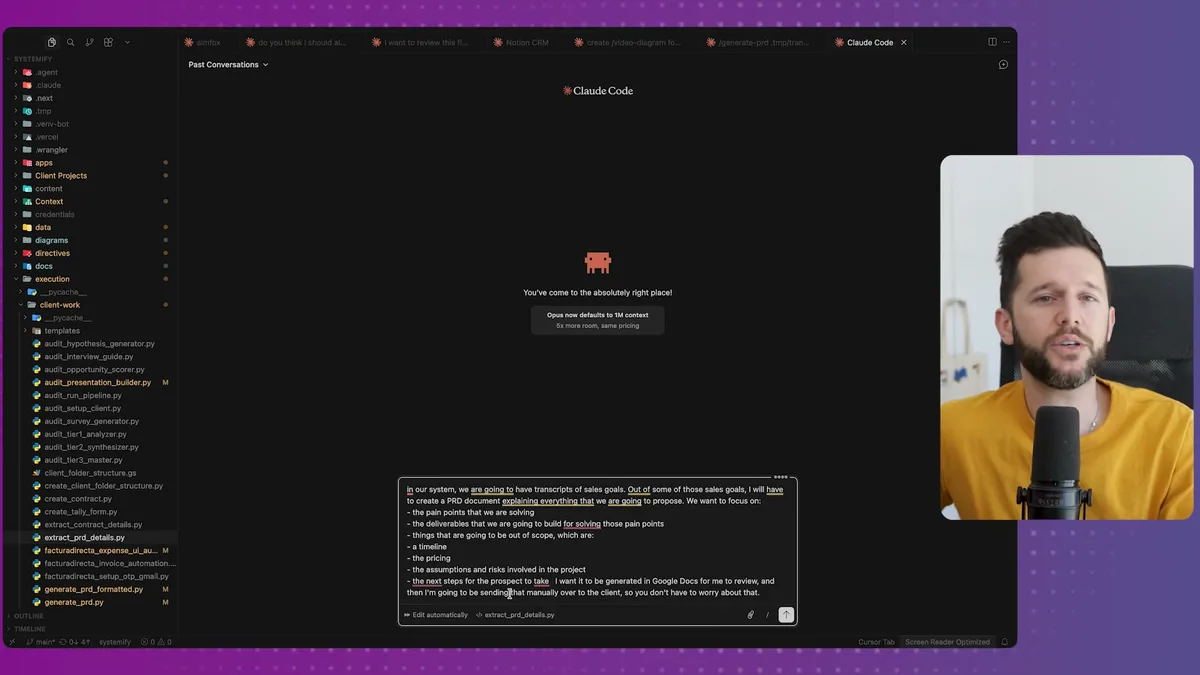
You're basically telling Claude Code: I have sales call transcripts, I need to generate proposal documents from them, here's what those documents should include, and I want the output in Google Docs so I can review before sending.
From there, Claude Code will guide you through the setup.
It'll ask for your Google Docs API credentials.
It'll build the directive and the execution script.
And you iterate in plain English until the output matches what you actually want.
Bear in mind, the context files are where you'll spend most of your time. Getting your brand guidelines and offerings files right is more work than setting up the automation itself.
But that's actually the right place to spend your time, because once those files exist, every automation you build after this can pull from them.
Of course, this is not all rainbows.
The pricing Claude Code suggests is going to need adjustment almost every time.
The deliverables list will sometimes be too broad or miss something specific that came up in the call.
And if your offerings file isn't detailed enough, the service matching is going to be off.
This is not a set-it-and-forget-it system. It's a first-draft machine. The value is that a very good first draft in 90 seconds is worth more than a perfect proposal that takes two hours and goes out the next day.
Now, once the basic version is working, there are some obvious next steps.
Sentiment-based pricing. Let's say the AI analyzes the tone of the transcript and notices the client was very engaged and asking about timelines. That's a signal to price at the higher end of your range versus a client who seemed hesitant.
Dynamic case studies. Let's say you work with home improvement companies, real estate agents, and web dev agencies. If your case studies are stored and tagged by industry, Claude Code can pick the most relevant one and drop it into the proposal automatically.
Webhook triggers. Instead of dropping a transcript manually, you change a status in Notion or HubSpot and the whole process fires on its own.
All of this is doable. The only thing that holds it back is whether your data is structured well enough for the AI to use it.
That's basically the lesson across everything I build.
The automation is not the hard part.
The foundation is the hard part. Your offerings, your brand, your case studies, your process documentation. When that context exists and it's clean, AI can do a lot with it.
When it doesn't exist, you're going to get generic outputs that need so much editing they're not saving you any time.
So if you're going to take one thing from this, start with the context files.
Get your brand guidelines into a markdown file.
Get your offerings documented with enough specificity that someone reading them could understand exactly what you do and who it's for.
Then build the automation on top of that foundation.
Frequently Asked Questions
Do I need to know how to code to set this up?
No. Claude Code generates the execution scripts for you. Your job is to describe what you want in plain English, provide your brand guidelines and offerings files, and iterate on the output until it matches your needs. The directive layer is just a markdown file you edit like a document.
How accurate is the pricing in the generated proposals?
The pricing suggestions are a starting point, not a final number. Claude Code bases them on your offerings file and what it extracts from the transcript, but you should adjust pricing on almost every proposal. The value is that the structure, deliverables, and framing are already done for you.
Can this work with tools other than Google Docs?
Yes. The execution script handles the output format, so you could adapt it to generate PDFs, Notion pages, or any other document type. Google Docs works well because it is easy to review, comment on, and share with the client directly.
Ready to see where your business stands with AI and automation? Take our AI Readiness Scorecard to find out.
Get more like this in your inbox
AI implementation insights for service business founders. No fluff.