AI & Automation
Claude Code Workflow: Build Anything Without Chaos
Learn the 3-step Claude Code workflow to build scalable automations without creating a Frankenstein system. Master skills-based development.
Daniel Canosa ·
TL;DR: Building in Claude Code without a structured workflow creates duplicated automations and broken systems over time. A three-step process, explore, plan, implement, using Claude's skills feature solves this by generating documented implementation plans before writing a single line of code.
Key Takeaways
- Claude Code skills are slash commands that trigger markdown files with step-by-step instructions, making any repeatable workflow consistent and scalable.
- The explore phase prevents building the wrong thing by researching existing work, comparing approaches, and writing a documented decision record before any implementation starts.
- The create plan step scopes the actual implementation with specific files, scripts, and tasks so Claude isn't guessing when it executes.
- The implement command reads the full plan and executes it sequentially, then documents what was built so your workspace doesn't drift into a Frankenstein system.
- This workflow works because context is preserved, not just for Claude, but for you, so you can audit and understand every automation running in your business.
Why Building in Claude Code Without a System Creates a Mess
The problem isn't Claude Code. The problem is how most people use it.
When I first started building in Claude Code, I had the same feeling I got when I first discovered Notion.
I can build whatever I want here.
So I just started building everything.
And it worked, for a while.
But the more I built, the bigger the project got, and the harder it was for Claude to actually be useful.
It was losing context.
I'd ask it to automate something new, it would build it, but it had no memory of what already existed in the workspace.
So it created duplicates.
It created overlapping systems that were supposed to work together but didn't.
With time, I had what I now call a Frankenstein system: a marsh of different automations all glued together, each one built in isolation, none of them talking to each other properly.
The fix wasn't a smarter prompt.
The fix was a structured workflow that forces Claude to research before it builds, plan before it codes, and document everything after.
That workflow has three steps: explore, create plan, implement.
And the whole thing runs through one of the most underused features in Claude Code: skills.
A skill is basically a slash command that invokes a markdown file.
That markdown file contains all the step-by-step instructions for what Claude should do.
So instead of typing a vague request every time you want to build something new, you type /explore and Claude already knows the exact process to follow.
Bear in mind, this is not just a convenience thing.
It's what keeps your Claude Code instance coherent as it grows.
The Three-Step Workflow: Explore, Plan, Implement
Each step has a specific job, and they build on each other in sequence.
Step 1: /explore
The explore phase does four things before Claude touches anything.
First, it clarifies the vision of what you actually want to build.
Second, it checks existing work in your workspace because maybe something already exists that can be reused.
Third, it researches externally to see which tools or integrations might be needed.
Fourth, it compares approaches and picks the best one.
Then it writes everything into an exploration document.
That document is the input for the next step, and honestly, that's the key insight here: each phase produces a document that feeds the next phase.
I'll walk through a real example from my own business.
I wanted a skill that, whenever I finish delivering work for a client, Claude could automatically generate a case study and push it to my website.
So I ran /explore and described what I wanted: pull information from call transcripts, emails, client notes, generate the case study following an existing template in the workspace, and have a draft-before-publish flow.
Claude researched the workspace, found what already existed, and came back with three different approaches.
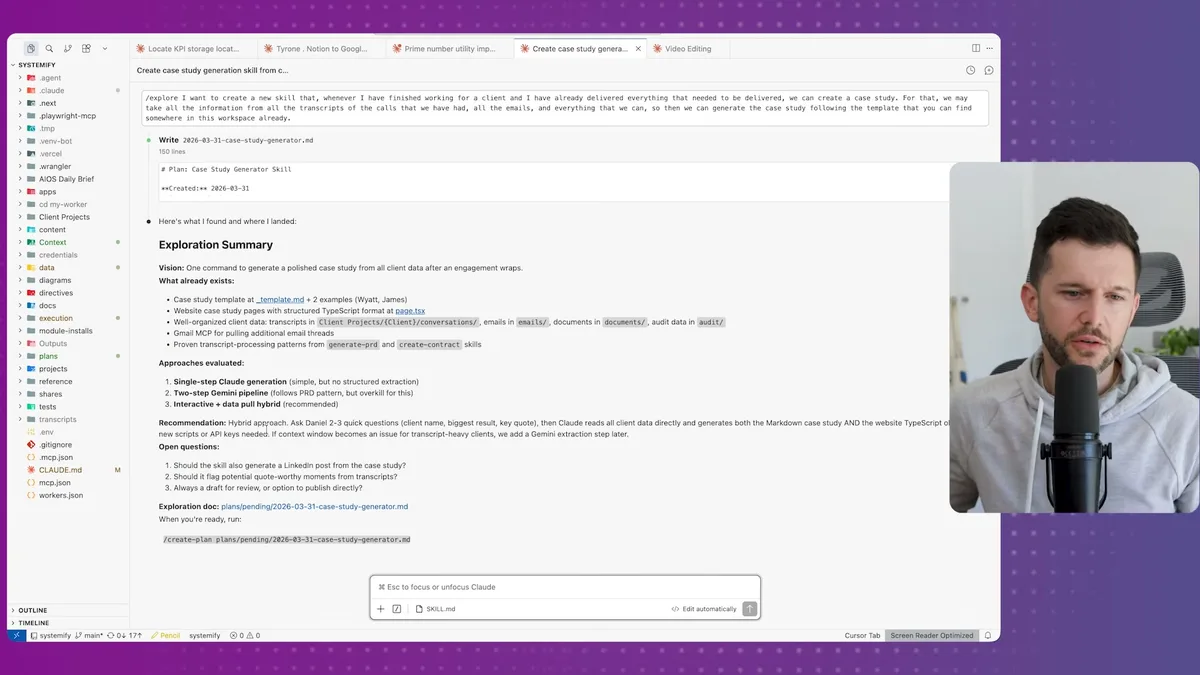
It recommended the hybrid approach, and it also flagged things I hadn't thought of, like whether to generate a LinkedIn post alongside the case study.
Honestly, I didn't even consider that.
I told it I'd rather have a newsletter issue instead, following our existing newsletter format.
I also said it should flag quote-worthy moments from transcripts but use them inside the case study itself, not surface them separately.
And always create a draft, never publish directly.
This is the high-level definition of the tool. Not the code. Not the scripts. Just what it should do and why.
Step 2: /create-plan
The plan step takes that exploration document and turns it into a real implementation blueprint.
It scopes which files need to be created, which scripts already exist and can be reused, what design decisions need to be made, and then produces a step-by-step task list for execution.
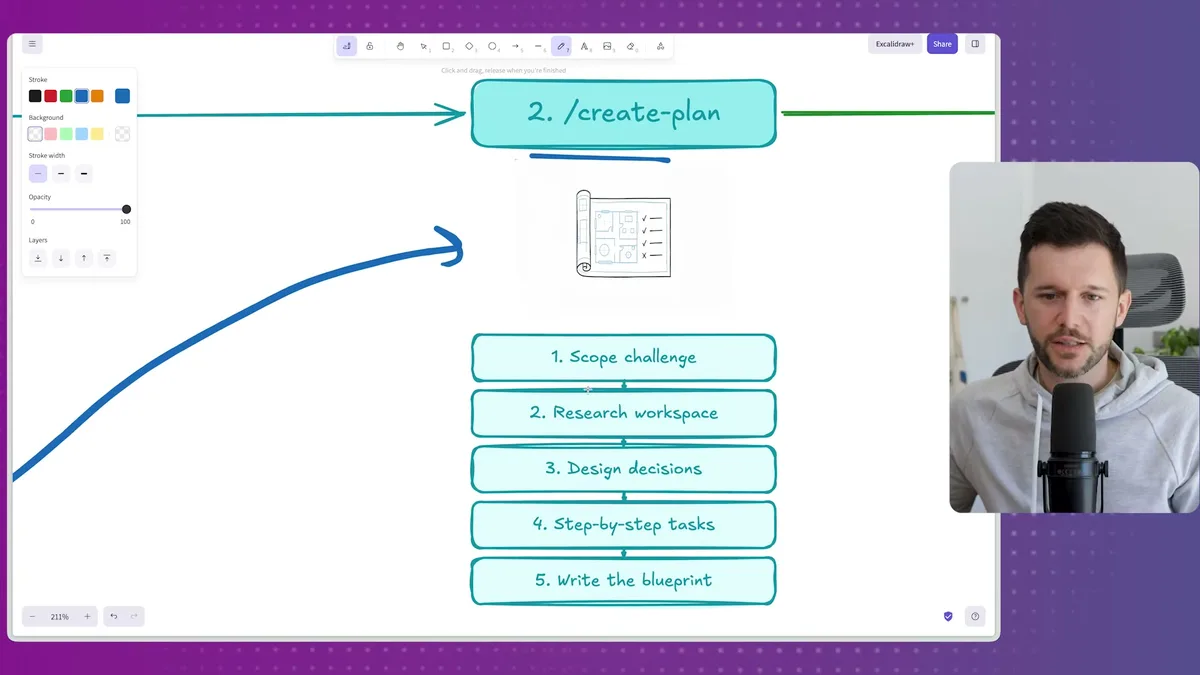
One thing I like about this step is the scope challenge it runs before writing the plan.
It presented me with three options.
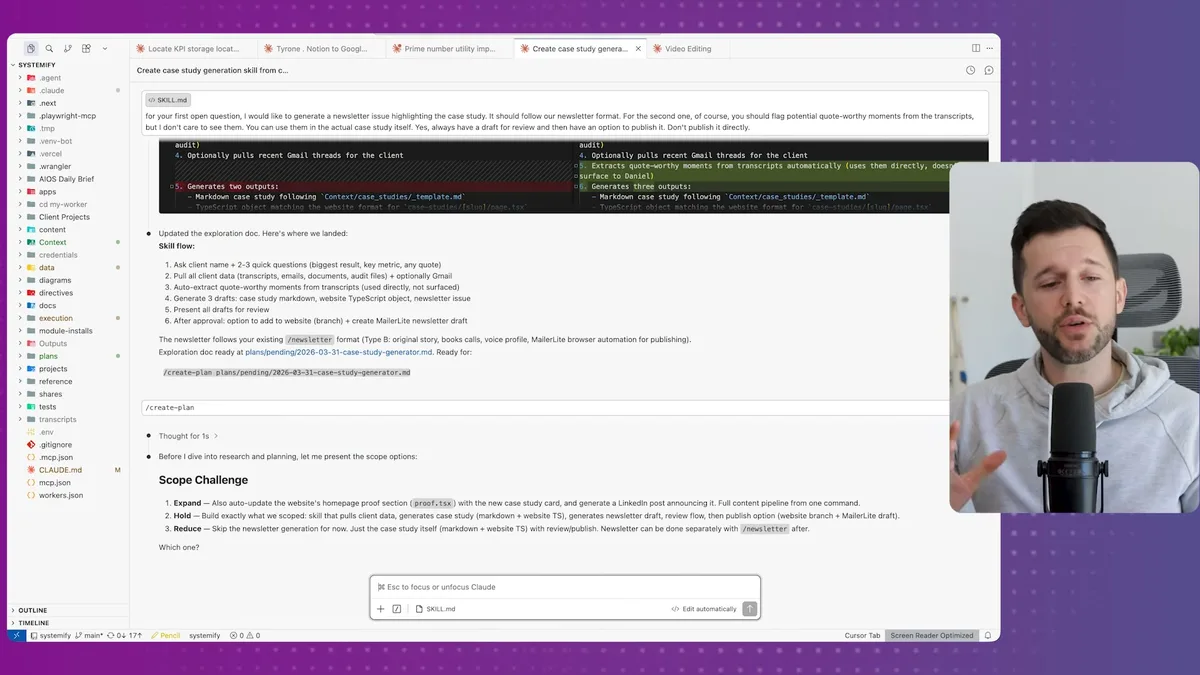
Expand meant adding features I hadn't asked for, like auto-updating a case study card on my homepage.
Hold meant building exactly what we scoped in the exploration.
Reduce meant stripping some features for a lighter, more testable version.
I went with hold.
Expand was overkill for what I needed right now, and reduce would have dropped the newsletter draft, which was actually important to me.
Now Claude researched the workspace again, this time looking at actual client conversations, existing Python scripts, file structures, anything relevant to the implementation.
I mean, it was even scanning transcripts from past client calls to understand the topics we cover, because all of that context is already loaded into my Claude Code instance.
The plan it produced was detailed.
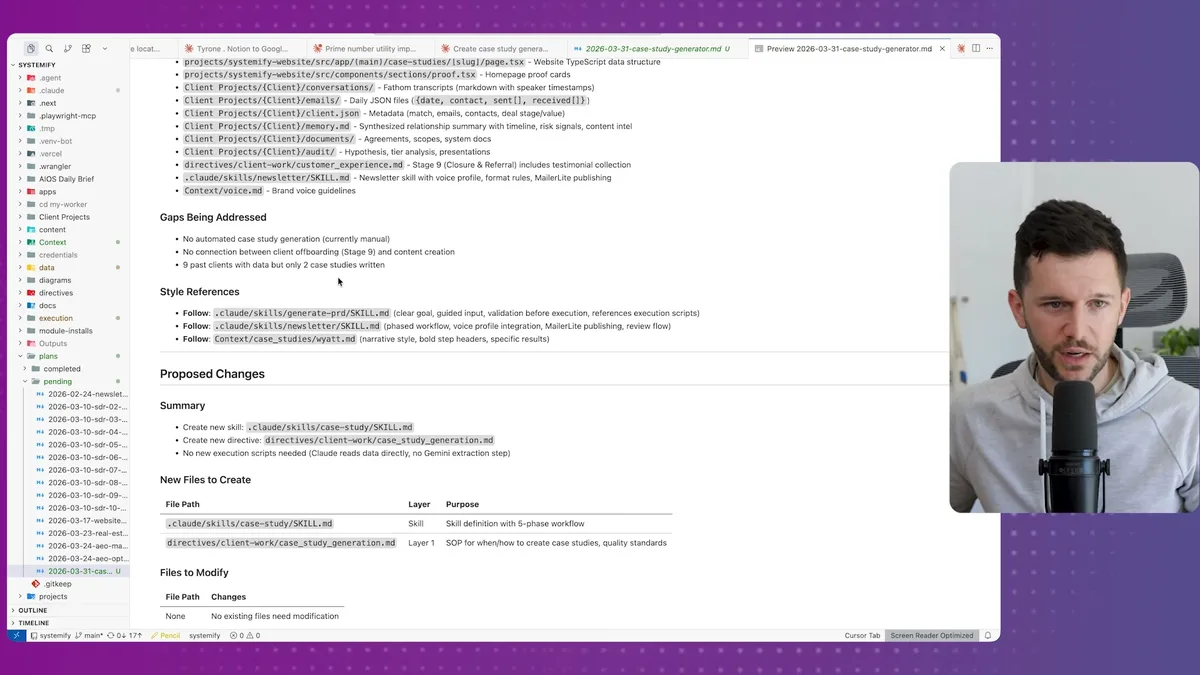
It flagged that I had nine past clients in the workspace but only two case studies written.
It listed every file that would be created or modified.
It identified that no new Python scripts were needed because Claude could read the existing data directly.
It specified three output formats from a single pass: a markdown case study, a TypeScript website object for publishing, and a newsletter draft in the correct format for my newsletter type.
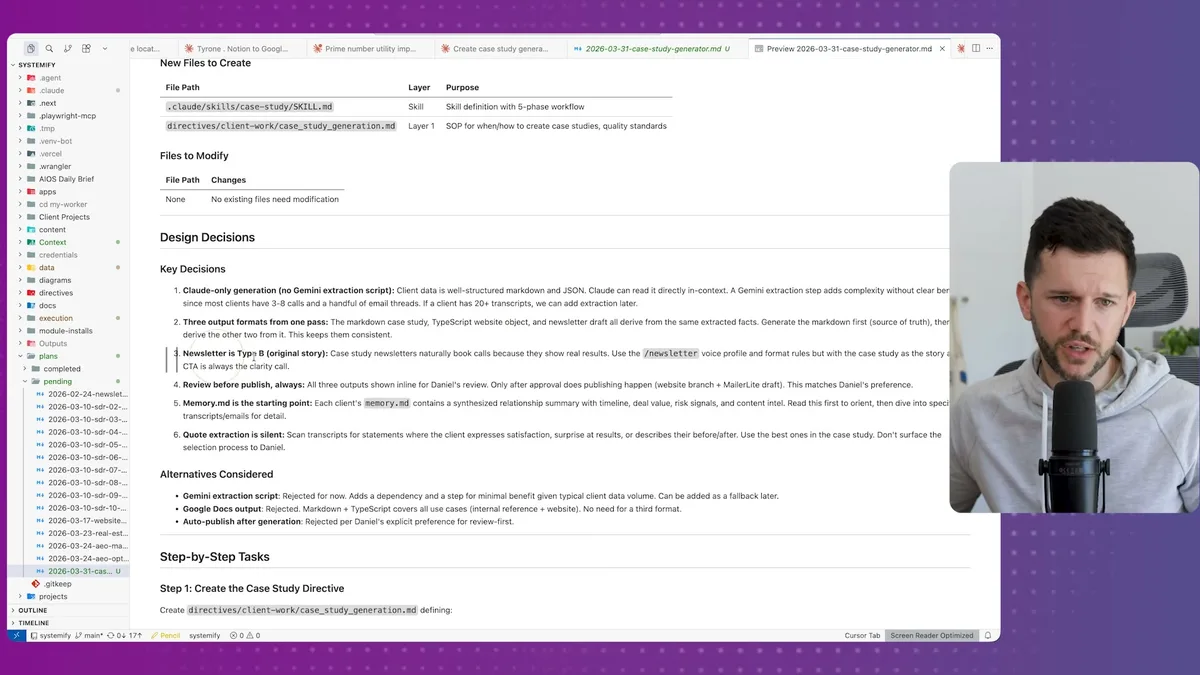
These are the decisions the agent made based on the exploration doc and the workspace research.
Compare that to what most people do, which is basically: "hey Claude, automate my invoicing."
The difference in output quality isn't even close.
Step 3: /implement
The implement step reads the entire plan and executes it, sequentially, one task at a time.
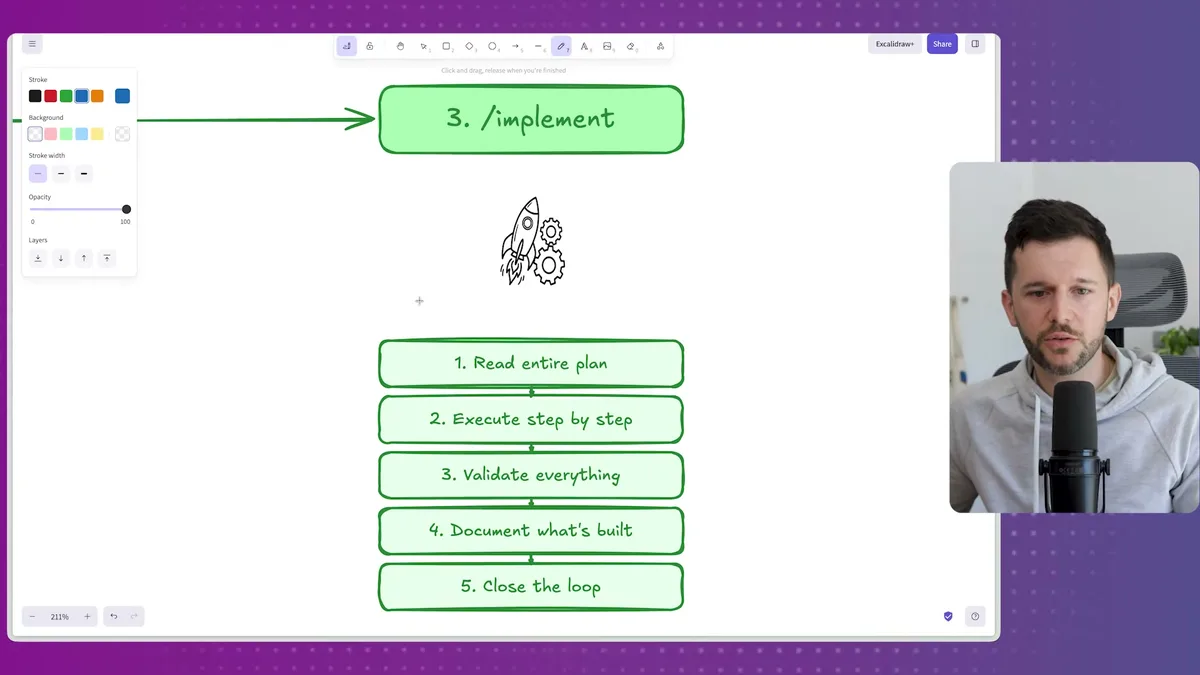
After execution, it validates that everything was built correctly.
Then it documents what was built inside an automations.md file I keep in the workspace, basically a running log of every automation that exists and what it does.
Then it closes the loop.
The skill it generated for this case study workflow was thorough.
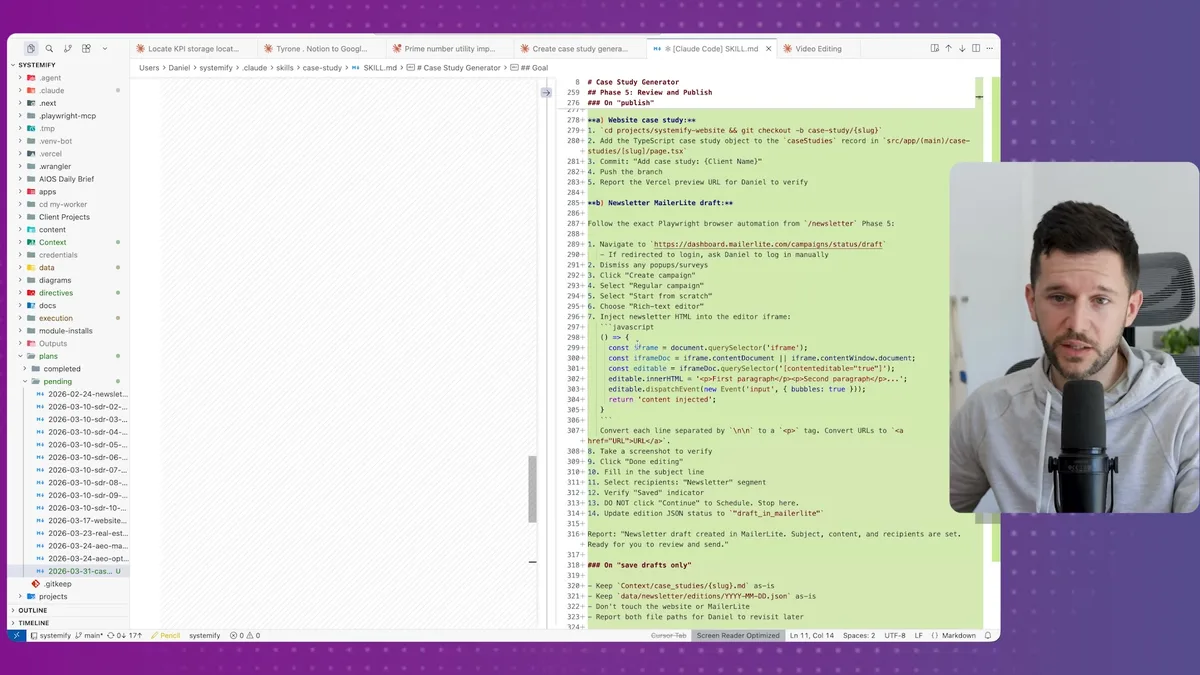
Context gathering, pulling headline results and client data.
Markdown case study generation.
TypeScript object generation for the website.
Newsletter draft creation, wired to MailerLite with the right format.
All of it in plain English instructions with some JavaScript where needed.
The only thing left was to test it manually, which I always do even when I have a QA agent running in the workspace.
There are always small things to iron out, and I'd rather find them myself first.
Why This Matters Beyond Claude Code
The workflow solves a documentation problem, not just a building problem.
Most business owners think about automation as: I have a problem, I build a thing, problem solved.
But as your business grows and you keep building things, you lose track of what exists.
You start rebuilding things that already work.
You create automations that conflict with each other.
You end up with a system that nobody, including you, fully understands.
This three-step workflow forces you to document intent before execution.
The exploration doc captures why you wanted this and what you considered.
The implementation plan captures what was built and what was rejected.
The automations log captures what's running and where.
Bear in mind, this is no different from what we used to do with deterministic automations in Make.com or n8n.
Before building a complex workflow there, you'd map it out first.
You'd think through the edge cases.
You'd design the structure before touching the canvas.
Claude Code is more powerful, which means the cost of building without a plan is also higher.
The more capable the tool, the more important the strategy.
What we do at Systemify is help businesses get this foundation right.
That usually means getting the business context into Notion first, client information, processes, templates, SOPs, all of it structured properly.
Then we build Claude Code on top of it.
Because Claude Code is only as useful as the context it has access to.
If the context is a mess, Claude will build a mess.
If the context is organized, Claude can do things that genuinely replace human work.
Not as a gimmick, but as a real operational layer that handles the stuff no one should be doing manually anymore.
Frequently Asked Questions
Q: What is a Claude Code skill and how does it work?
A Claude Code skill is a slash command that triggers a markdown file containing step-by-step instructions for a specific workflow. When you type the command, Claude reads the file and follows the instructions exactly, making any repeatable process consistent without needing to re-explain it each time.
Q: Why does Claude Code lose context when building automations over time?
Claude Code doesn't maintain persistent memory of everything it has built across sessions unless that information is explicitly stored in the workspace. Without a documentation system like an automations log, Claude has no way to know what already exists, which leads to duplicated or conflicting automations.
Q: What is the difference between the explore and plan steps in this workflow?
The explore step defines what you want to build and why, comparing approaches and documenting decisions at a high level. The plan step takes that exploration document and produces a concrete implementation blueprint with specific files, scripts, tasks, and design decisions. Explore answers "what and why," plan answers "how and exactly what gets built."
Q: Do I need to have all my business data already in Claude Code for this workflow to work?
The more context Claude has access to, the better the output. If you have client information, transcripts, templates, and SOPs already loaded into your workspace, Claude can make much smarter decisions during the explore and plan phases. Starting with a well-organized knowledge base, ideally in Notion first, significantly improves what Claude Code can produce.
Ready to see where your business stands with AI and automation? Take our AI Readiness Scorecard to find out.
Get more like this in your inbox
AI implementation insights for service business founders. No fluff.