AI & Automation
How Claude Code Automates Your Business Operations
Learn how to use Claude Code to automate business tasks, integrate tools, and get daily executive briefings. Real behind-the-scenes setup guide.
Daniel Canosa ·
TL;DR: Claude Code can run as an always-on operating system for your business, connecting to every tool you use and executing scheduled tasks automatically. This post breaks down six systems I've built, including a morning brief, autonomous cold email, client memory, and a self-healing watchdog, that have made me more productive in one month than the entire previous year.
Key Takeaways
- Claude Code connects to any tool with an API, email, Stripe, Notion, YouTube, LinkedIn outreach software, and more, making it possible to automate almost every business workflow.
- Scheduled tasks in Claude Code run like cron jobs, meaning your systems work overnight and on weekends without you touching anything.
- A client memory file updated every 24 hours gives Claude Code full context on every deal, so it can proactively surface risks and upsell opportunities.
- A self-healing watchdog system monitors all running automations and attempts to fix errors automatically before alerting you.
- Business owners who understand automation fundamentals, even no-code tools like Make or n8n, will build these systems faster and with fewer breakdowns.
The Morning Brief and Why It Changes Everything
Every morning I wake up and Telegram has already delivered a full snapshot of my business.
Revenue, YouTube subscribers, newsletter growth, outreach stats, conversion data, engagement rates.
All of it, organized, waiting for me before I've had coffee.
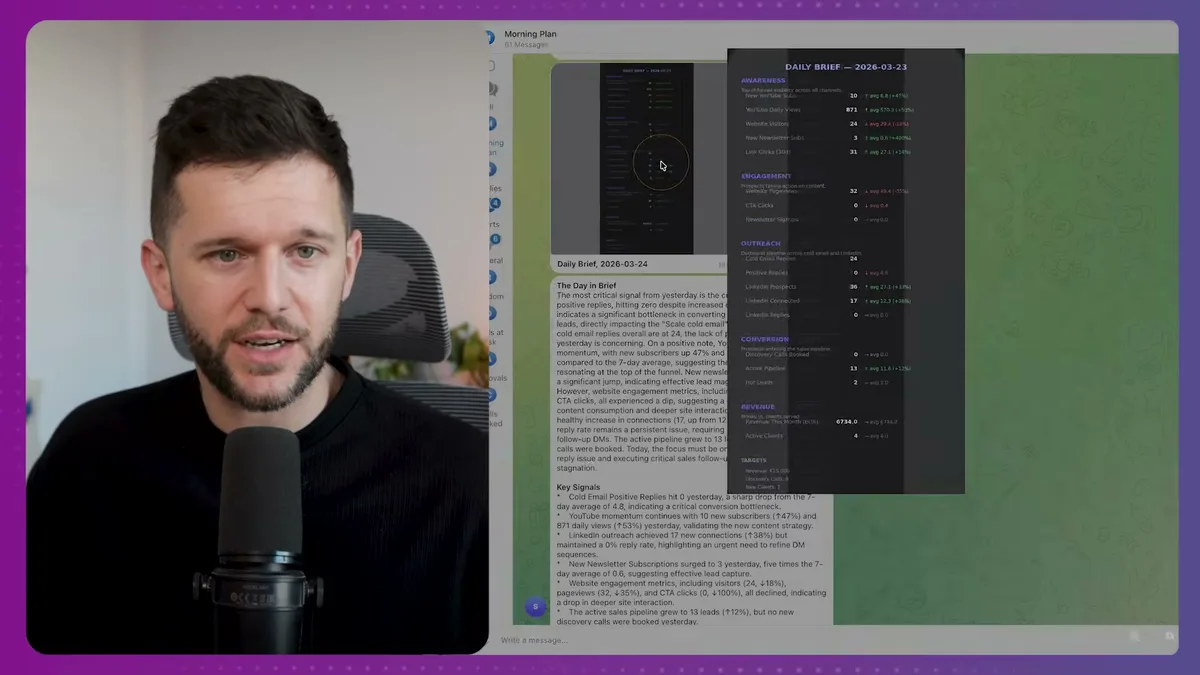
That's real business data, formatted automatically and sent to my phone.
Below the dashboard, there's a second message.
It's the day brief.
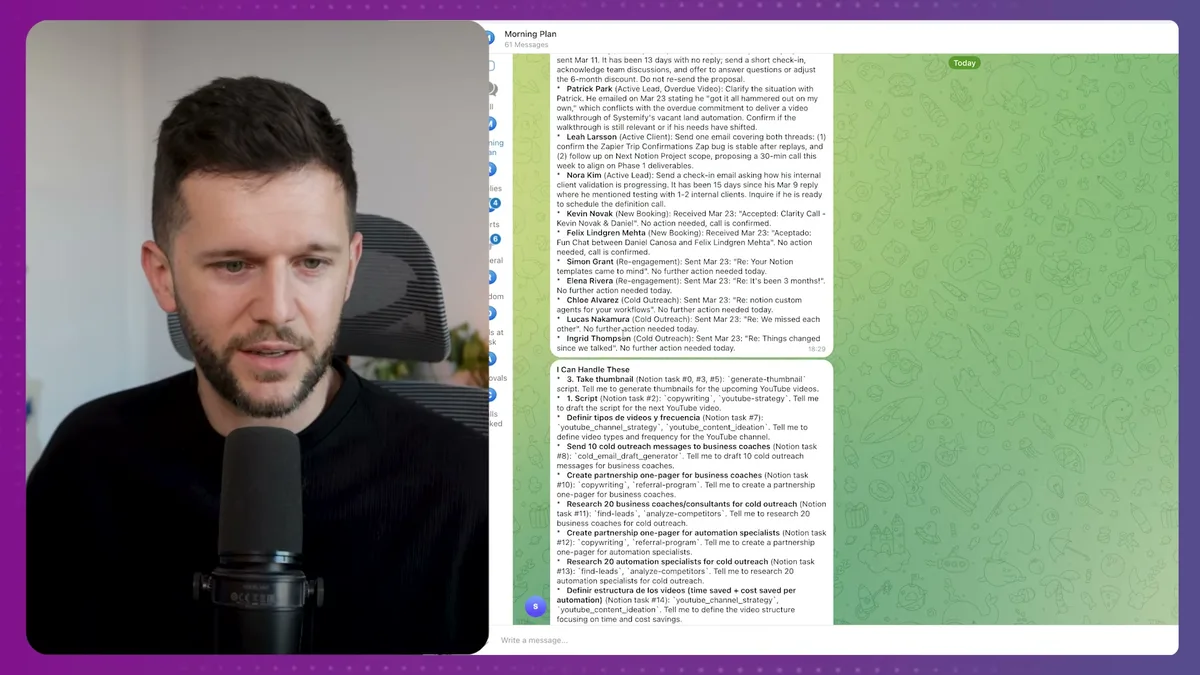
This one covers key signals, email positive replies, YouTube performance, LinkedIn outreach numbers, newsletter subscriptions, sales priorities sorted by where each lead is in the pipeline, and a note on what the AI can handle on its own today.
Honestly, this is the closest thing I've experienced to having an executive assistant.
You know those scenes in movies where the president is eating breakfast and someone walks in saying "here's what happened, here's what needs your attention"?
That's basically what this is.
And the way it works is simpler than most people expect.
Claude Code supports scheduled tasks, or cron jobs if you want the technical term.
You define a task, you tell Claude when to run it, and it runs.
In this case, the task pulls data from my email, Slack messages, Stripe payments, YouTube analytics, and website stats, then formats everything into that visual dashboard and fires it to Telegram.
Bear in mind, the quality of what comes out depends entirely on how structured your data sources are going in.
Garbage in, garbage out, of course.
But if your data is clean and your sources are connected, Claude Code becomes the thing that reads your entire business every single morning so you don't have to.
Cold Email, Client Memory, and the Notion Task Queue
These three systems are where Claude Code earns its place as a full business operator, not just a productivity tool.
Starting with cold email, because I have a story here.
A couple of years ago I set up a cold email campaign, properly.
Twenty accounts, different domains, personalized copy per domain, AI-assisted at the time.
I launched it.
And then I never looked at the results.
I didn't optimize it.
I just let it run and waste money because reviewing campaign stats felt like work I kept putting off.
Now Claude Code handles all of that automatically.
It pulls the campaign analytics itself.
It rewrites copy based on what's performing.
It adjusts targeting based on reply data.
It finds new companies matching filters I've defined, writes personalized emails, and sends up to 70 per day depending on how many sending accounts are active.
When replies come in, Claude reads every one.
If someone is interested, I get notified.
I don't want the AI responding to real prospects on my behalf, so for now it drafts me a suggested reply, I copy it, add my own flavor or scrap it entirely, and send from there.
For a solo operator with no outreach team, this is the difference between cold email actually working and cold email sitting there doing nothing.
Now, finding leads is only half the problem.
Once someone becomes a client, you need to actually know what's going on with them.
What was said on the last call.
Whether they've paid.
What they committed to.
Whether they're at risk of going cold.
I built a client memory system for this.
Every 24 hours, a scheduled task checks email threads, Slack messages, Stripe payments, and Fathom call transcripts for every client.
It updates a memory file for each one.
Here's what one of those files looks like:
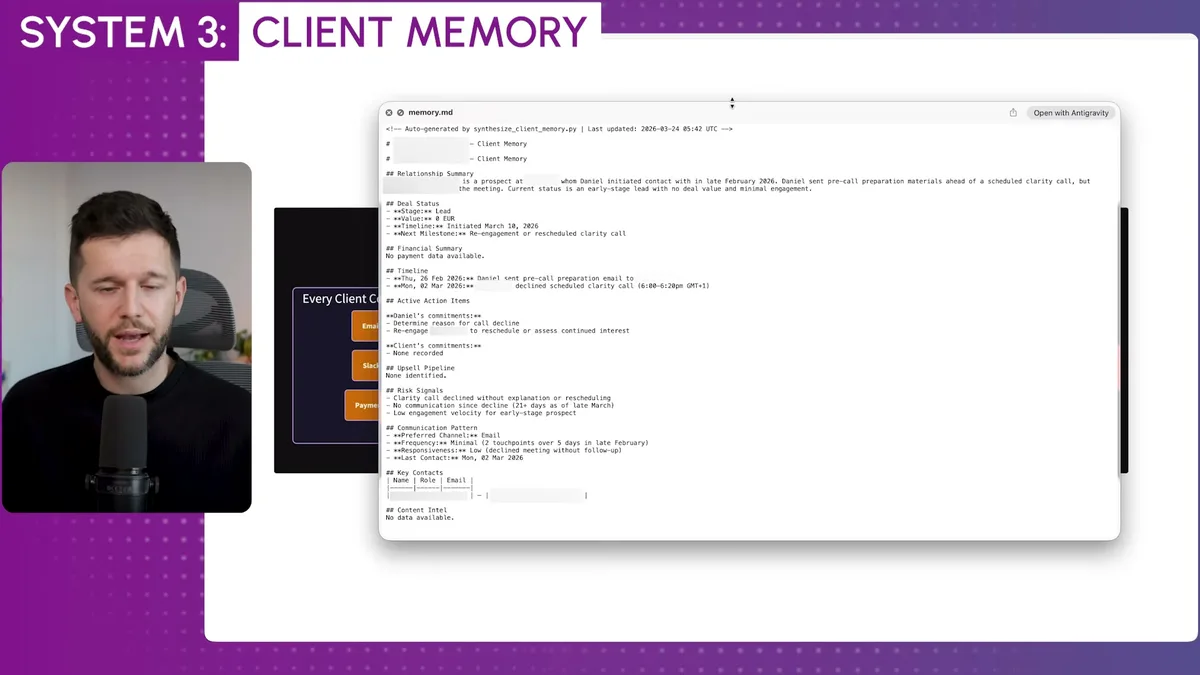
Relationship summary, deal status, financial history, action items, upsell opportunities, risk signals, communication preferences, last contact date.
All of it updated automatically, every morning.
This is probably my favorite system of everything I've built.
Because now when Claude Code is running tasks that involve clients, it has full context.
It knows who's been quiet for two weeks.
It knows who mentioned wanting to expand scope on the last call.
It can tell me, proactively, "reach out to this person, here's why, here's what to say."
The fourth system is how I assign work to Claude Code from Notion.
I use Notion as my task manager.
So I built an integration where I can create a task in Notion, click one button, and assign it to Claude.
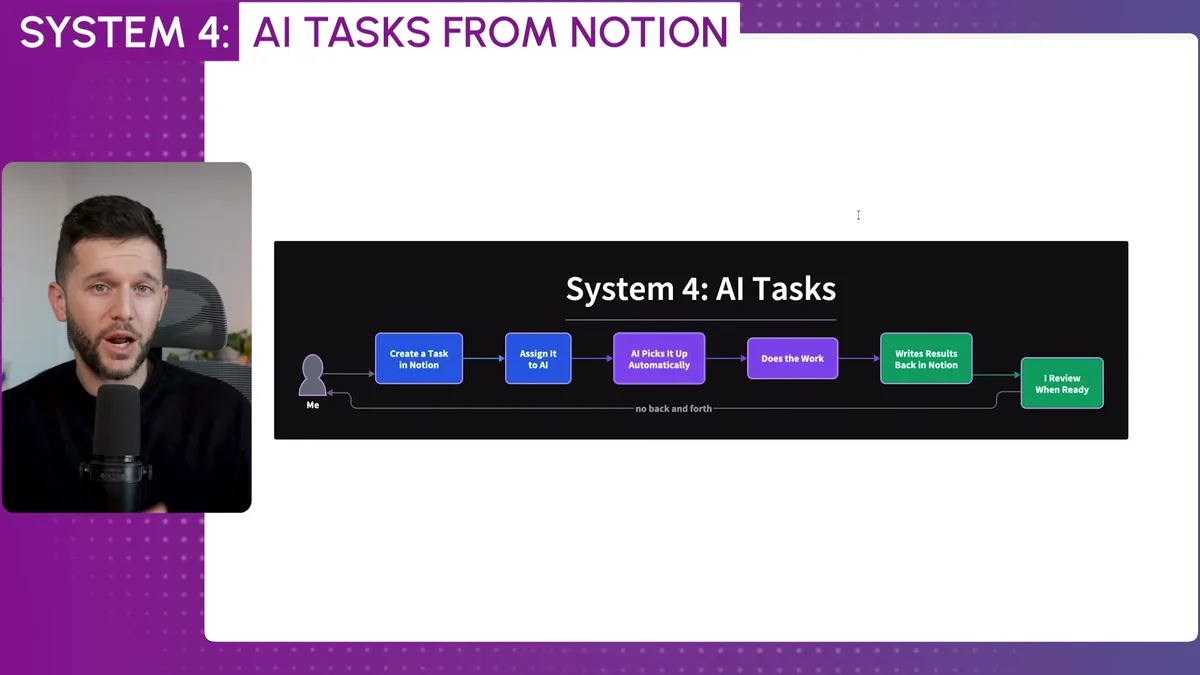
Every 15 minutes, Claude checks for tasks assigned to it.
When it finds one, it picks it up, executes the work using all its API connections and business context, and writes the results back to Notion.
Then it assigns the reviewed task back to me.
I can literally write "update the cold email sequence based on this week's reply data" in a Notion card, click assign, and come back later to review what it did.
I mean, this is not some demo setup.
This is running every day.
The Watchdog, the Content Pipeline, and Where This Is All Going
Every automated system breaks eventually.
APIs change.
Endpoints deprecate.
Data comes in a format a script doesn't expect.
After a couple of months running all these systems, I built something I call the watchdog.
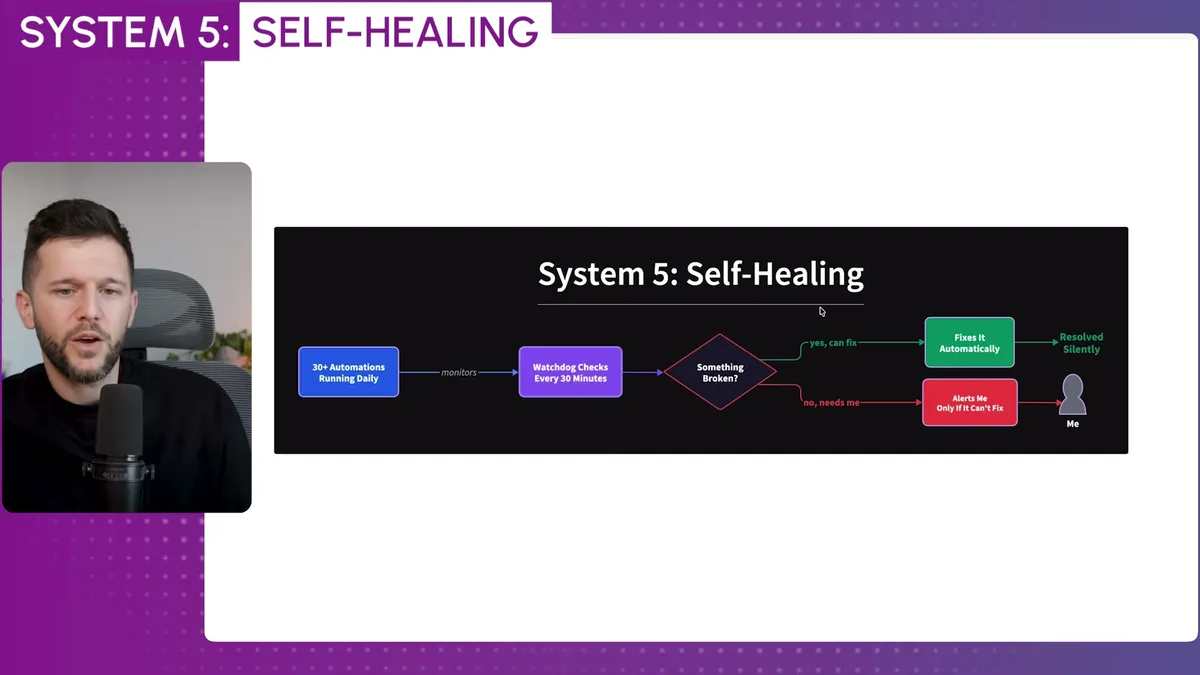
It's a scheduled task that runs every 30 minutes and checks that every automation and every script is still running correctly.
When something's broken, the watchdog doesn't just alert me.
It first tries to fix the problem itself.
If it can, I never hear about it.
If it can't, I get a Telegram message.
The most recent one was a lead magnet automation where the PDF creation step was timing out.
The watchdog caught it, couldn't resolve it automatically, and sent me the error with enough context that I could copy it into Claude and say "what's happening here, fix it."
That's the self-healing loop.
Most of the time it's invisible.
When it's not, it's a one-message fix.
The content pipeline is the last system I want to walk through, and it's the one that probably saves me the most thinking time.
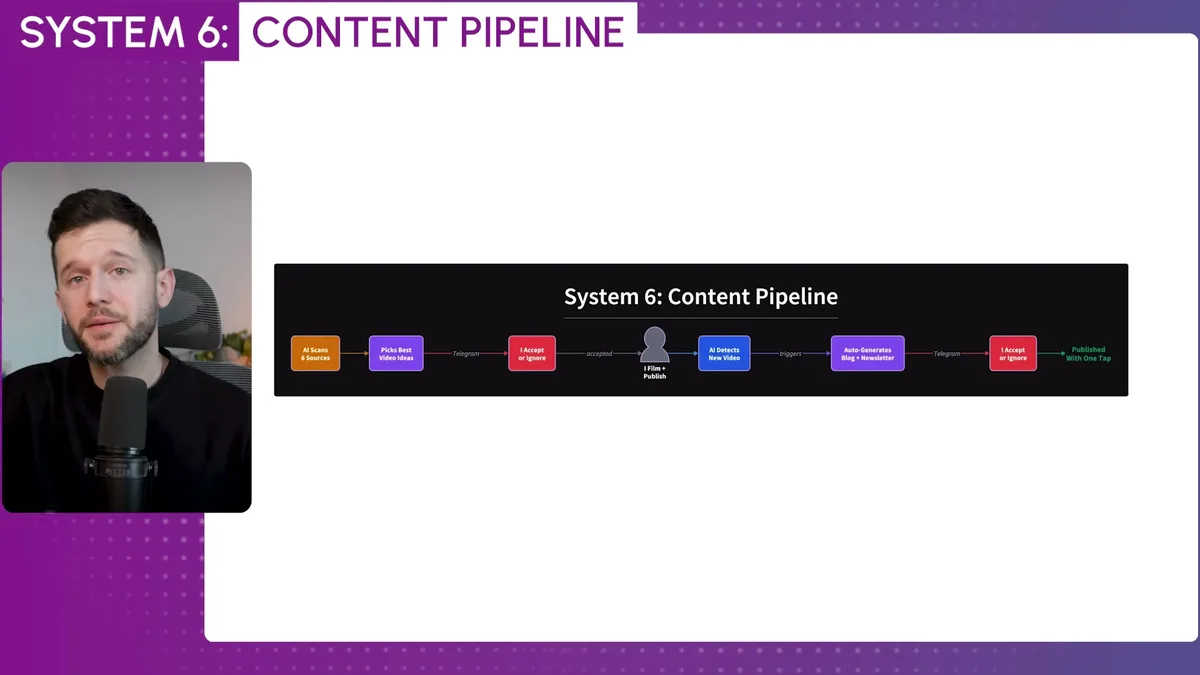
Claude Code scans six sources on a rolling basis: YouTube competitors, Reddit, Hacker News, tech news, Google Trends, and YouTube search data.
Because it knows my business and what I sell, it filters those sources for ideas that actually make sense for my channel.
Then it sends the best options to Telegram.
I accept or ignore each one.
If I accept an idea, Claude generates a full script and a title.
I edit the script, film it, my editor cuts it, we publish.
Then Claude checks every day whether I've uploaded something new to YouTube.
When it finds a new video, it pulls the transcript and sends me a message asking if I want it repurposed into a newsletter and a blog post.
One tap.
It generates both.
The newsletter points readers to the YouTube video.
The blog post does the same.
I mean, this post you're reading right now came from that pipeline.
This is not all rainbows, to be clear.
I was able to build all of this because I already understood how automations work from years of building in Make and n8n.
That background is what lets me prompt Claude in ways that don't break.
If you're starting from zero on automation, the learning curve is real.
But if you have even basic automation knowledge, Claude Code is genuinely a different category of tool.
The gap between what a solo operator can now do versus what a team of five could do two years ago is basically gone.
In my opinion, the businesses that figure this out in the next year or two are going to have a structural advantage that's very hard to catch up to.
Not because AI is magic.
Because consistent, automated systems compound over time, and most businesses still don't have them.
Frequently Asked Questions
Q: What tools does Claude Code need to connect to in order to run business automations?
Claude Code connects via API to any tool that has one. Common integrations include email, Google Calendar, Slack, Telegram, Notion, cold email software, LinkedIn outreach tools, Stripe, YouTube Analytics, and website hosting platforms like Vercel. The more data sources you connect, the more context Claude has when executing tasks.
Q: Do you need coding knowledge to build systems like these in Claude Code?
You don't need to write code manually, but understanding how automations work at a conceptual level, for example from using tools like Make or n8n, makes a significant difference. It helps you prompt Claude in ways that produce reliable, non-breaking scripts rather than fragile one-off solutions.
Q: How does the self-healing watchdog system work in Claude Code?
A scheduled task runs every 30 minutes and checks whether all active automations and scripts are functioning correctly. If an error is detected, the watchdog attempts to diagnose and fix it automatically. If the fix succeeds, no alert is sent. If it cannot resolve the issue, it sends a Telegram message with the error details so the user can address it manually.
Q: Is Claude Code actually running tasks autonomously, or does it still need constant human input?
Most tasks run without any human input once set up. Scheduled cron jobs handle recurring tasks like the morning brief, client memory updates, and outreach optimization. Human input is only required for decisions that involve judgment, like approving a video idea, reviewing a drafted email reply, or checking a flagged error from the watchdog.
Ready to see where your business stands with AI and automation? Take our AI Readiness Scorecard to find out.
Get more like this in your inbox
AI implementation insights for service business founders. No fluff.