AI & Automation
Property Management System in Notion: AI-Powered Guide
Learn how to build a centralized property management system in Notion with AI integration. Streamline maintenance tracking, tenant data, and operations.
Daniel Canosa ·
TL;DR: A US property management company managing thousands of rental units replaced their scattered Excel and Microsoft Access setup with a centralized Notion system. The result: automated lease generation, instant AI answers about maintenance history, real-time occupancy dashboards, and personal task views for every team member, all powered by a clean database structure that AI can actually use.
Key Takeaways
- Centralizing your data is the prerequisite for AI to work. If your information lives in five different tools, AI cannot help you, no matter how good the model is.
- Notion AI can generate lease agreement PDFs by pulling tenant data, rent amounts, and terms directly from your existing database, no manual data entry required.
- A good Notion system answers operational questions instantly, like when a carpet was last replaced or what the status of an active renovation is, without anyone having to ask the team.
- Personal dashboards matter as much as generic ones. People need to see their tasks, not everyone's tasks.
- All dashboards are linked views of a central database structure. The complexity lives in the backend. The experience stays simple.
I just finished a Notion build for a property management company in the US.
They were managing thousands of rental units, all of them occupied, and they had a real operational problem: nobody knew anything without asking someone else first.
When was the last time a unit's HVAC was replaced?
Someone had to dig through emails.
What's the status of that renovation project?
Someone had to track down the project manager.
How much have we spent on improvements across all properties this year?
One person spent the end of every month gathering invoices from every vendor, manually processing them, and building a report.
The information existed, it just lived in Excel for some things, Microsoft Access for others, email for the rest.
So when they came to me, the goal was simple: get everything into one place, structure it properly, and let the AI do the heavy lifting.
Here's what we built.
The Structure: One Property Record That Contains Everything
The core of this system is the property record.
Every property has its own page in Notion, and that page is basically a hub for everything related to that property.
But instead of scrolling through a massive document, we used Notion's tabs feature to organize information into clean sections.
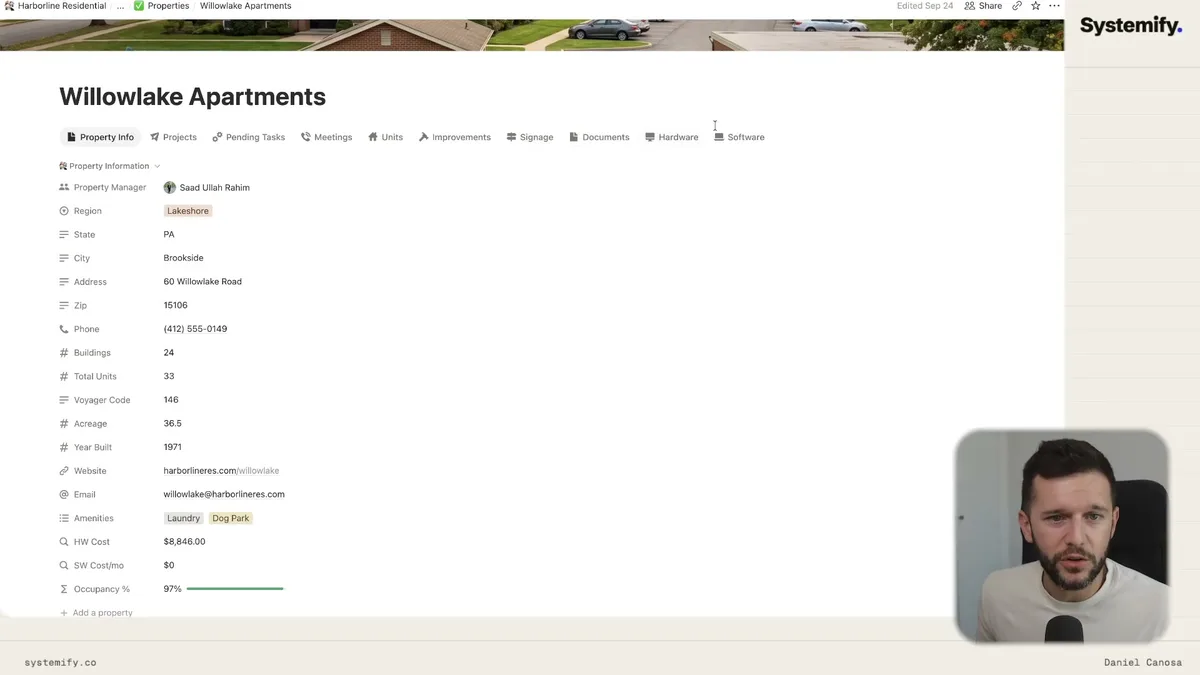
So inside any property record, you can navigate between Property Info, Projects, Pending Tasks, Meetings, Units, Improvements, Signage, Documents, Hardware, and Software, all from that one page.
Each tab is a filtered view of a backend database.
The units tab, for example, shows every unit in the building with the current rent, occupancy status, active lease, who the tenant is, and when the last payment was made.
Click into any unit and you see its full history: every improvement made, every lease, everything.
The improvements tab shows exactly how much has been spent on that property, broken down by year.
Replacing windows, swapping out an HVAC system at end of life, bathroom remodels. It's all there, dated, categorized, and linked to the property and the unit it belongs to.
One thing that was specific to this client was signage.
They manage physical properties with entrance signs, directional signs, branding elements, and they had a whole process for requesting sign replacements or repairs that was honestly just chaos before.
So we built a dedicated sign system inside the main system.
Every replacement request goes in with photos of the current sign's condition, the proposed render from the vendor, and the final photo once the job is done.
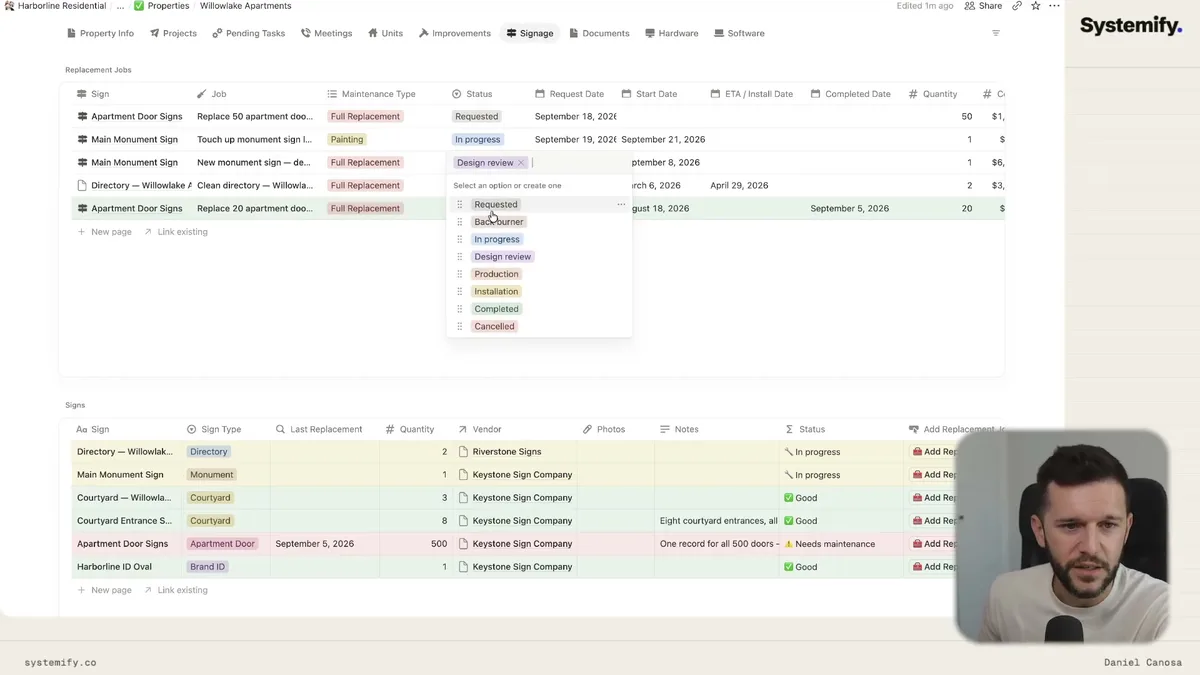
Each job moves through a clear status pipeline: Requested, In Progress, Design Review, Production, Installation, Completed, or Cancelled.
The vendor uploads their render directly into the system.
The team can see at a glance how many new requests are sitting there and how many are in progress, without emailing anyone.
What AI Can Do When the Data Is Organized
This is the part that makes the whole structure worth it.
When all your data lives in one place and is properly linked, AI stops being a chatbot you use occasionally and becomes something that actually works inside your operation.
The first example I showed was lease generation.
We taught Notion AI a skill for creating rental contracts.
Because all the relevant information already lives in the system, the property details, the unit, the rent amount, the tenant, the terms, the AI can pull everything together and generate a complete, branded lease agreement.
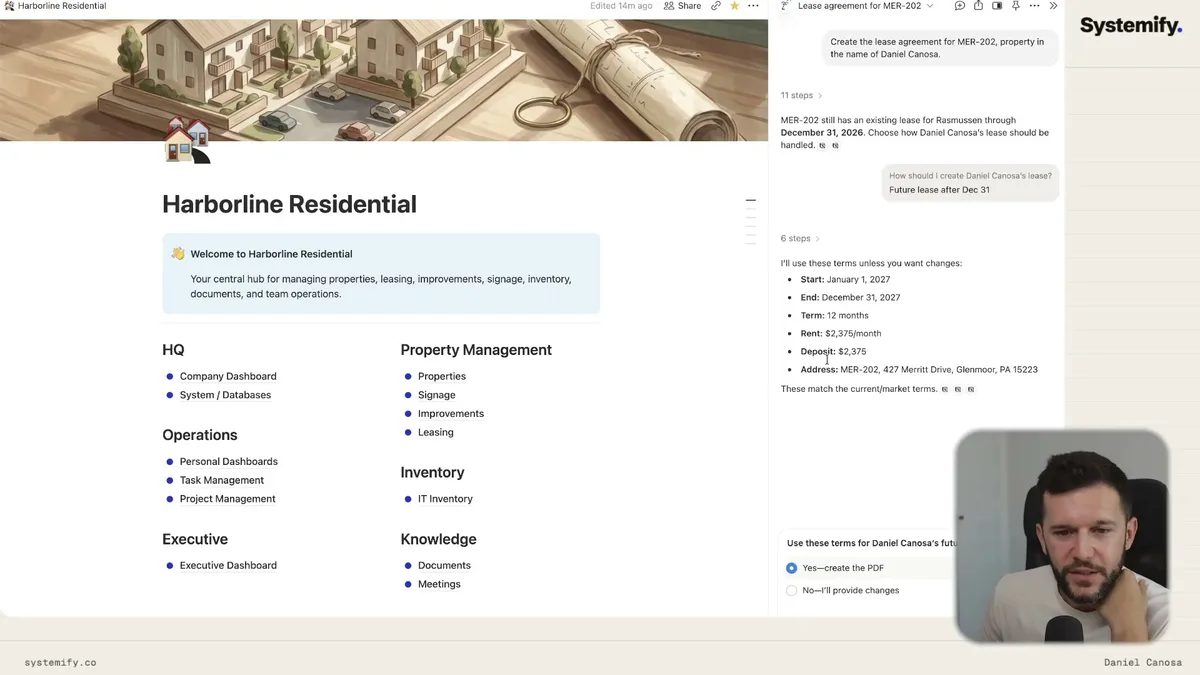
And yes, Notion now exports PDFs.
So the workflow is: click a button, confirm the terms, and the AI generates an HTML document, converts it to a PDF with the company's branding, and the lease is ready to send for signing.
That whole process used to be manual. Someone would open a template, look up the tenant info, fill in the fields, check the dates, save as PDF, attach to an email. Now it's one click.
The second AI use case came from a real operational question this company dealt with constantly: who pays for a replacement, the tenant or the company?
Let's say a tenant requests new carpet.
The answer depends on when the carpet was last replaced. If it was five years ago, that's wear and tear and the company pays. If it was one year ago, that's likely misuse and the tenant pays.
Before this system, answering that question meant asking the maintenance team, searching through old invoices, or just guessing.
Now you ask Notion AI: "When did we last replace the carpet in Unit X?"
Even before you finish typing the question, it answers.
"Replaced in 2025. One year ago. The tenant should pay."
That's the point.
The third example was renovation status. Instead of a manager having to track down a project manager to ask what's happening with a specific renovation, they just ask the AI.
"What's the status of the renovation at Property Y?"
"Active, urgent, targeting March 31st."
The AI knows because the data is there. That's the only reason it works. If the data wasn't centralized, the AI would be useless.
Dashboards That Actually Reflect How People Work
Most Notion systems I see built for companies have one problem: they're built for nobody.
There's a generic project view, a generic task view, a list of everything happening everywhere, and nobody actually uses it because it's overwhelming and not relevant to any one person.
This build has both types of dashboards, and both matter for different reasons.
The improvements dashboard is a good example of a management-level view.
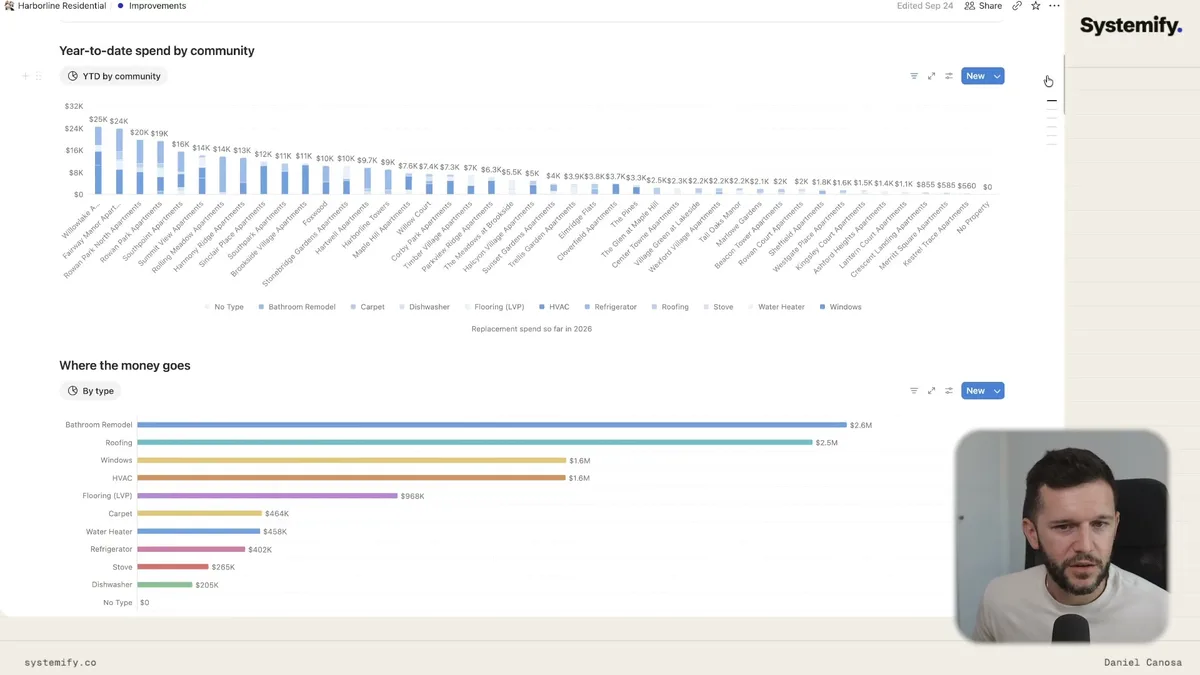
Year-to-date spending per property. Where the money is going by category. Which properties are spending the most. What items are past their expected lifespan. What's coming out of warranty.
Honestly, this view exists more for the AI than for humans to sit and analyze manually. But it's there, and when a manager needs a quick answer about budget allocation, it's there in seconds instead of requiring a report.
The occupancy dashboard is similar.
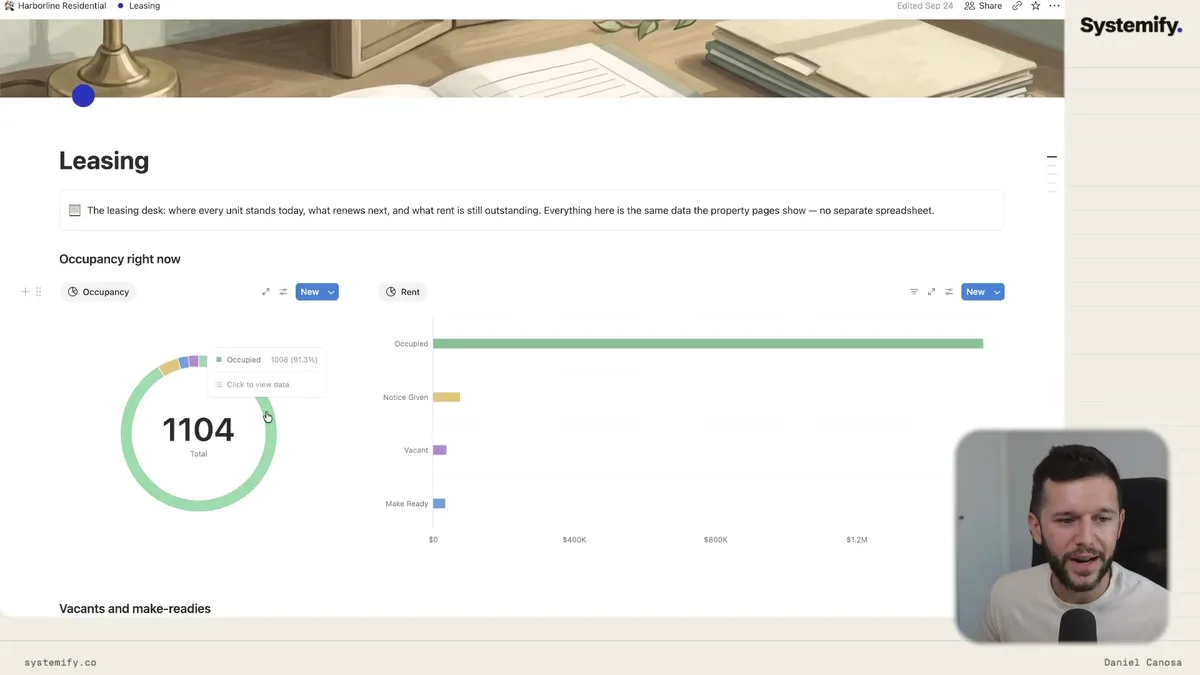
91.3% occupied. 1,008 units out of 1,104. You can see exactly how much rent is being collected and exactly how much is being lost to vacancies, units on notice, and make-ready status.
That number used to require a spreadsheet someone had to maintain by hand.
Now the personal dashboards are where I spend a lot of time in every build I do.
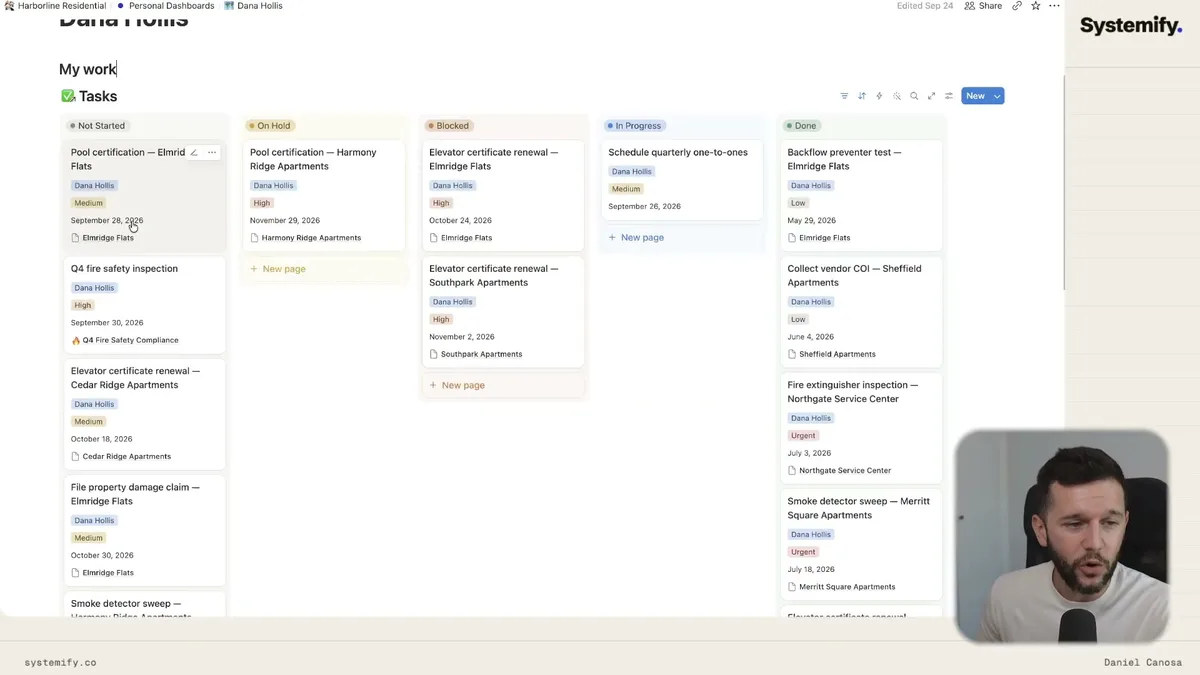
This is Donna's dashboard. She sees her tasks, her projects, and the properties she's involved with. Nothing else.
She doesn't have to dig into each property page to figure out what she needs to do today. It's filtered and surfaced for her automatically.
That's the difference between a system people use and a system people ignore.
Then there are the operational dashboards for managers.
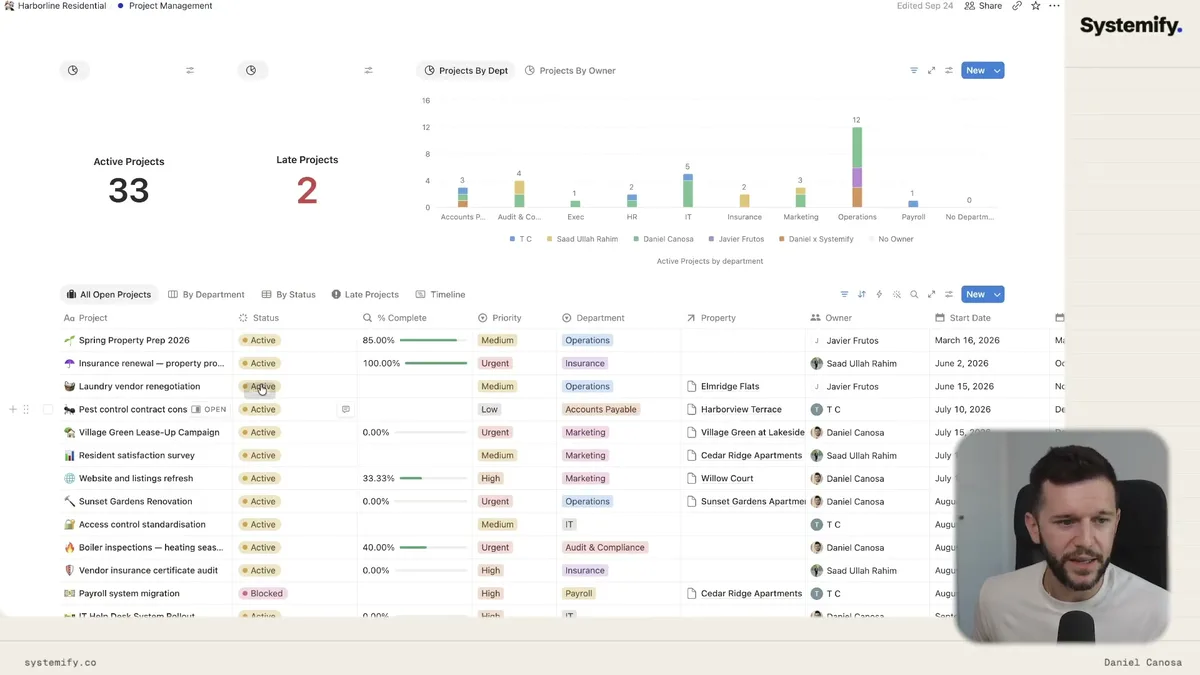
Unassigned tasks, workload per person, tasks that are late, projects by department. The unassigned tasks number is one I always watch because in my experience, unassigned tasks are tasks that never get done. That number should always be zero.
And for documents and meetings, same principle applies.
Every meeting gets logged, transcribed by Notion AI, and linked to the property it belongs to.
After a meeting, one button creates all the follow-up tasks from the transcript.
Documents are centralized and linked to their property, with permissions set so only relevant people can see them.
One-on-ones and private meetings are only visible to the attendees.
Bear in mind, this isn't about Notion being fancy. It's about information being where it needs to be, for the people who need it, and not visible to everyone else.
The backend that powers all of this is basically a collection of about fifteen linked databases.
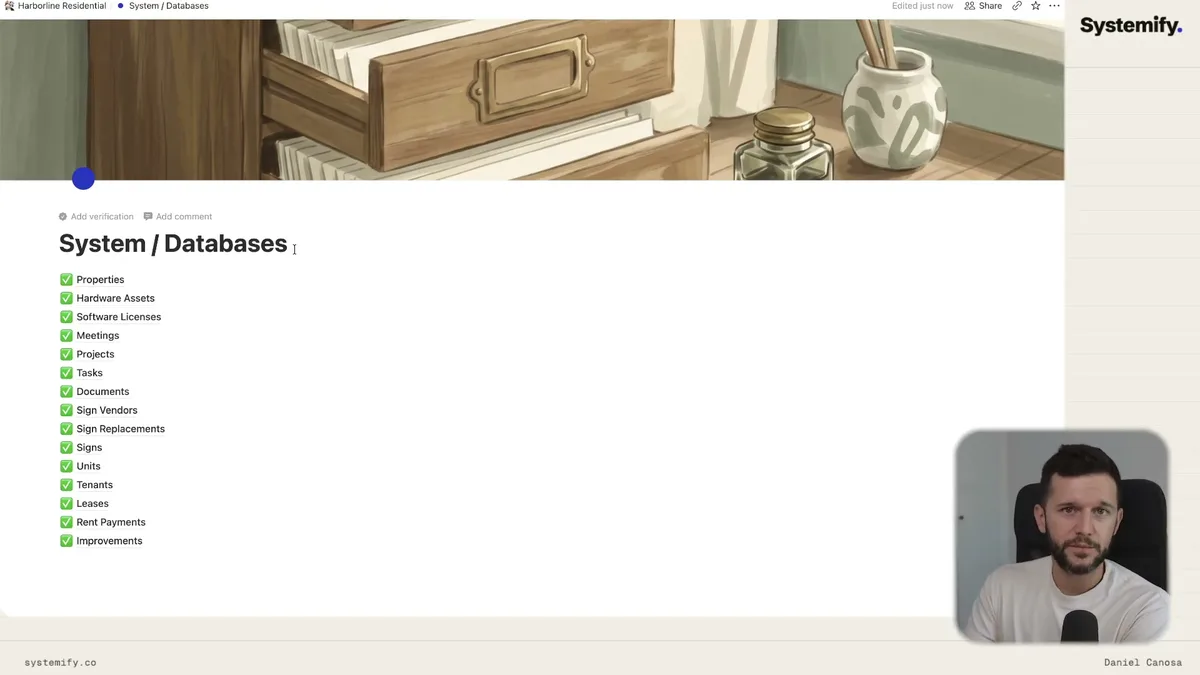
Properties, Units, Tenants, Leases, Rent Payments, Improvements, Projects, Tasks, Meetings, Documents, Signs, Sign Replacements, Sign Vendors, Hardware Assets, Software Licenses.
Every dashboard you see in the system is a linked view of one of these databases, filtered to show exactly what's needed in that context.
The databases themselves are locked away where nobody will accidentally touch them.
The complexity is in the structure. The experience is simple.
And that simplicity is what makes the AI useful. You can't connect AI to chaos. You connect AI to structure, and then it works.
Frequently Asked Questions
Q: Can Notion actually replace tools like Excel or Microsoft Access for property management?
For most property management workflows, yes. Notion handles relational data across properties, units, tenants, leases, and maintenance history, and it does so in a way that AI can query directly. Bear in mind, the setup requires proper database planning upfront, but once built, it's significantly easier to maintain than Excel.
Q: How does Notion AI generate lease agreements automatically?
Notion AI uses a saved skill that knows the structure of a lease agreement for that company. Because tenant data, rent amounts, dates, and property details are already in the connected databases, the AI pulls that information and generates the document. Notion then converts it to a PDF ready for signing.
Q: What's the best way to structure a Notion property management system?
Start with your core databases: Properties, Units, Tenants, Leases, and Improvements at minimum. Build relationships between them. Then create dashboard pages that use linked views of those databases, filtered to the right context. Personal dashboards per team member, operational dashboards for managers, and a master databases page that stays locked in the background.
Q: Why does centralizing data matter so much for AI tools?
AI tools, including Notion AI, can only answer questions about information they can access. If your data lives across Excel files, emails, and different software tools, the AI has nothing to work with. Centralizing everything into one structured system is what turns AI from a generic chatbot into something that actually knows your operation.
Ready to see where your business stands with AI and automation? Take our AI Readiness Scorecard to find out.
Get more like this in your inbox
AI implementation insights for service business founders. No fluff.