AI & Automation
Turn Your Dead CRM Into a Deal Engine With AI
Learn how to automate lead matching and re-engagement signals to transform untouched CRM data into qualified sales opportunities using AI automation.
Daniel Canosa ·
TL;DR: A commercial real estate broker had 100,000+ property owners sitting untouched in his Notion CRM. By defining a re-engagement signal (a nearby property sale), building a CSV-to-email pipeline with Claude Code and Modal, and adding a human review step in Notion, the system turned dead CRM data into active outreach, drafting 498 emails from a single 41-property CSV upload in under 10 minutes.
Key Takeaways
- Dead CRM data becomes useful when you define a re-engagement signal, a specific event that gives you a reason to reach out to cold leads again.
- You don't need to be a developer to build this. Claude Code handles the scripting once you've defined the solution and chosen your infrastructure.
- A human-in-the-loop review step protects quality at scale. The client edits and approves emails in Notion before anything sends.
- Sending 25 emails per day with a 90-day deduplication rule keeps deliverability manageable and avoids the spam folder on a cold outreach campaign.
- Early results were honest: 2 positive replies, 17% bounce rate, 303 emails sent. The data itself becomes the roadmap for what to fix next.
The Problem: 100,000 Contacts and Almost Zero Outreach
Most CRMs are graveyards. I don't mean that in a dramatic way. I mean it literally. The data is in there, it's structured, it has value, but nobody is touching it because there's no scalable way to figure out who to contact, when, or why.
That's exactly what I ran into with this client.
He's a commercial real estate broker I've worked with before.
About two years ago, I built his entire Notion workspace, the CRM, the properties database, the team structure, all of it.
At the time, we weren't thinking about AI.
We were just trying to give him something organized so he could delegate and grow.
But that work ended up being the foundation for everything we just built.
Because in the age of AI, your AI is only as powerful as the context you give it.
And if your data is already structured, that's a massive head start.
So the setup we had going in: a Notion CRM with owner and seller records, a properties database with zip codes and unit sizes, and more than 100,000 property owners sitting mostly untouched.
The problem wasn't a lack of leads. The problem was that manual outreach doesn't scale.
He didn't have time to go through 100,000 records and figure out who to contact based on what.
98% of those leads were just sitting there.
So we needed a trigger. Something that would tell the system, "now is the right time to contact this person, and here's why."
That's what I call a re-engagement signal.
The idea is simple: something has happened, and because it happened, you have a legitimate reason to reach out.
In his case, the signal we chose was a property selling in the same zip code with a similar unit size.
So let's say a three-unit building just sold for a million dollars in a specific zip code.
The system uses that sale to identify owners in that same area with similar buildings and reaches out with a message like: "Hey, a property just like yours sold for this amount. Do you want me to quote your building so you know what you could get for it?"
That's the first step of every real estate deal.
And now we're starting that conversation automatically, at scale, instead of manually, one by one.
Bear in mind this same logic works for almost any service business.
Let's say you run a marketing agency and you've got a CRM full of leads that didn't convert because your price was too high.
If you've just launched a lower-priced offer, you have a signal.
Go find those leads, pull out the ones who said it was too expensive, and reach out.
Or let's say you're an ads agency.
You could set up a system to check whether old leads are currently running ads.
If they are, you message them asking how the ads are going, because honestly, they're probably not happy with the results.
If they're not running ads at all, you ask if they just haven't found someone reliable.
Either way, you have a reason to restart the conversation.
The specific examples don't matter as much as the mindset.
The only thing that you need to figure out is: what event gives me a legitimate reason to contact a cold lead right now.
How the System Actually Works, Step by Step
The workflow goes from a CSV upload to a sent email with a human review in the middle. Here's exactly how it runs.
My client uses another tool (CoStar) to pull recent sold properties.
He exports those as a CSV and uploads it into a simple custom app we built.
From there, the system matches those sold properties against his Notion CRM, filtering by zip code and unit size.
From one CSV with 41 properties, the system found 2,745 owner matches.
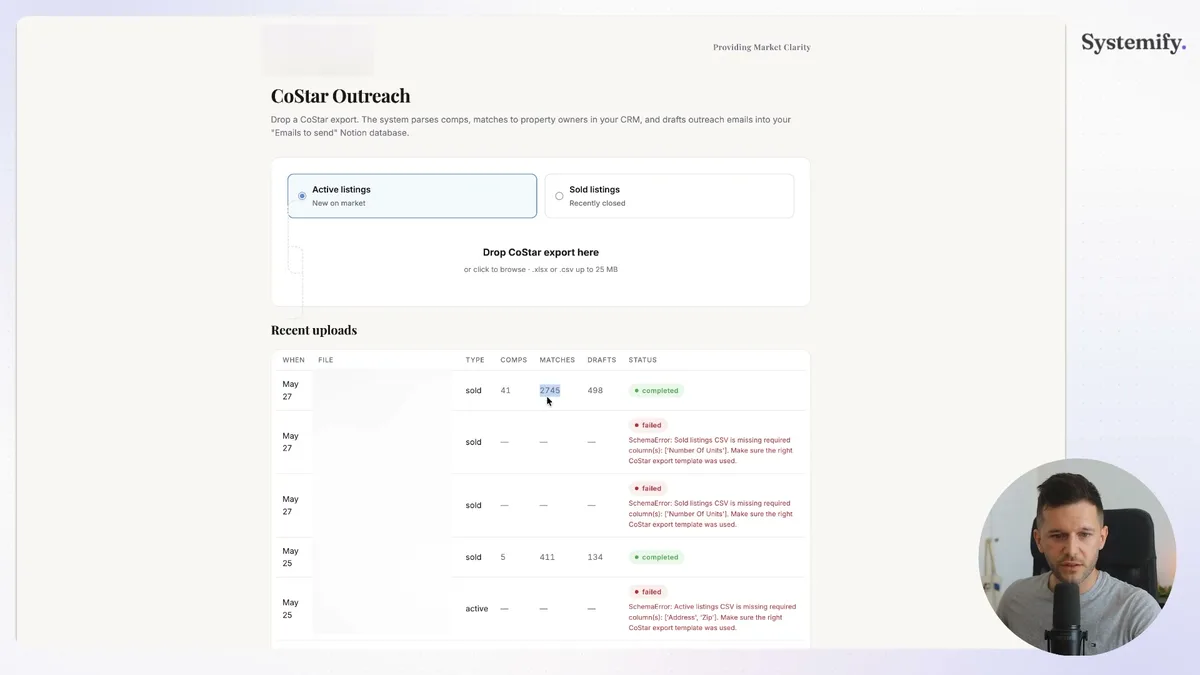
That table shows the full output from a single upload, 41 properties in, 2,745 matches found, and 498 emails drafted.
The gap between 2,745 matches and 498 emails exists because we don't have email addresses for everyone in the CRM.
The system accounts for that automatically and only drafts emails where we actually have a valid contact.
The drafting itself takes 5 to 10 minutes.
We're using Claude with a fairly static prompt to write the outreach emails at scale.
Once the drafts are ready, they drop into a Notion database where my client can review each one before anything sends.
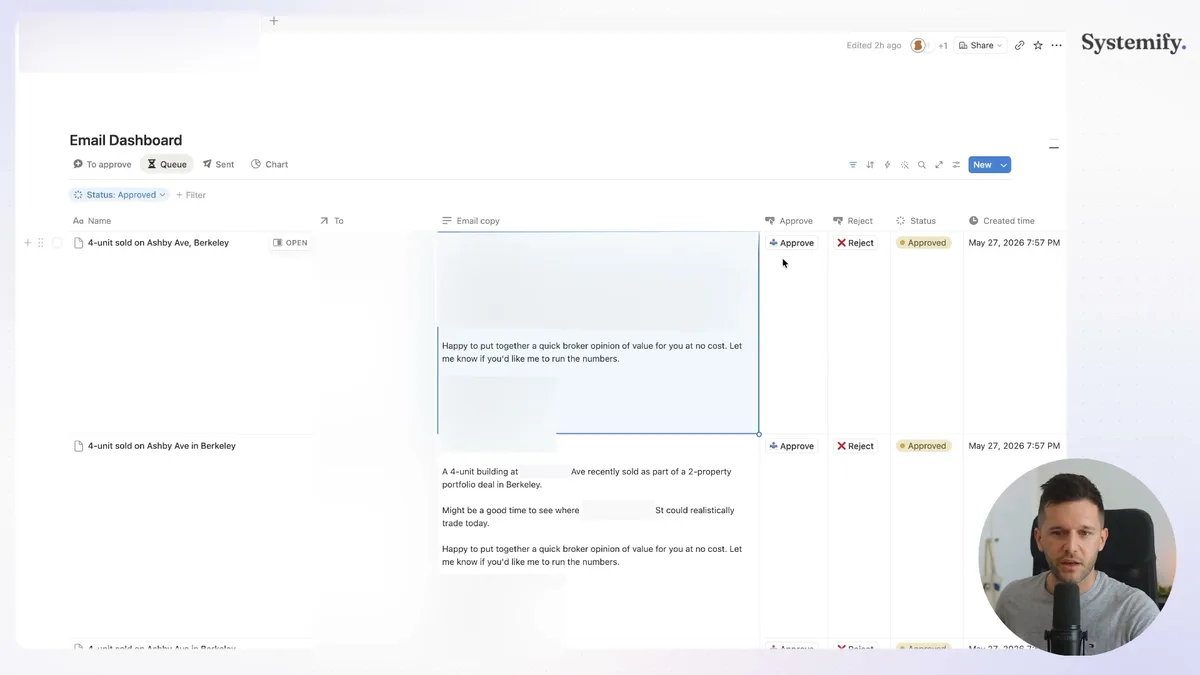
This is the view he uses every day.
He reads through the drafts, makes any edits he wants directly in Notion, and hits approve.
Whatever he edits in that view is what actually goes out.
Nothing sends without his sign-off.
That's intentional.
I mean, when you're sending cold outreach at this volume, you want a human checking the output before it hits someone's inbox.
Once he approves a batch, those emails go into a queue.
The system sends a maximum of 25 per day, running from 7am to 7pm.
So if he approves 100 emails on a Monday, those go out across four days.
We also have deduplication built in.
The same owner won't receive an email more than once every 90 days, regardless of how many properties match their area.
And the system monitors replies and bounces, categorizing them using an AI agent so we can track what's working and what isn't.
Here's the honest data from the campaign so far:
- 303 emails sent
- 2 positive replies (just under 1%)
- 1 do-not-contact reply
- 81% no reply
- 17% bounce rate
The bounce rate is the thing I'm most focused on fixing next.
17% is high.
The fix is straightforward: add an email verification step before drafting, so we're only queuing emails for addresses that actually exist.
But that data, the bounce rate, the reply rate, the categorized responses, that's exactly what tells us where to go next.
The system isn't just sending emails. It's generating feedback we can act on.
What It Was Built With (and How We Built It Without a Dev Team)
The whole system runs on Modal, Claude Code, Notion, and Claude. That's basically it.
Modal is the infrastructure layer.
It lets you host code and trigger it on whatever schedule you define.
Each piece of the workflow lives as its own app inside Modal: the CSV processor, the Notion uploader, the email sender, the bounce diagnostics, the reply monitor.
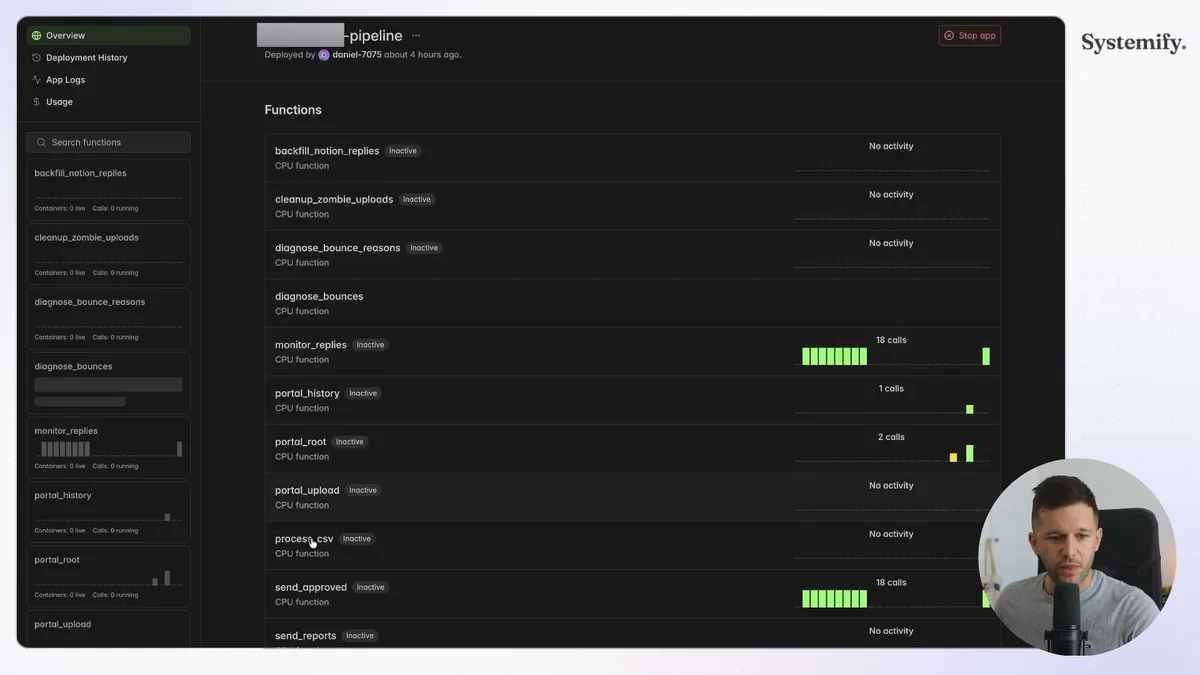
Each row in that dashboard is a separate function doing one specific job.
The email sender, for example, has been triggering multiple times every day.
Now, the question I always get: "But I'm not a developer. How do you actually build this?"
Honestly, I'm not a developer either.
I can read code, but I don't write it from scratch.
The way we built this was with Claude Code, and the process has three steps.
First, define the solution clearly before you touch any tools.
What is the signal?
What is the process that follows from that signal?
What infrastructure do you need to make it work?
If you can't answer those questions in plain language, you're not ready to build.
Second, choose your infrastructure.
In our case, Modal for hosting the automations and scripts.
Notion for the CRM, the email review queue, and the tracking database.
Third, hand it off to Claude Code.
You give it the solution design and the infrastructure context, and it builds the scripts.
Then you test, iterate, fix what breaks, and validate that the whole thing works end to end.
Bear in mind it's not one prompt and done.
There are iterations.
But the point is you're directing the build, not doing the coding yourself.
After testing, we confirmed: emails were sending correctly, no hallucinated drafts, deliverability was within acceptable range, and everything was being tracked so we could measure results.
Then we pushed it to production with real CRM data.
Two leads have responded positively so far.
My client has already sent them a building quote.
If either of those converts, the typical commission on a commercial real estate deal is 20 to 40 thousand dollars.
One closed deal justifies the entire build many times over.
This is not all rainbows, of course.
The bounce rate needs fixing, the reply rate is where you'd expect cold outreach to land, and we're still in early days.
But the system is running, generating data, and giving us something concrete to optimize.
That's the point.
Frequently Asked Questions
Q: What is a re-engagement signal and how do I find one for my business?
A re-engagement signal is a specific event that gives you a legitimate, timely reason to reach out to a cold lead. For a real estate broker, it's a nearby property sale. For a marketing agency, it could be a new lower-priced offer or a competitor going under. The key is that something changed, either in your business or in the lead's situation, that makes the conversation relevant again.
Q: Do you need to be a developer to build an AI-powered CRM outreach system like this?
No. The build process involves defining your solution clearly in plain language, choosing infrastructure like Modal and Notion, and then using Claude Code to write the actual scripts. You direct the process and test the output. The technical execution is handled by the AI, not by you.
Q: How do you avoid landing in spam with automated cold email outreach?
Sending no more than 25 emails per day and running a 90-day deduplication rule are the two main controls used here. Staying under a daily send cap keeps your sending reputation healthy. Adding email verification before drafting, which is the next step for this system, also reduces bounce rate, which is one of the clearest signals that lands you in spam.
Q: What does the human review step in Notion actually look like?
After the system drafts emails using Claude, they appear in a Notion database view. The client reads each draft, edits the copy directly in Notion if needed, and clicks approve. Only approved emails enter the send queue. Nothing goes out automatically without that manual sign-off, which protects quality at volume.
Ready to see where your business stands with AI and automation? Take our AI Readiness Scorecard to find out.
Get more like this in your inbox
AI implementation insights for service business founders. No fluff.